







Software teams move fast today. Releases happen weekly or daily, and systems run across many tools and platforms. Manual work slows teams down and leads to mistakes.
That is why DevOps automation matters more than ever. It helps teams build, test, and ship software in a steady and repeatable way.
In this guide, I share what this approach really means and why teams rely on it.
You will learn how automation fits into modern DevOps workflows and where it makes the biggest impact.
I have also shared common tools teams use, from CI/CD to container platforms, along with real use cases you can relate to.
By the end, you will understand the main benefits, key best practices, and common challenges to expect.
What Is DevOps Automation?

DevOps automation is the practice of using tools and scripts to handle tasks that teams used to do by hand.
This includes building code, running tests, setting up servers, and deploying updates.
Instead of repeating the same steps every time, teams rely on automated workflows that run the same way on each release.
The main goal is to reduce manual work and limit human error. Developers can focus on writing code, while operations teams spend less time fixing avoidable issues.
Automation helps teams move faster without cutting corners. Automated tasks smooth handoffs and reduce delays.
Over time, this leads to more stable releases and fewer surprises. DevOps automation does not replace people.
It supports them by handling routine tasks so teams can focus on planning, improving systems, and solving real problems that need human judgment.
How DevOps Automation Works?
DevOps automation follows a clear flow that keeps software changes moving smoothly from idea to release. Each step connects to the next, so teams can work faster with fewer manual handoffs.
- Planning: Teams define goals, timelines, and tasks using shared tools. This keeps everyone aligned before work begins.
- Code Integration: Developers push code to a shared repository. Automated triggers start builds and checks right away.
- Testing: Automated tests run to catch bugs early. This includes unit, integration, and security checks.
- Deployment: Approved code moves to staging or production automatically. This reduces rollout errors and downtime.
- Monitoring: Systems track performance and errors in real time. Alerts help teams respond quickly when issues appear.
Key Principles of DevOps Automation
These principles guide how teams design and improve automated workflows. They help teams move faster while keeping systems stable and easy to manage.
1. Consistency
Consistency means every task runs the same way each time. Automation removes guesswork by following defined steps for builds, tests, and deployments.
This prevents differences between environments and reduces human mistakes.
When systems behave predictably, teams spend less time fixing unexpected issues. Consistent processes also make onboarding easier because new team members follow the same workflows.
Over time, this creates a shared standard across teams. Automation maintains it as teams grow and projects evolve.
2. Speed
Speed focuses on reducing delays without lowering quality. Automation removes manual steps that slow down releases, such as running tests or setting up environments.
Tasks that once took hours can finish in minutes. Faster feedback helps developers fix problems early, before they grow bigger.
Speed also supports frequent updates, which is key in modern software delivery.
By automating repeat work, teams can release updates more often while still keeping control over the process and results.
3. Reliability
Reliability means systems work as expected, even under pressure. Automated checks and deployments reduce the risk of missed steps or skipped tests.
This reduces broken releases and downtime. Automation also helps teams spot issues quickly through monitoring and alerts.
Reliable workflows build trust between development and operations teams.
Over time, this trust supports smoother releases and stronger systems. Automation plays a key role by keeping processes stable and repeatable across all stages.
4. Scalability
Scalability allows systems and processes to grow without breaking. Automation makes it easier to manage more users, services, and environments.
Instead of adding manual work, teams reuse scripts and tools to handle growth.
This supports cloud platforms and container-based systems where demand changes often. Scalable automation also supports continuous improvement.
Teams can update workflows as needs change, test new ideas, and improve performance without starting from scratch each time.
How Does Security Fit into DevOps Automation?
Security fits into DevOps automation through a practice called DevSecOps. It means adding security checks into the workflow instead of treating them as a final step.
In automated pipelines, tools scan new code for risks and check for unsafe settings or known threats.
This helps teams catch issues early, when fixes are easier and cheaper. Automation also supports consistent security rules across all environments.
Compliance checks can run automatically to make sure systems follow required standards. When security runs alongside builds and deployments, teams avoid last-minute surprises.
DevSecOps does not slow work down. It supports fast releases by making security part of everyday tasks.
With automation handling routine checks, teams stay focused while keeping systems safer and more stable over time.
Benefits of DevOps Automation
DevOps automation delivers clear gains for both teams and businesses. These benefits improve daily workflows while supporting long-term growth.
1. Faster Releases
Automation shortens the time between writing code and releasing it. Builds, tests, and deployments run without waiting on manual steps.
This helps teams push updates more often and respond quickly to changes. Faster releases also mean quicker feedback from users, which helps guide improvements.
Teams stay productive because they spend less time on repetitive tasks.
Over time, this steady release pace helps businesses stay competitive and keep products moving forward without added stress.
2. Fewer Errors
Manual work often leads to missed steps or small mistakes. Automation follows the same process every time, which reduces these risks.
Automated testing catches problems early, before they reach users.
Consistent deployments also limit configuration issues across environments. Fewer errors mean less time spent fixing urgent problems and more time improving systems.
This stability builds confidence across teams and helps protect the business from costly outages or rushed fixes.
3. Better Collaboration
Automation creates clear and shared workflows for development and operations teams.
Everyone works from the same process, which reduces confusion and handoffs. When tasks run automatically, teams focus on planning and problem-solving instead of coordination issues.
Shared dashboards and alerts also improve visibility. Better collaboration leads to faster decisions and fewer delays.
Over time, teams build trust and work more smoothly toward common goals.
4. Cost Savings
Automation reduces the need for manual effort and rework. Teams spend less time fixing avoidable issues and managing routine tasks.
Faster releases and fewer errors also lower downtime costs.
Automation tools help scale work without adding more staff for repetitive jobs. These savings add up over time.
Businesses can reinvest resources into growth, product improvements, or customer support instead of ongoing maintenance.
Common DevOps Automation Use Cases
Teams apply DevOps automation across daily workflows to reduce manual effort. These use cases show how automation supports speed, stability, and control.
- CI/CD Pipelines: Code changes trigger automated builds, tests, and deployments. This helps teams release updates quickly and safely.
- Infrastructure Provisioning: Scripts set up servers, networks, and cloud resources on demand. Teams avoid manual setup and keep environments consistent.
- Automated Testing: Tests run automatically after each code update. This catches bugs early and reduces last-minute fixes.
- Monitoring and Alerts: Systems track performance and errors in real time. Alerts notify teams before small issues turn into bigger problems.
- Automated Rollbacks: Failed releases revert to a stable version automatically. This limits downtime and protects users from broken updates.
The Role of Kubernetes in DevOps Automation
Kubernetes plays a key role in DevOps automation by managing containers at scale. It helps teams run applications the same way across different environments.
Kubernetes handles container orchestration, which means it automatically starts, stops, and connects containers.
This removes the need for manual control. It also supports deployment automation by rolling out updates step by step and rolling them back if something breaks.
Teams release changes with less risk. Kubernetes adjusts CPU and memory based on demand, keeping systems stable.
Built-in monitoring and self-healing restart failed containers automatically.
These automated actions help teams maintain reliable systems while focusing on building and improving applications instead of managing infrastructure by hand.
Essential Tools for DevOps Automation
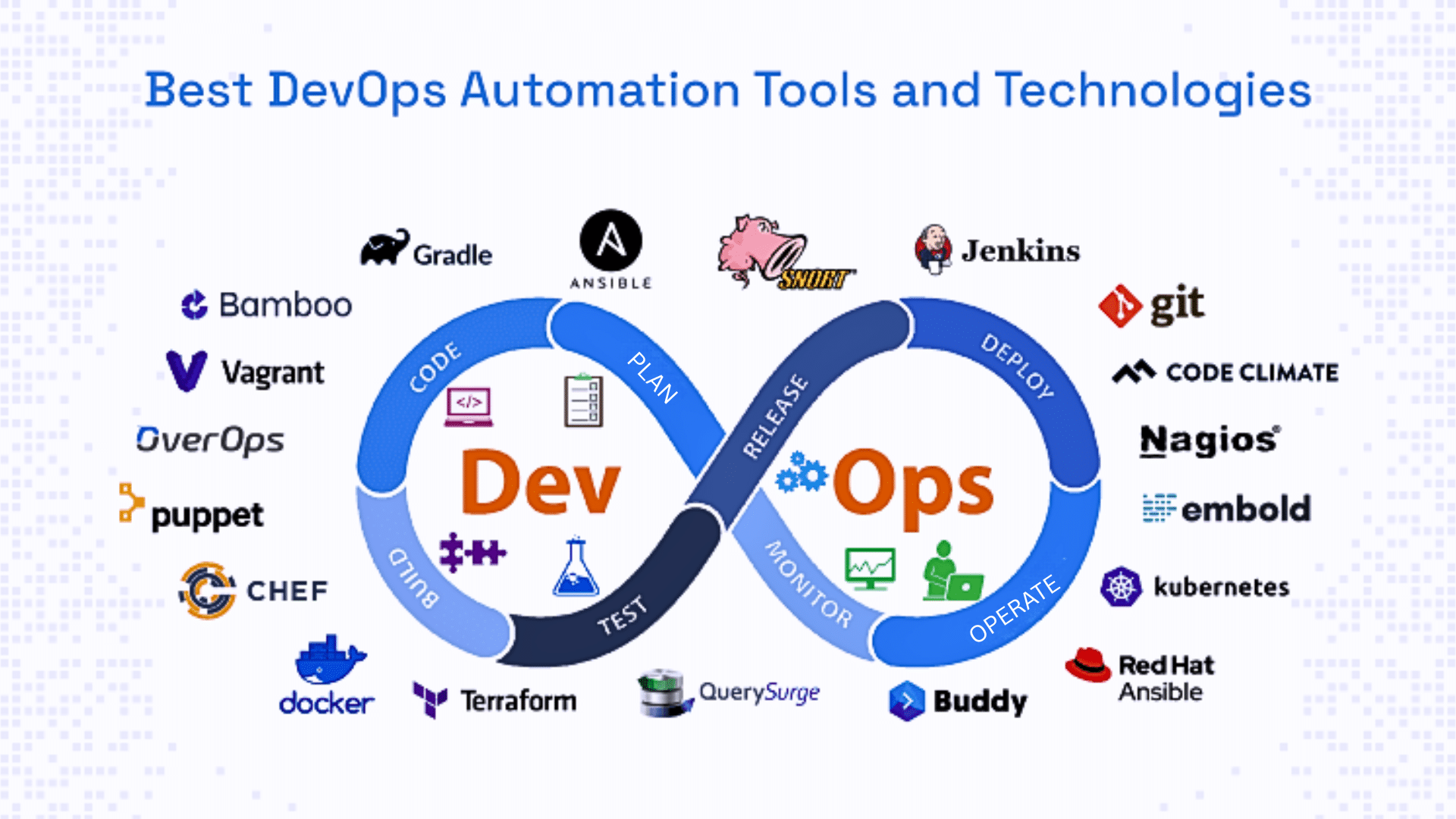
DevOps automation relies on tools that handle repeat tasks across the pipeline. Each category supports a specific part of the workflow.
1. CI/CD Tools
CI/CD tools automate building, testing, and deploying code. They trigger actions when developers push updates to a shared repository.
This helps teams catch issues early and release changes faster. These tools reduce manual steps and keep pipelines consistent.
By automating checks and deployments, teams maintain quality while moving quickly.
CI/CD tools also provide visibility into pipeline status, making it easier to track progress and fix problems before releases reach users.
- Jenkins: Automates builds, tests, and deployments using pipelines.
- GitHub Actions: Runs CI/CD workflows directly from GitHub repositories.
2. Configuration Management Tools
Configuration management tools keep systems set up the same way across environments. They automate tasks like installing software, applying settings, and updating servers.
This prevents differences between development, testing, and production systems.
These tools also make changes easier to track and repeat.
When teams automate configuration tasks, they reduce setup time and avoid errors caused by manual changes. This helps systems stay stable as they scale.
- Ansible: Automates server setup and configuration using simple scripts.
- Chef: Manages system configurations and keeps environments consistent.
3. Container and Orchestration Tools
Container tools package applications with everything they need to run. Orchestration tools then manage these containers at scale.
They automate deployment, scaling, and recovery when containers fail.
This helps teams run applications consistently across different platforms. Automation in this category reduces downtime and manual work.
Teams can focus on improving applications while tools handle container placement, updates, and resource use behind the scenes.
- Docker: Packages applications into containers for consistent runtime behavior.
- Kubernetes: Manages container deployment, scaling, and recovery automatically.
4. Monitoring and Logging Tools
Monitoring and logging tools automate system visibility. They track performance, errors, and system health in real time.
Automated alerts notify teams when something goes wrong.
Logs help teams trace issues and understand system behavior. With these tools, teams respond faster and reduce downtime.
Automation also supports trend tracking, helping teams spot issues early and improve system reliability over time.
- Prometheus: Collects and tracks system metrics in real time.
- ELK Stack: Centralizes logs to help teams monitor and troubleshoot systems.
Challenges in DevOps Automation
DevOps automation brings many benefits, but teams often face hurdles along the way. Understanding these issues helps teams plan better and avoid common mistakes.
- Tool Overload: Using too many tools creates confusion and maintenance issues. Teams can fix this by choosing tools that integrate well and serve clear purposes.
- Skill Gaps: Automation tools require new skills that teams may lack. Training, clear documentation, and gradual adoption help close this gap.
- Security Concerns: Poorly configured automation can expose systems to risks. Adding security checks early and reviewing pipelines regularly reduces this risk.
- Process Complexity: Over-automating too soon can make workflows hard to manage. Starting small and improving step by step keeps systems easier to control.
Conclusion
DevOps automation plays a big role in how teams build and deliver software today. It reduces manual work, lowers errors, and helps teams release updates with more confidence.
More importantly, it gives teams time back to focus on planning, improving systems, and solving real problems.
Automation does not have to happen all at once. Starting small makes it easier to learn, adjust, and see real results without feeling overwhelmed.
Even simple automated tasks can bring noticeable improvements over time.
The key is to apply automation where it adds the most value and grow from there. Every team’s setup is different, and what works best often comes from real experience.
If you are already using DevOps automation, or just getting started, share what has worked for you in the comments below.

