

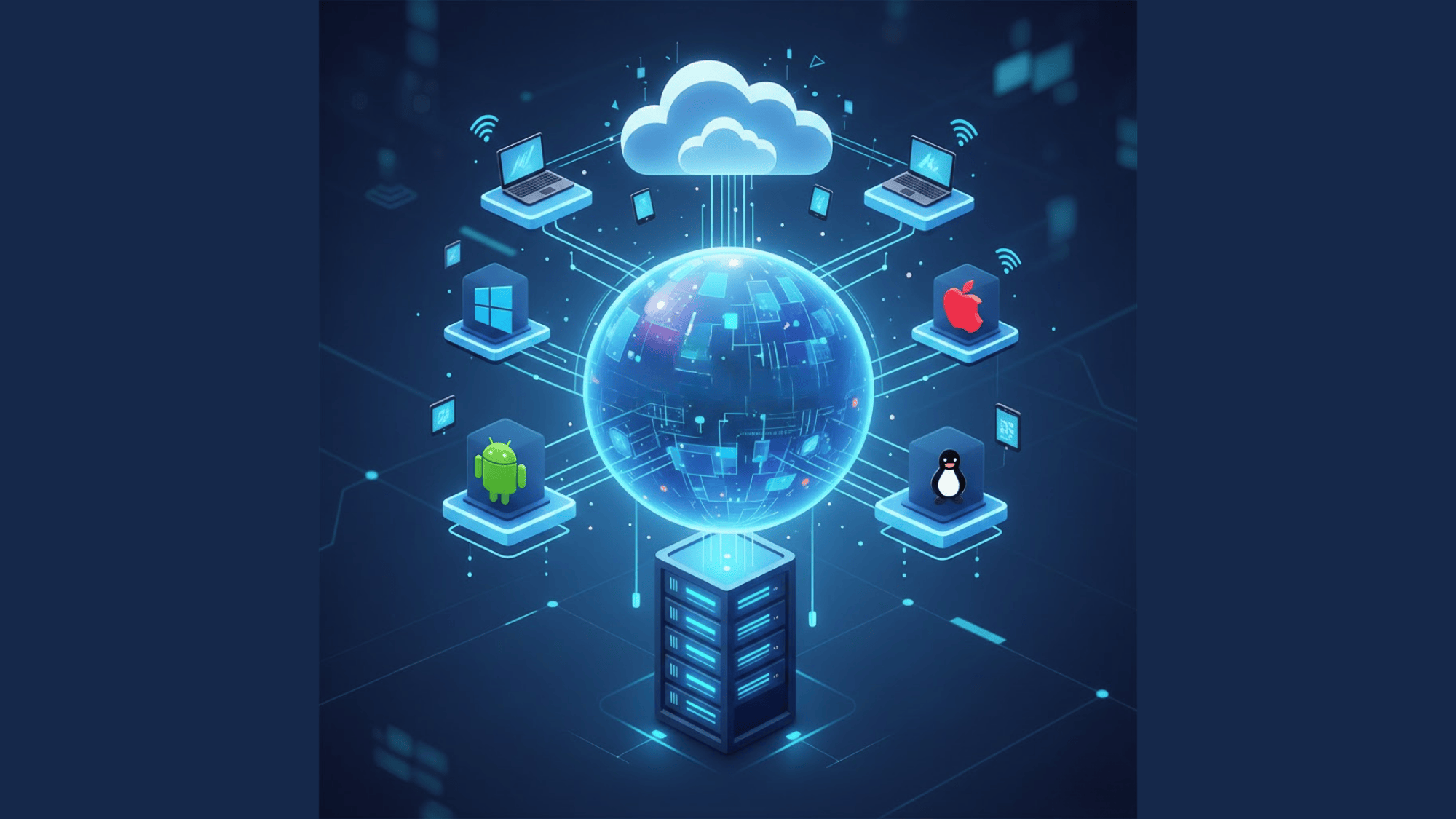





Ever wondered how cloud services like Google Drive or Netflix can serve millions of people at once without crashing? The secret is virtualization.
Think of it like turning one powerful computer into several smaller virtual computers, each working independently. This technology is what makes cloud computing possible and affordable.
In this guide, you’ll learn what virtualization really means, how it powers the cloud services you use every day, and the different types that exist.
Even if you’re a student, tech enthusiast, or just curious about how the internet works, this beginner-friendly explanation will make everything crystal clear. Let’s get right in!
What Exactly is Virtualization?
Let’s break down virtualization in the simplest way possible. Virtualization is the technology that creates virtual versions of physical hardware.
Instead of one computer doing one job, virtualization splits that single machine into multiple “virtual computers” called virtual machines (VMs).
Each VM acts like a completely separate computer with its own operating system and apps, even though they’re all sharing the same physical hardware.
The Apartment Building Analogy
Think of a physical server as a large apartment building. Before virtualization, it was like having one family living in the entire building, tons of wasted space.
After virtualization, that same building gets divided into separate apartments. Each apartment (virtual machine) has its own space and runs independently.
Different families (different applications) share the same building structure (physical server), but each has complete privacy and control.
Before vs. After Virtualization
Before: Companies bought expensive servers that used only 10-15% of their power. Need a different application? Buy another server. This meant rooms full of underused hardware, massive energy bills, and wasted money.
After: One powerful server now hosts 10, 20, or even 50 virtual machines. Hardware utilization jumps to 80% or higher, energy costs drop, and new servers can be created in minutes instead of days.
Virtualization solved waste by sharing resources intelligently. When one VM isn’t using much power, another can use it, like carpooling instead of everyone driving separate cars. This breakthrough laid the foundation for modern cloud computing, powering everything from AWS servers to Netflix streaming.
Core Components of Virtualization in Cloud
Understanding how virtualization works doesn’t require a computer science degree. At its core, virtualization relies on three main components working together like a well-oiled machine. Let’s break down each piece.
1. Physical Hardware (Host Machine)
This is the actual, physical computer, the real metal and circuits sitting in a data center. The host machine contains all the essential hardware components:
- CPU (Processor): The brain that does all the computing work. Modern servers have powerful multi-core processors that can handle heavy workloads.
- RAM (Memory): Temporary storage that holds data the CPU is actively using. More RAM means more virtual machines can run smoothly at once.
- Storage (Hard Drives/SSDs): Where all the data, operating systems, and applications are permanently stored. Think of it as the filing cabinet that holds everything.
All these physical resources are shared among the virtual machines running on top of them.
2. Hypervisor (Virtual Machine Monitor)
The hypervisor is thesoftware layer that makes virtualization possible. It sits between the physical hardware and the virtual machines, acting like a traffic controller at a busy intersection. The hypervisor’s job is to:
- Divide up the physical resources (CPU, RAM, storage) among different VMs
- Keep each virtual machine isolated so they don’t interfere with each other
- Manage resource allocation to ensure everything runs smoothly
Popular hypervisor examples include:
- VMware ESXi: Widely used in enterprise data centers
- KVM (Kernel-based Virtual Machine): Open-source hypervisor built into Linux
- Xen: Powers many cloud platforms, including AWS
- Microsoft Hyper-V: Microsoft’s virtualization solution for Windows servers
Without a hypervisor, virtualization simply can’t happen; it’s the essential middleman.
3. Virtual Machines (Guests)
Virtual machines are the end result of virtualization. Each VM acts like a completely real, independent computer, even though it’s just software running on shared hardware. Here’s what makes VMs special:
- Runs its own operating system: One VM might run Windows Server, while another runs Linux Ubuntu, all on the same physical machine
- Has dedicated apps and files: Each VM can install different software and store its own data without affecting other VMs
- Operates in isolation: If one VM crashes or gets infected with malware, the others keep running normally
- Can be easily managed: VMs can be started, stopped, copied, or moved to different physical servers with just a few clicks
Think of VMs as fully functional computers living inside a computer, complete with their own personality, purpose, and independence.
How Virtualization Works in Cloud Computing
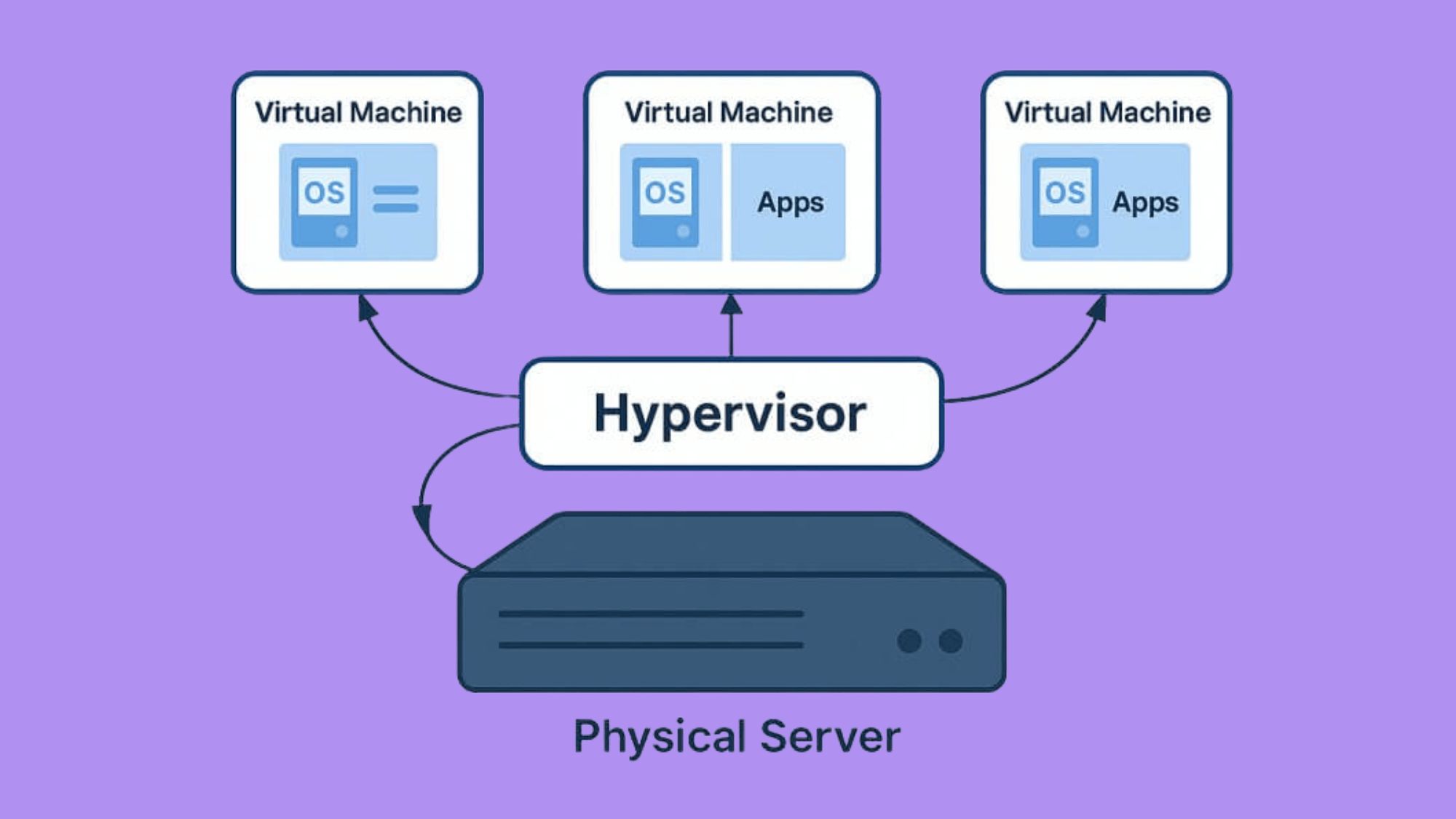
Ever wondered what actually happens when virtualization turns one physical server into multiple virtual machines? Let’s walk through the process step-by-step to see how it all works together.
Step 1: The Hypervisor Takes Control
First, special software called a hypervisor gets installed on the physical server. This hypervisor takes charge of all the hardware resources, the CPU, RAM, and storage.
Step 2: Resources Get Divided
The hypervisor divides physical resources into smaller parts, like allocating 8GB of RAM to one VM and 16GB to another, and does the same with CPU cores and storage.
Step 3: Virtual Machines Are Created
When someone needs a new virtual machine, the hypervisor creates an isolated environment and assigns it a portion of the physical resources.
This VM now thinks it has its own dedicated CPU, RAM, and hard drive, even though it’s actually sharing.
Step 4: The Magic of Abstraction
Here’s where it gets clever. The hypervisor creates a “virtual layer” between the VMs and the hardware. When a VM requests CPU use or saves a file, it doesn’t talk directly to hardware.
Instead, the request goes through the hypervisor first.
Step 5: Resource Requests are Managed
The hypervisor acts like a translator and traffic controller. When multiple VMs need CPU power at the same time, the hypervisor schedules which one gets to use it and for how long.
It juggles these requests so fast, millions of times per second, that each VM feels like it has the hardware all to itself.
Step 6: Isolation is Maintained
The hypervisor keeps each VM in its own secure bubble. VM #1 can’t see VM #2’s data or interfere with its operations. If one VM crashes, the hypervisor ensures the others keep running smoothly.
Types of Hypervisors in Virtualization
Not all hypervisors are created equal. There are two main types, each designed for different purposes and performance needs. Here’s a quick breakdown:
| Feature | Type 1 Hypervisor (Bare-Metal) | Type 2 Hypervisor (Hosted) |
|---|---|---|
| Installation | Installed directly on physical hardware (no operating system needed) | Runs on top of an existing operating system (Windows, macOS, Linux) |
| Performance | High performance, direct access to hardware resources | Lower performance, must go through the host OS first |
| Use Cases | Production environments, data centers, cloud computing | Testing, development, learning, personal use |
| Who Uses It | Cloud providers like AWS, Azure, Google Cloud | Developers, students, IT professionals |
| Examples | VMware ESXi, Microsoft Hyper-V, KVM, Xen | Oracle VirtualBox, VMware Workstation, Parallels Desktop |
| Resource Efficiency | More efficient, no extra OS layer consuming resources | Less efficient, the host OS uses some resources |
| Best For | Running multiple production servers 24/7 | Running a few VMs for experiments or testing |
Type 1 hypervisors sit directly on the hardware like a lightweight operating system, giving them blazing-fast performance.
Type 2 hypervisors are software applications that run inside your regular operating system, making them easier to set up but slower overall.
For cloud computing, Type 1 hypervisors are the industry standard because they deliver the speed and reliability needed to serve millions of users simultaneously.
Why Virtualization is Essential for Cloud Computing

Virtualization isn’t just a nice feature of cloud computing; it’s the entire backbone. Without virtualization, the cloud as we know it wouldn’t exist.
Here’s why this technology is absolutely essential for delivering cloud services that millions of people and businesses rely on every day.
- Resource Sharing: Virtualization allows multiple users to share the same physical hardware without interfering with each other, maximizing efficiency and reducing waste in data centers.
- On-Demand Scalability: Need more computing power? Virtualization lets cloud providers instantly create new virtual machines or allocate additional resources without buying new physical hardware.
- Isolation and Security: Each virtual machine operates in its own protected environment, ensuring that one customer’s data and applications remain completely separate from another customer’s.
- Cost Efficiency: By running dozens of VMs on one server instead of maintaining separate physical machines, cloud providers save money and pass those savings to customers.
- Fast Provisioning: Virtualization enables cloud instances to spin up in minutes, not days, letting businesses deploy new servers and applications at lightning speed.
Virtualization is the technology that enables sharing, while cloud computing is the service model that delivers it.
Virtualization vs Cloud Computing
Many people use these terms interchangeably, but virtualization and cloud computing aren’t the same thing. While they’re closely related, understanding the difference helps clarify how modern technology actually works.
Here’s a side-by-side comparison:
| Feature | Virtualization | Cloud Computing |
|---|---|---|
| Definition | Technology that creates virtual versions of hardware | A service model that delivers computing resources over the internet |
| Purpose | Create and manage virtual machines on physical servers | Deliver on-demand resources like storage, servers, and applications online |
| Ownership | Usually, in-house; companies own and manage their own infrastructure | Provider-owned, third parties like AWS, Azure, or Google own the infrastructure |
| Scalability | Limited to the physical hardware available on-site | Highly scalable; can instantly access nearly unlimited resources from the provider |
| Location | Runs in your own data center or server room | Runs in the provider’s data centers across the globe |
| Cost Model | One-time hardware purchase plus maintenance costs | Pay-as-you-go pricing based on actual usage |
| Access | Local network access | Accessible from anywhere with an internet connection |
Virtualization is the engine, and cloud computing is the car. You can have virtualization without the cloud (running VMs in your own office), but you can’t have cloud computing without virtualization powering it behind the scenes.
Types of Virtualization
Virtualization isn’t just one thing; it comes in several flavors, each designed to virtualize different parts of the IT infrastructure.
From servers to storage to entire desktops, here are the six main types of virtualization powering today’s cloud computing world.
1. Server Virtualization
Server virtualization is the most common and widely used type. It’s what most people picture when they think about virtualization.
This approach uses a single powerful physical server and partitions it into multiple virtual servers, each running independently with its own operating system and applications.
Rather than buying ten separate physical servers for ten different tasks, companies can run all ten as virtual machines on a single piece of hardware. This dramatically cuts costs, saves energy, and simplifies management.
Real-World Example:
Amazon Web Services EC2 (Elastic Compute Cloud) enables customers to launch virtual servers quickly through server virtualization. Each EC2 instance is a virtual machine on AWS’s physical infrastructure.
2. Storage Virtualization
Storage virtualization pools multiple physical storage devices into what appears as a single storage unit.
Think of it like combining several small water tanks into one giant reservoir; users see one big storage pool, even though the data is spread across different hard drives or storage systems.
This makes storage management much simpler. IT teams don’t have to worry about which specific hard drive has free space; the virtualization layer handles all that automatically.
Real-World Examples:
- Amazon S3 presents unlimited cloud storage, but it’s actually millions of physical drives working together.
- SAN (Storage Area Network) combines multiple storage devices into one high-performance system.
3. Network Virtualization
Network virtualization creates software-based networks that run independently of physical network hardware. In place of configuring routers, switches, and cables manually, everything is managed through software.
Multiple virtual networks can exist on the same physical infrastructure, each completely isolated from the others.
This approach gives businesses incredible flexibility. They can create, modify, or delete entire networks in minutes without touching a single wire.
Real-World Example:
AWS VPC (Virtual Private Cloud) lets customers create isolated virtual networks within AWS’s infrastructure, complete with custom IP ranges, subnets, and security rules, all managed through software.
4. Desktop Virtualization
Desktop virtualization (also called VDI – Virtual Desktop Infrastructure) delivers entire desktop environments remotely.
Instead of running locally on your desktop computer, it runs on a server in a data center, and you access it over the internet.
This is perfect for remote work. Employees can access their full work desktop from any device, laptop, tablet, or even a smartphone, and everything looks and works exactly the same.
Real-World Examples:
- Amazon WorkSpaces provides cloud-based virtual desktops
- VDI solutions from VMware and Citrix power remote workforces globally
5. Application Virtualization
Application virtualization separates apps from the underlying operating system. Rather than installing software directly on each computer, the application runs in a virtual environment and streams to users as needed.
The app thinks it’s installed locally, but it’s actually running elsewhere.
This eliminates the “it works on my machine” problem. Everyone gets the same version of the software, and IT teams don’t have to install updates on hundreds of individual computers.
Real-World Examples:
- Citrix Virtual Apps delivers Windows applications to any device
- Microsoft App-V packages applications for virtual delivery across enterprises
6. Data Virtualization
Data virtualization creates a unified view of data from multiple sources without physically moving or copying it.
Instead of combining databases into a single massive storage system, data virtualization lets applications query data from different sources as if they were all in one place.
This saves massive amounts of time and storage space. Companies can analyze data from SQL databases, cloud storage, and legacy systems simultaneously, all through a single interface.
Real-World Example:
Denodo and similar platforms let businesses access and combine data from dozens of sources in real time without creating duplicates.
Each type of virtualization solves specific challenges, but they all share the same core benefit: doing more with less by abstracting physical resources into flexible, software-defined versions.
Benefits of Virtualization in Cloud Computing
Virtualization delivers real, measurable advantages that save money, boost efficiency, and make IT management dramatically easier.
These aren’t just theoretical perks; businesses experience these benefits daily. From slashing hardware costs to enabling lightning-fast disaster recovery.
Here’s why virtualization has become the backbone of modern cloud infrastructure.
- Reduced Hardware and Energy Costs: Fewer physical servers mean lower equipment purchases, reduced electricity bills, and smaller data center spaces, cutting operational expenses by up to 70%.
- Better Hardware Utilization: Physical servers increase utilization from 15% to 80% or more, maximizing value from every piece of hardware.
- Faster Disaster Recovery: Virtual machines can be backed up, replicated, and restored in minutes, minimizing downtime and protecting businesses from catastrophic data loss scenarios.
- Improved Security Through Isolation: Each virtual machine operates in its own secure bubble, preventing malware or breaches in one VM from spreading to others.
- Easy Backups and Migration: VMs can be copied, moved between servers, or deployed to new locations with simple file transfers; no complex hardware reconfiguration is needed.
These benefits combine to create cloud platforms that are more reliable, affordable, and flexible than traditional computing.
Future of Virtualization in Cloud Computing
Virtualization isn’t standing still; it’s evolving rapidly to meet tomorrow’s computing demands.
AI-driven resource optimization is making virtualization smarter, with machine learning algorithms that automatically predict workload patterns and allocate resources before they’re needed.
Integration with containers and serverless computing is creating hybrid environments where VMs, containers, and serverless functions work seamlessly together, giving developers the best of all worlds.
Edge computing and 5G networks are pushing virtualization closer to users, enabling lightning-fast processing for IoT devices, autonomous vehicles, and real-time applications.
Meanwhile, the push toward sustainable, green cloud infrastructure is driving innovation in energy-efficient virtualization, helping data centers reduce their carbon footprint while handling ever-growing workloads.
The future looks incredibly efficient and environmentally conscious.
At the End
Virtualization has changed the way we use technology, making cloud computing affordable, flexible, and accessible to everyone.
From turning one server into many virtual machines to enabling global services like Netflix and AWS, this technology quietly powers the digital world we rely on daily.
Understanding how virtualization works, through hypervisors, different types like server and storage virtualization, and its core benefits, gives valuable insight into modern technology’s foundation.
The future looks even more exciting, with AI optimization, edge computing, and sustainable practices taking virtualization to new heights.
Ready to learn more about cloud computing? Check out more of our guides and stay updated on the latest tech trends!

