




Starting a website can feel confusing at first, especially when new terms pop up everywhere.
One of the first things you will hear about is a domain name. It may sound technical, but it plays a simple and important role in how websites exist online.
In this guide, I explain what a domain name is and how it works.
A domain name is the web address people type to reach a site, and it helps users find you without remembering numbers. It also builds trust and gives your site a clear identity.
You will also learn how domain names connect to websites, what they are made of, and how they differ from hosting.
You will learn how to choose a domain and register it the right way. By the end, you will know where to start.
What Is a Domain Name and How Does It Work?
A domain name is the address people type into a browser to visit a website, like google.com.
Instead of remembering long numbers called IP addresses, users rely on names that are easy to read and recall.
For example, when you type amazon.com, your browser looks up the matching IP address and connects you to the right server.
This process happens in seconds and works quietly in the background. Browsers use domain names to find websites through a system called DNS.
The cost of a domain name is usually simple too. Most domain names cost between $10 and $20 per year.
Prices can change based on the domain ending or if the name is in high demand. A domain name matters because it helps people reach your site, trust it, and remember it.
Why Domain Names Are Important for Websites?
A domain name helps people find, remember, and trust a website. It also gives a site a clear identity online.
- Trust: A proper domain name makes a website look real and reliable. Users are more likely to trust a site with a clear name instead of a long or random link.
- Branding: A domain name reflects your website or business name. It helps users recognize you and remember your site later.
- Ease of Access: Domain names are easy to type and share. They allow visitors to reach a website without dealing with numbers or complex links.
- Online Identity: A domain name gives your website a unique place on the internet. No two websites can use the same name.
What Are the Different Parts of a Domain Name?
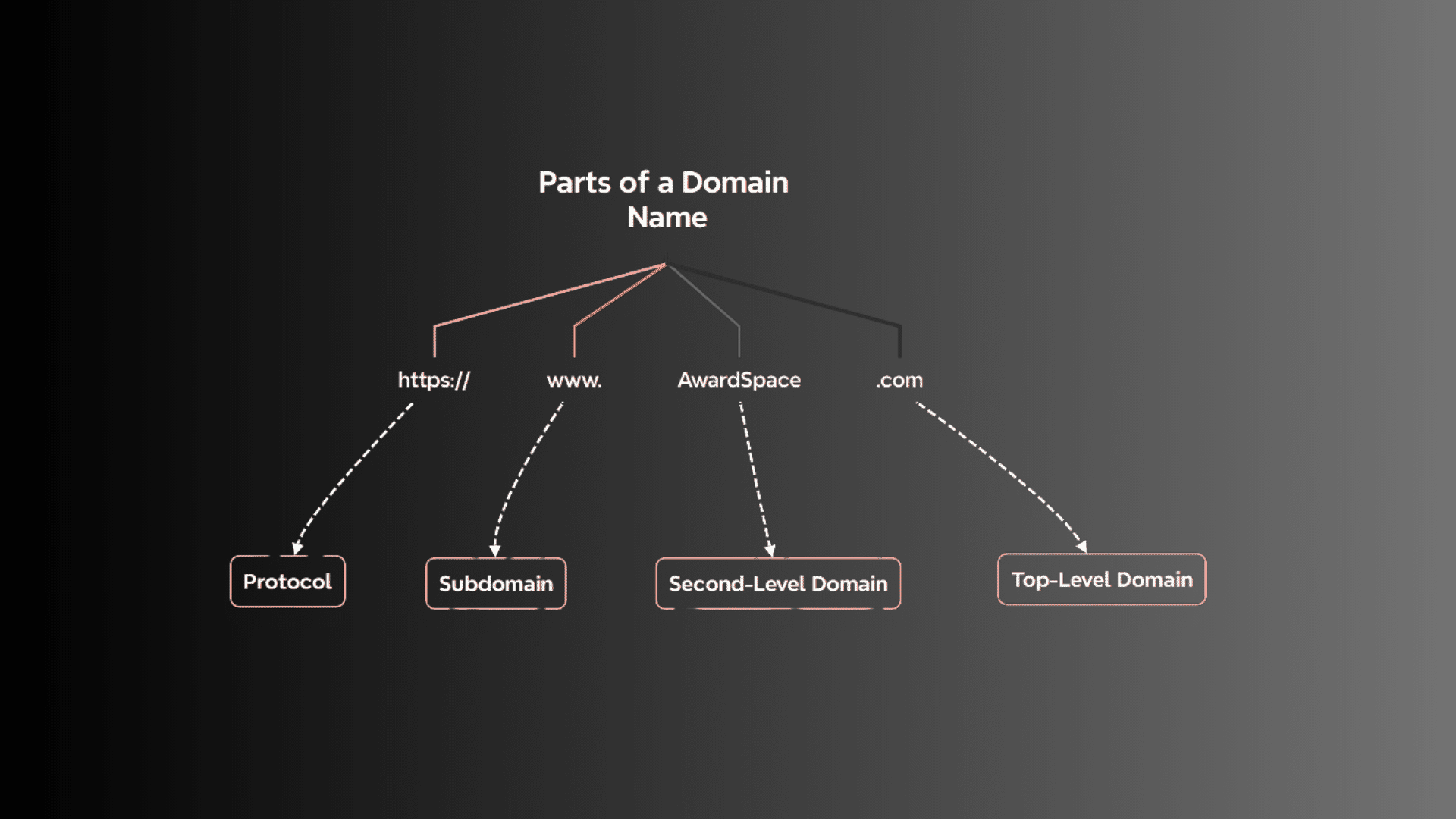
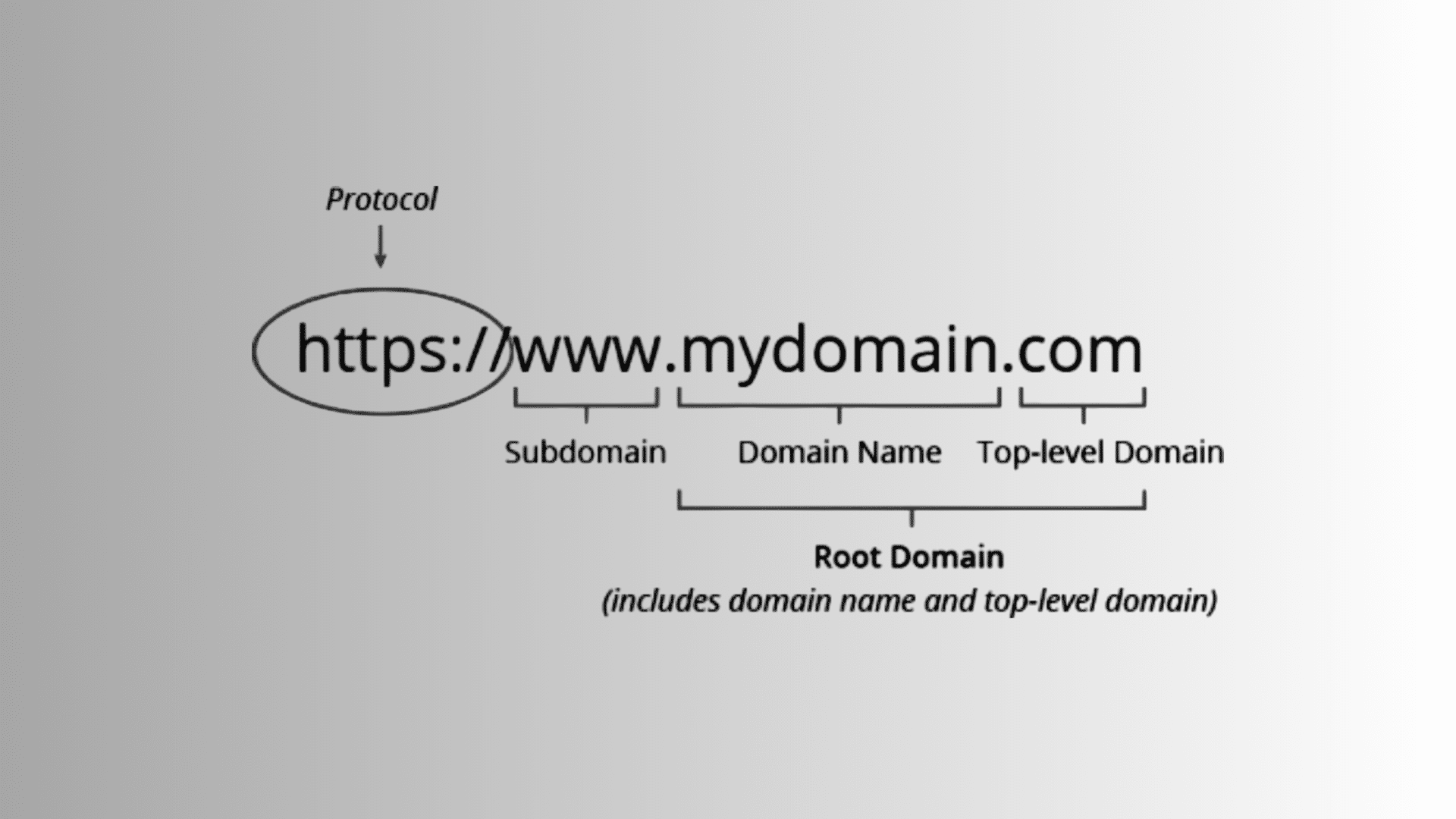
A domain name has a few clear parts that work together to form a complete web address. Each part plays a different role in how websites are named and found online.
1. Top-Level Domain (TLD)
The top-level domain is the last part of a domain name, such as .com, .org, or .net. It comes after the main name and helps show the type or purpose of a website.
For example, .com is often used for businesses, while .org is common for organizations.
Some TLDs also show location, like .us or .uk. While a TLD does not control a website’s content, it does affect how users view and trust the site.
2. Second-Level Domain
The second-level domain is the main name of the website and appears just before the TLD.
In a domain like example.com, “example” is the second-level domain. This part is usually the brand name, business name, or topic of the site.
It is the most important part for recognition because users remember it first.
Choosing a clear and simple second-level domain helps people find and return to a website more easily over time.
3. Subdomain
A subdomain comes before the second-level domain and is used to organize content.
For example, in blog.example.com, “blog” is the subdomain.
It allows website owners to separate sections like blogs, shops, or support pages without buying a new domain. Subdomains help keep large websites organized and easy to manage.
They are optional, but useful when a site grows and needs a clear structure for users and search engines.
4. Protocol
The protocol shows how data moves between the browser and the website server.
It appears at the start of a web address, such as http or https. The most common protocol today is https, which means the connection is secure.
It protects data like passwords and form details while users browse a site.
Protocols do not change the website’s name, but they affect safety and trust. Browsers often warn users if a site does not use a secure protocol.
Domain Name vs Web Hosting
Both parts are needed to run a website smoothly. One helps people find the site, while the other stores and delivers the content.
| Feature | Domain Name | Web Hosting |
| Purpose | Acts as the website’s address on the internet | Stores website files, images, and data |
| What It Does | Points users to the correct server | Makes the website content available online |
| Example | google.com | The server where Google’s site files live |
| Required For | Helping users reach a website | Displaying pages when visitors arrive |
| Purchased From | Domain registrars | Hosting providers |
| Works Alone? | No, it needs hosting to show content | No, it needs a domain to be accessed |
| Role Together | Directs traffic to the server | Delivers the site once traffic arrives |
How to Get a Domain Name?
Buying a domain name is a simple process that usually takes only a few minutes. You just need to check availability, choose a registrar, and complete the purchase.
Step 1: Search for Domain Name Availability
Start by choosing a domain registrar and using its search tool to check if your desired name is available. Type in the name you want and review the results.
If the name is already taken, the registrar will suggest similar options or different domain endings.
This step helps you confirm that no one else owns the name. Try to keep the domain short, easy to spell, and clear so users can remember it easily later.
Step 2: Choose a Domain Registrar
Once you find an available domain, select a trusted registrar to buy it from.
Registrars are companies approved to sell domain names. Many also offer extras like privacy protection and email services.
Compare prices, renewal costs, and support before choosing one. Picking a reliable registrar makes managing renewals and settings easier over time.
This step ensures your domain stays active and under your control without issues.
Step 3: Complete Registration and Payment
After choosing a registrar, add the domain to your cart and complete the registration process.
You will need to provide basic contact details and select how many years you want to register the domain. Most domains are paid yearly.
Once payment is complete, the domain becomes yours.
You can then connect it to web hosting or save it for future use when building your website.
Tips for Registering a Domain Name
Small choices during registration can save time, money, and trouble later. These tips help you pick and manage a domain name the right way.
- Length: Keep the domain name short and simple. Short names are easier to type, remember, and share without errors.
- Spelling: Avoid hard words, numbers, or hyphens. Clear spelling reduces confusion and helps users reach your site without mistakes.
- Privacy Protection: Enable domain privacy to keep your personal details hidden. This helps reduce spam and protects your contact information.
- Renewals: Turn on auto-renewal to avoid losing your domain. Expired domains can be taken by others if not renewed on time.
- Extension Choice: Pick an extension that fits your site’s purpose. Common endings like .com are easy for users to recognize and trust.
Types of Domain Names You Should Know
Domain names come in different types, each serving a specific purpose. Choosing the right type helps match your website’s goal and audience.
1. Generic Top-Level Domains (gTLDs)
Generic top-level domains include common endings like .com, .org, and .net. These are widely used and easy for users to recognize.
A .com domain works well for businesses, blogs, and personal websites.
A .org domain is often used by nonprofits and community groups. Because gTLDs are familiar, they build trust and are easier to remember.
They suit most websites, especially those targeting a broad or global audience online.
2. Country Code Top-Level Domains (ccTLDs)
Country code top-level domains are linked to specific countries, such as .us for the United States or .uk for the United Kingdom.
These domains help show that a website targets users in a certain location.
They are useful for local businesses or services focused on one country.
Using a ccTLD can build local trust and improve relevance for regional visitors searching for local information or services online.
3. Sponsored and Special Domains
Sponsored and special domains are created for specific groups or purposes. Examples include .edu for educational institutions and .gov for government websites.
These domains often have rules about who can use them. Because of this, they carry strong trust and authority.
They suit schools, official organizations, and public services.
Most personal or business websites cannot register these domains, but they are helpful to recognize when browsing the web.
What Is a URL and What Are the Parts of a URL?
A URL is the full web address used to reach a specific page on a website. It includes the domain name and extra details that tell the browser exactly where to go.
When you type a URL into a browser, it reads the address and looks for the correct server and page.
The domain name is the main part of a URL that identifies the website. The rest of the URL points to a specific page or file.
URLs help browsers load the right content and help users move from one page to another.
Without URLs, the internet would not know which pages to open or how pages connect across different websites online.
Parts of a URL
Each part of a URL has a specific role in helping the browser load the right page. Together, these parts guide the browser from the server to the exact content.
- Protocol: Shows how data is transferred, such as HTTP or https.
- Domain Name: Identifies the website, like example.com.
- Path: Points to a specific page or section on the site.
- Query String: Passes extra information, often seen after a question mark.
- Fragment: Directs the browser to a specific spot on a page.
Difference Between a Domain Name and a URL
These two terms are often mixed up, but they serve different roles online. Understanding the difference makes website basics much easier to grasp.
| Feature | Domain Name | URL |
| What It Is | The main address of a website | The full address of a specific page |
| Example | example.com | https://www.example.com/blog |
| Purpose | Identifies the website | Points to an exact page or file |
| Includes Protocol | No | Yes |
| Includes Path Details | No | Yes |
| Used For | Finding a website | Opening a specific page |
How to Choose the Right Domain Name?
The right domain name makes a website easier to find and remember. It should stay useful as your site grows over time.
- Keywords: Use a simple keyword related to your topic or business. This helps users understand what your site is about at a glance.
- Branding: Choose a name that matches your brand or idea. A clear name helps people recognize and recall your website later.
- Length: Keep the name short and clean. Short domain names reduce typing errors and are easier to share.
- Spelling: Pick words that are easy to spell and say. Avoid numbers or special characters that can confuse users.
- Long-Term Use: Choose a name that will still fit your site years from now. Avoid names that limit future growth.
Conclusion
A domain name is more than just a web address. It is how people find your website, remember it, and trust it online.
It works by connecting a simple name to the server where your site lives, making the internet easier to use for everyone.
Once you understand how domain names, URLs, and hosting work together, the process feels far less confusing.
If you are planning to start a website, choosing and registering a domain is one of the first real steps. Pick a name that feels right, stays simple, and fits your long-term plans.
Taking action now helps turn ideas into something real.
If you have already bought a domain or are still deciding, share your experience or questions in the comments below.