




Every day, your computer faces invisible threats, viruses, malware, and malicious code trying to steal your data or damage your files.
The good news? You can stop most of these attacks with simple, proven steps. Preventing viruses isn’t complicated when you know what to do.
This guide covers everything you need to stay safe online. You’ll learn the most effective ways to block malware, understand how viruses spread through emails and downloads, and find tools like antivirus software and firewalls.
We’ll also walk you through smart browsing habits, password protection, and why regular backups matter.
Even if you’re protecting your personal computer or your workplace network, these practical strategies will help you build strong defenses against today’s digital threats.
What Are Viruses and Malicious Code?
Think of viruses and malicious code as digital troublemakers that sneak into your computer to cause problems.
Just like getting sick from germs, your computer can get “infected” by harmful software that damages files, steals information, or takes control of your device.
What’s the Difference Between Viruses, Malware, and Malicious Code?
These terms often get mixed up, but here’s what they really mean:
- Malicious code is the big umbrella term for any harmful software designed to damage your computer or steal your data
- Malware (short for “malicious software”) means the same thing: it’s bad software created to hurt your system
- A virus is one specific type of malware that copies itself and spreads to other files, just like a real virus spreads from person to person
Common Types of Malicious Code You Should Know
Viruses attach themselves to your files and programs. When you open that infected file, the virus activates and spreads to other files on your computer. It’s like a chain reaction you definitely don’t want.
Trojans trick you by pretending to be legitimate software. You might think you’re downloading a helpful tool or fun game, but you’re actually letting a criminal into your computer.
Ransomware locks your files and holds them hostage. Criminals encrypt your photos, documents, and important data, then demand money to give you back access.
Spyware secretly watches everything you do on your computer. It tracks your browsing habits, records what you type (including passwords), and sends this private information back to cybercriminals without your knowledge.
How Viruses and Malicious Code Spread
Understanding how malicious code spreads is your first line of defense. Cybercriminals use clever tactics to trick people into letting malware into their systems.
The scary part? These attacks are getting smarter and harder to spot. But here’s the good news: once you know their methods, you can protect yourself.
1. Email-Based Attacks: The Most Common Threat
Your email inbox is a favorite hunting ground for hackers. They send messages that look like they’re from your bank, a shipping company, or even your boss.
These emails contain dangerous attachments or links that unleash malware when you click them. Sometimes the email seems urgent: “Your account will be closed!” or “You’ve won a prize!”
This pressure makes people act without thinking. One click, and the malware starts installing itself on your computer.
2. Infected Downloads and Pirated Software
Free stuff sounds great, until it comes with a hidden price. When you download pirated software, cracked games, or “free” versions of expensive programs from sketchy websites, you’re rolling the dice with your security.
Cybercriminals bundle malware with popular downloads. That “free Adobe Photoshop” might work, but it probably also installed spyware or ransomware alongside it.
File-sharing sites and torrent platforms are loaded with infected files disguised as entertainment.
3. Compromised Websites: Danger Where You Least Expect It
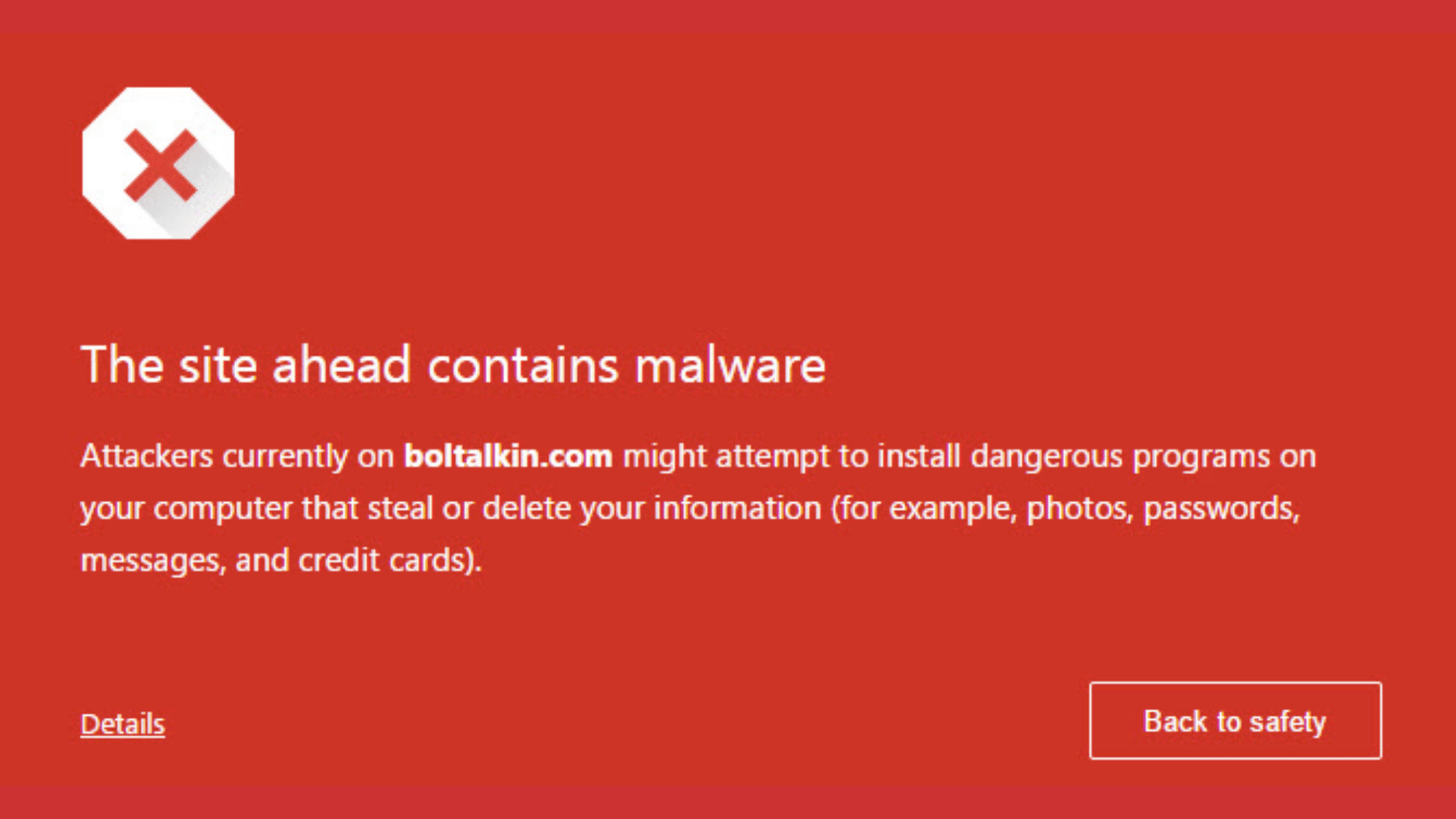
You don’t have to visit shady websites to encounter malware. Hackers break into legitimate sites and inject malicious code.
When you visit that compromised site, the code can exploit security weaknesses in your browser and install malware automatically, no download required.
These “drive-by downloads” happen in the background while you’re browsing normally. Pop-up ads are another huge risk. Some contain malicious code that runs the moment they appear on your screen.
4. Public Wi-Fi and Fake Networks: Invisible Threats

That free Wi-Fi at the coffee shop or airport seems convenient, but it’s also a goldmine for hackers. Public networks often have weak security, letting cybercriminals intercept your data and passwords.
Even sneakier? Fake Wi-Fi networks. Hackers set up networks with names like “Free Airport WiFi” that look legitimate.
When you connect, everything you do goes through their system first. They can monitor your activity and push malware onto your device.
5. Social Engineering and Phishing: Hacking Humans

The weakest link in cybersecurity isn’t technology, it’s people. Social engineering means manipulating people into giving up sensitive information or doing something that compromises security.
Phishing is the most common type. Scammers pretend to be someone you trust to get you to reveal passwords or download infected files.
These messages create urgency: “Verify your account now or it will be locked!” Phone calls, text messages, and social media all spread malware through phishing tactics.
Why Prevention Matters More Than Ever
Viruses spread by exploiting human behavior and system weaknesses, meaning one careless click can cause massive damage, but awareness dramatically reduces risk for everyone online.
- Single mistakes like clicking links allow attackers to steal data, money, identities, and control systems.
- Malware damage includes stolen photos, locked files, loss, privacy breaches, and devices used for attacks.
- Cybercriminals rely on distraction, urgency, and trust to bypass defenses and trick users into actions.
- Education and awareness stop attacks because informed users recognize threats before malware executes or spreads.
When people understand how viruses spread and why prevention matters, security becomes proactive, confidence increases, and everyday digital actions turn into powerful defenses for everyone.
Technology-Based Protection
Strong security tools act like digital guards, working quietly in the background to block threats, stop harmful activity, and protect devices before problems turn serious.
1. Use Antivirus and Anti-Malware Software
Antivirus and anti-malware software help protect computers from harmful programs that try to steal data or damage files.
These tools work in real time, checking files, downloads, and websites for threats. Modern options, including Next-Gen Antivirus (NGAV), can spot unusual behavior and stop new or unknown malware before it causes harm.
- Automatically checks new files, emails, and downloads for hidden threats
- Warns users before harmful programs can install or run
- Reduces risk from viruses, ransomware, and spyware attacks
2. Keep Software and Systems Updated
Keeping systems updated helps fix security holes that hackers often target. Updates for operating systems, browsers, and apps include safety patches that block known threats.
Skipping updates leaves devices open to attacks that could easily be avoided with timely installs.
- Fixes known weaknesses that cybercriminals actively search for
- Improves system performance and stability, along with security
- Helps devices stay compatible with newer security tools
3. Enable Firewalls
Firewalls act as a barrier between your device and the internet. They watch incoming and outgoing traffic and block suspicious connections.
A firewall helps stop unauthorized access attempts and prevents harmful data from entering or leaving a network unnoticed.
- Blocks unknown programs from communicating with the internet
- Helps control which apps can access network connections
- Adds protection when using home or public networks
Safe User Habits That Stop Malware Before It Starts

Smart daily online habits act like a human firewall, stopping viruses early by reducing risky actions that cybercriminals depend on to spread malicious code.
4. Email Safety Best Practices
Email is one of the most common ways malware spreads. Harmful files and fake links are often hidden inside messages that look normal or urgent.
Being careful with emails helps stop threats before they ever reach the device.
| Safe Email Action | Why It Matters |
|---|---|
| Scan attachments before opening | Detects harmful files before they can run |
| Avoid unknown links | Prevents visits to fake or infected websites |
| Use preview mode carefully | Reduces accidental clicks on unsafe content |
Key habits to follow:
- Treat unexpected emails as suspicious, even if they look professional
- Watch for spelling errors, pressure tactics, or unusual sender addresses
- Delete messages asking for passwords or urgent actions
5. Safe Browsing Habits
Websites can hide harmful scripts that install malware without a clear warning. Browsing safely helps reduce exposure to these hidden threats and keeps personal information protected.
Simple Rules for Safer Browsing:
- Use websites that show HTTPS and a lock icon
- Close pop-ups instead of clicking inside them
- Type website addresses directly when possible
Why This Works:
These habits reduce the chances of landing on fake pages designed to steal data or install malicious code quietly in the background.
6. Downloading Software Safely
Many viruses come from unsafe downloads. Free tools, games, or cracked software often hide malware. Using trusted sources keeps devices clean and stable.
| Download Rule | Risk Avoided |
|---|---|
| Official app stores only | Blocks fake or modified software |
| Avoid pirated programs | Prevents hidden malware infections |
Extra safety tips:
- Read reviews before installing new software
- Avoid download buttons on unfamiliar websites
- Remove programs that are no longer needed
Passwords, MFA, and Security
Strong account security acts as a digital lock, stopping hackers from spreading malware by stealing logins and using trusted accounts to access systems.
7. Create Strong and Unique Passwords
Passwords are often the first target in cyberattacks. Weak or reused passwords make it easy for hackers to break in. Strong passwords help protect emails, banking apps, and work accounts from being taken over and misused.
What makes a password strong:
- At least 16 characters long
- Mix of letters, numbers, and symbols
- Different password for every account
| Weak Password Habit | Security Risk |
|---|---|
| Reusing passwords | One breach opens multiple accounts |
| Simple words or dates | Easy for attackers to guess |
8. Use Password Managers for Safer Logins
Password managers store and create strong passwords automatically. This removes the need to remember many logins and helps avoid unsafe shortcuts like writing passwords down or reusing them.
Why password managers help:
- Generate strong passwords instantly
- Store login details securely
- Reduce human error during sign-ins
Helpful habit:
Using one strong master password keeps all other accounts protected and easier to manage safely.
9. Enable Multi-Factor Authentication (MFA)
Multi-Factor Authentication adds an extra step during login, such as a code sent to a phone or a fingerprint scan. Even if a password is stolen, MFA helps stop attackers from getting in.
| Without MFA | With MFA |
|---|---|
| A stolen password allows access | Extra verification blocks entry |
How MFA Prevents Malware Spread:
- Stops hackers from hijacking email accounts
- Blocks attackers from installing malware using stolen credentials
- Reduces damage from phishing attacks
10. Data Backups: Your Last Line of Defense
Data backups act like a safety net when viruses or ransomware strike. Even if files are locked, deleted, or damaged, backups help restore important data without panic or paying attackers.
Backups matter because ransomware often blocks access to photos, documents, and work files. Without a backup, recovery can be costly or impossible. With a backup, systems can be cleaned and files restored safely.
Cloud vs External Backups
Both options offer protection, and using both together works best.
- Cloud backups save files online automatically and protect data from device damage or theft.
- External backups use hard drives or USB devices kept offline, which blocks ransomware from reaching them.
How Backups Reduce Damage
Backups limit how much harm an attack can cause. After removing malware, clean copies of files can be restored quickly. This shortens downtime, protects personal information, and removes pressure to pay ransom demands.
Preventing Viruses and Malicious Code at Work
Workplace security depends on both people and technology. When teams follow safe habits and systems are set up correctly, malware has fewer chances to spread inside an organization.
1. Employee Cybersecurity Awareness
Employees are often the first target for cybercriminals. Phishing emails and fake messages are designed to look real and create urgency.
Training helps staff spot warning signs early and avoid clicking harmful links or attachments. Knowing how and when to report suspicious activity allows security teams to respond faster and stop threats before they spread.
2. Network Security Basics
A strong network setup helps contain damage if malware enters the system. Network segmentation separates systems into smaller sections, limiting how far threats can travel.
Limiting admin privileges also reduces risk, since malware cannot make major system changes without special access. These controls keep attacks smaller and easier to manage.
3. Mobile and Remote Work Safety
Remote work increases risk when devices connect to public Wi-Fi. Open networks make it easier for attackers to intercept data. Using a VPN encrypts internet traffic and keeps information private.
Managing app permissions also matters, as unnecessary access can expose sensitive data and invite malicious activity.
How AI Is Changing Malware
Artificial intelligence is changing how malware is created and spread. Cybercriminals now use AI to make attacks smarter, faster, and harder to spot.
These modern threats often look more real and act more human, which makes simple mistakes easier to make.
AI-Powered Phishing Emails
AI helps attackers write emails that sound natural and convincing. These messages copy real writing styles and often feel urgent or personal.
This makes fake emails harder to recognize and increases the chance of clicking on harmful links.
- Messages look professional and well-written
- Emails may include personal details to build trust
- Fake requests often appear urgent or important
Polymorphic Malware
Polymorphic malware can change its appearance each time it spreads. This allows it to hide from older security tools that look for known patterns. Even after being detected once, it can return in a new form.
| Traditional Malware | Polymorphic Malware |
|---|---|
| Looks the same each time | Changes code to avoid detection |
| Easier to block | Harder to identify and stop |
Why Traditional Antivirus Alone Is Not Enough
Older antivirus tools mainly look for known threats. AI-driven malware can behave differently each time, making it harder to catch with simple scans. This is why relying on one tool no longer offers full protection.
Wrapping Up
Viruses and malicious code are not going away, but staying protected is completely possible with the right habits and tools.
Small actions, like updating devices, using MFA, backing up files, and slowing down before clicking, can prevent most infections.
At work, awareness and smart network settings help stop one mistake from turning into a bigger problem. Even with AI making attacks more convincing, layered security keeps protection strong.
The goal is not to be perfect every day, but to be consistent. Choose a few steps from this guide, set them up once, and keep them going.
Start today: turn on updates, enable MFA, and run a full security scan now.