




Over the last few years, I’ve worked with teams moving apps and workloads into the cloud, and I keep seeing the same issue.
Many companies still rely on old security habits that were built for slower and simpler systems. That approach creates gaps once containers, Kubernetes, and fast deployment pipelines enter the picture.
In this guide, I’ll walk you through how Cloud-Native Security works in real environments and why it matters for modern applications.
You’ll learn about the 4Cs framework, Zero Trust access, runtime monitoring, CI/CD protection, and the tools teams use to reduce risk every day.
I also cover mistakes, practical fixes, and ways to improve visibility without making security harder to manage.
By the end, you will have a clear information you can actually use, even if you’re still new to cloud systems and modern development workflows today.
What Is Cloud-Native Security?
Cloud-native security is the process of protecting apps, data, and systems that are built to run in cloud environments.
These systems often use containers, Kubernetes, microservices, and CI/CD pipelines that change and scale quickly.
Traditional security methods focused mainly on protecting a fixed network perimeter, but modern cloud systems move too fast for that approach alone.
Cloud-native security works by protecting every layer of the environment, from code and APIs to containers and runtime activity.
It helps teams find vulnerabilities early, control access, monitor workloads, and respond to threats faster. Security tools are often automated so checks happen continuously during development and deployment.
The main goal is to reduce risk without slowing down development or system performance.
This approach supports fast releases while helping teams keep cloud applications stable, secure, and easier to manage every day.
Key Features
- Automated alerts: Notifies the right team members instantly when suspicious activity is detected across systems.
- Playbook integration: Pre-defined response steps help teams act fast without confusion during an active incident.
- Forensic analysis tools: Capture detailed evidence during an attack to support investigation and future prevention.
- Rollback capabilities: Allow teams to quickly restore systems to a last-known-safe state after an incident.
The 4Cs of Cloud-Native Security
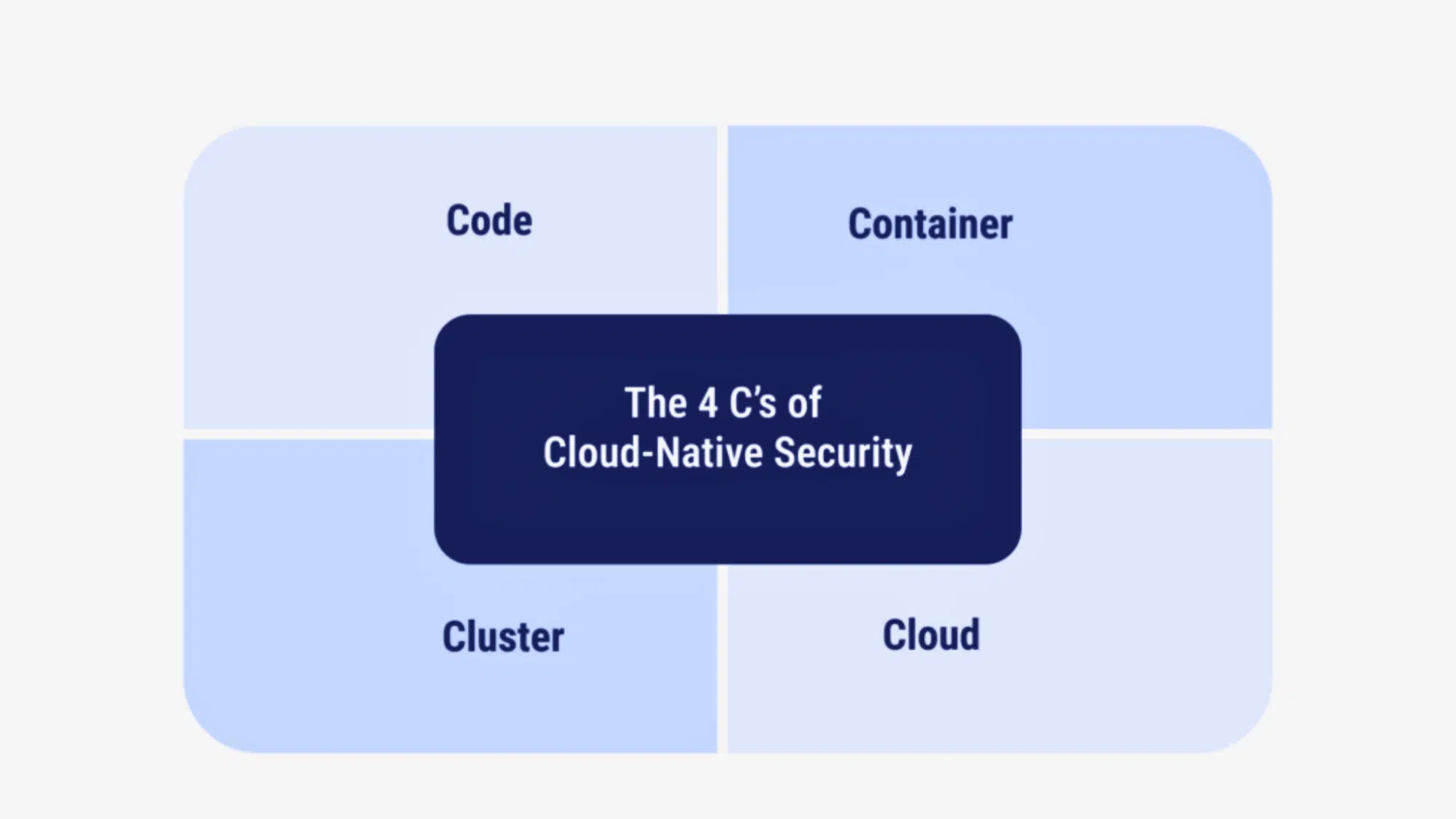
The 4Cs- Cloud, Cluster, Container, and Code provide a layered security model in which each level depends on the strength of the one below it.
1. Cloud
This is the strong foundation of cloud-native security today. Cloud security broadly covers your infrastructure, networking, and identity and access management (IAM).
If your cloud environment is badly misconfigured, everything built on top of it is directly exposed to serious risk.
Strong configuration management consistently helps reduce that overall risk.
It means actively limiting permissions, carefully securing networks, regularly monitoring access, and ensuring only the right people and services can access critical systems and resources.
Impact: Getting the foundation right means every layer built on top of it starts from a much safer position.
2. Cluster
This layer focuses on Kubernetes, the system most teams use to manage containers. It ensures clusters are properly configured, updated, and protected from unauthorized access.
Securing a cluster means using RBAC to limit access, protecting the Kubernetes API, and hardening nodes to reduce overall attack risk exposure.
A poorly secured cluster can give attackers wide access to your entire environment.
It can expose workloads, data, and internal services to serious security risks.
Impact: A locked-down Kubernetes cluster keeps your entire container environment from becoming an easy target for attackers.
3. Container
Containers need to be secure before they ever run. That starts with scanning images for known vulnerabilities, using trusted registries, and protecting your software supply chain.
If a compromised image is deployed to production, it can affect every service running on it.
Regular scanning and strict registry controls help catch problems early.
Teams should also use minimal base images to reduce the number of exposed components. Image signing and verification add another layer of trust before deployment.
Impact: Catching a vulnerable image before deployment is far easier and less costly than dealing with a breach after it goes live.
4. Code
Security starts at the code level. This means writing secure code from the start, keeping dependencies up to date, and running both static and dynamic testing throughout development.
Catching issues in code early is far cheaper and faster than fixing them after deployment.
Developers should follow secure coding standards and peer review processes. Automated scans in CI pipelines help detect weaknesses before release.
Clear documentation and regular updates reduce long-term security risks.
Impact: Fixing a security flaw in code takes minutes during development, but can take weeks and significant resources to resolve after a breach occurs.
Why Cloud-Native Security Matters?
Cloud-native security matters because cloud environments follow a shared responsibility model, and security gaps arise when these roles are misunderstood or ignored.
| Layer / Component | Cloud Provider Responsibility | Customer Responsibility |
|---|---|---|
| Physical Infrastructure | Manages data centers, servers, and core hardware.Ensures physical security and system availability. | No responsibility for hardware or facilities. Focus remains on applications and configurations. |
| Operating System (IaaS) | Provides infrastructure uptime and base environment.Maintains core cloud platform stability. | Responsible for OS setup and patching.Must harden and secure the system. |
| Applications & Workloads | Delivers a reliable runtime platform.Ensures service availability. | Must write secure code and fix vulnerabilities.Handles updates and secure configurations. |
| Identity & Access Management | Provides IAM tools and authentication services.Maintains backend identity systems. | Defines roles and permissions.Enforces least privilege access. |
| Data & Network Security | Maintains storage durability and core networking.Supports infrastructure-level protection. | Encrypts data and manages keys.Configures firewalls and traffic controls. |
The 3Rs Security Strategy Model
The 3Rs- Risk, Remediation, and Response provide a clear plan for identifying threats, fixing issues, and responding effectively to security incidents.
1. Risk
Before you can fix a problem, you need to find it first. Risk is all about identifying vulnerabilities in your system before attackers do, and exploiting them quickly.
This means scanning your code, containers, and infrastructure for weak spots.
It helps identify vulnerabilities before attackers can exploit them.
Threat modeling helps, too; it’s basically asking, “what could go wrong, and where?” The earlier you spot a risk, the easier and cheaper it is to deal with.
Impact: Teams that find and fix vulnerabilities early spend far less time and money recovering from attacks down the line.
2. Remediation
Once you know the risks, you fix them. Remediation includes patch management, which means keeping your software up to date so known vulnerabilities don’t remain open.
Automated fixes speed things up by handling common issues without waiting for someone to act manually.
This reduces response time and limits the impact of security incidents.
Integrating security into your CI/CD pipeline means that fixes occur as part of your normal build process, so problems are caught and resolved before they reach production.
Impact: Automated remediation cuts the time between spotting a vulnerability and fixing it, giving attackers a much smaller window to act.
3. Response
Even with great security, something can still go wrong. Response is your plan for when it does. It starts with incident detection, spotting unusual activity quickly before it spreads.
Monitoring and logging provide a record of what happened and when, helping your team understand the attack.
They also support faster response, investigation, and recovery after incidents.
Strong recovery strategies mean you can get systems back up quickly and learn from the incident to prevent it from happening again.
Impact: A clear response plan means the difference between a minor incident that is quickly contained and a full-scale breach that shuts down operations.
What Is CNAPP and Why It Matters?
CNAPP stands for Cloud-Native Application Protection Platform. It combines cloud security tools into one platform to protect apps, containers, workloads, and infrastructure from development to runtime.
Instead of using separate tools, CNAPP combines scanning, monitoring, and compliance in one platform.
It can detect vulnerabilities, monitor cloud activity, check permissions, and identify risky configurations across multi-cloud environments.
Many CNAPP platforms also support Kubernetes security, IaC scanning, and runtime threat detection.
The main goal of CNAPP is to give teams better visibility and faster risk detection across modern cloud systems. It helps security and DevOps teams work together more efficiently while reducing alert overload.
CNAPP also supports automation, making it easier to manage security in fast-moving cloud-native environments.
Why It Matters?
- Improves Visibility: Gives teams a clear view of cloud workloads, containers, identities, and configurations from one dashboard.
- Reduces Tool Sprawl: Combines multiple security functions into one platform, making management simpler and more organized.
- Finds Risks Faster: Detects vulnerabilities, misconfigurations, and suspicious activity before they become larger problems.
- Supports DevOps Teams: Integrates with CI/CD pipelines so security checks happen during development and deployment.
- Strengthens Compliance: Helps teams follow security standards and maintain better control over cloud environments.
- Improves Response Time: Alerts teams quickly and helps prioritize the most critical security issues first.
Key Cloud-Native Security Practices
Cloud-native security relies on practical strategies that protect systems throughout development and deployment, reducing risk and improving visibility.
- Shift-Left Security: Catch security issues early in development instead of waiting until after deployment. Automated testing in CI/CD pipelines finds vulnerabilities before your code goes live.
- Zero Trust Architecture: Give users and services only the access they actually need, nothing more. Continuously verify every request instead of trusting anyone by default.
- Runtime Monitoring: Keep an eye on your system while it’s running to spot anything unusual fast. Threat detection tools alert your team the moment suspicious activity shows up.
- Infrastructure as Code Security: Scan your infrastructure templates for vulnerabilities before deployment to catch misconfigurations early and prevent security gaps.
- Secrets Management: Store sensitive data, such as passwords and API keys, in a secure location and rotate them regularly to prevent misuse.
- Container Image Scanning: Check container images for vulnerabilities before production and use automated tools to catch outdated libraries and risky dependencies early.
- Least Privilege Access Control: Limit permissions to only what each user, service, or workload needs, and revoke unused permissions regularly to reduce the risk of misuse.
Tools Supporting Cloud-Native Security
Modern cloud environments rely on specialized tools to strengthen cloud-native security across containers, clusters, pipelines, and infrastructure.
1. Container Security Tools
Container security tools help keep your container images safe before and after you use them. They scan images to identify weak spots, such as outdated software or unsafe settings.
Some tools also check running containers to see if anything strange is happening. This helps teams fix problems early.
When you use these tools, you reduce the risk of attacks and maintain strong, steady cloud-native security. They also improve visibility and help your team respond faster to threats.
2. Kubernetes Security Tools
Kubernetes security tools protect your clusters and workloads by enforcing strict access controls and carefully reviewing permissions across users and services.
These tools also monitor network traffic between containers to detect unusual behavior in real time.
If something suspicious occurs, they alert your team so action can be taken without delay.
This helps teams respond quickly and limit damage. Strong Kubernetes security keeps your cloud-native environment protected as it scales and evolves.
3. CI/CD Security Rules
CI/CD security tools check your code while it is being built and tested. They scan for bugs, weak spots, and unsafe libraries before the app goes live.
This means you fix problems early, not after release. These tools work automatically inside your pipeline.
They reduce manual effort and ensure consistent security checks.
That makes cloud-native security part of the development process rather than something added at the end. It helps teams build secure systems from the very beginning.
4. Cloud Security Posture Management (CSPM)
CSPM tools check your cloud settings and look for mistakes. They find issues such as open storage, weak permissions, or misconfigured settings.
These small mistakes can cause big problems if no one notices them.
CSPM tools keep scanning your cloud all the time. They alert your team when risky settings or gaps appear.
They help you follow security rules and keep your cloud-native security clean and well-managed. They also provide clear reports to support audits and compliance checks.
Popular Cloud-Native Security Tools
Modern cloud environments need tools that can monitor containers, Kubernetes clusters, CI/CD pipelines, and cloud settings in real time.
- Trivy: A lightweight scanner that checks container images, Kubernetes clusters, and files for known vulnerabilities and misconfigurations.
- Snyk: Helps developers find and fix security issues in code, open-source dependencies, containers, and Infrastructure as Code files.
- Falco: A runtime security tool that monitors system activity and alerts teams when unusual behavior or suspicious actions appear.
- Kyverno: A Kubernetes-native policy tool that validates configurations, manages policies, and automates security controls inside clusters.
- Wiz: A cloud security platform that gives full visibility across cloud workloads, identities, and infrastructure from one dashboard.
- Prisma Cloud: Protects cloud applications, containers, and workloads with threat detection, compliance checks, and runtime monitoring.
- Aqua Security: Focuses on securing containers, Kubernetes workloads, and software supply chains throughout development and runtime.
- Sysdig: Provides runtime monitoring, container visibility, threat detection, and Kubernetes security analytics for cloud-native systems.
How to Prioritize Cloud-Native Risks?
Prioritizing cloud-native risks starts with finding which problems can cause the most damage to your systems and data.
Teams should first focus on issues that expose public services, sensitive data, or critical workloads.
Misconfigured cloud storage, weak IAM permissions, and vulnerable container images usually need immediate attention because attackers often target them first.
Risks connected to production systems should always rank higher than low-impact development issues.
It also helps to look at how easy a vulnerability is to exploit and how many systems it can affect. Runtime alerts, threat intelligence, and continuous scanning tools make this process easier by showing where the biggest risks exist.
The goal is to fix the most dangerous problems first instead of wasting time on low-priority alerts that have little real impact.
Common Challenges in Cloud-Native Security
Cloud-native security comes with real challenges as systems grow more complex and distributed. Fast-moving containers, clusters, and microservices make it harder to maintain visibility and control.
- Limited Visibility: Threats can hide in plain sight when you lack full visibility across your entire environment.
- Blind Spots: New services spinning up and down without proper monitoring create gaps that are easy to miss.
- Misconfiguration Risk: A single wrong setting can expose your entire system without anyone realizing it.
- Insecure Defaults: Many teams go live without reviewing default settings, leaving the door open for attackers.
- Multi-Cloud Complexity: Different tools, rules, and setups across providers make consistent security hard to maintain.
Cloud-Native Security vs Traditional Cloud Security
Cloud-native security and traditional cloud security differ in how they protect systems and handle change. The main difference lies in architectural design, speed, automation, and where security is applied.
| Feature | Cloud-Native Security | Traditional Cloud Security |
|---|---|---|
| Architecture Focus | Built for containers, microservices, and Kubernetes environments.Protects dynamic and distributed systems. | Built for virtual machines and fixed infrastructure.Works best in stable, centralized systems. |
| Security Approach | Security is built in from the start during development. Follows a shift-left model. | Security is added after systems are deployed. Often handled as a separate step. |
| Speed & Scale | Supports rapid releases and auto-scaling workloads.Adapts quickly to system changes. | Better suited for slower release cycles. Scaling may require manual adjustments. |
| Protection Style | Secures code, containers, clusters, and cloud layers.Focuses on layered protection. | Focuses mainly on network and perimeter defense.Less emphasis on application-level security. |
| Automation | Uses automated testing and monitoring tools.Integrates security into CI/CD pipelines. | Relies more on manual reviews and checks. Automation is limited in many cases. |
Best Practices Checklist
Strong cloud-native security depends on simple, repeatable habits that teams follow every day. This checklist highlights practical steps that reduce risk and improve system reliability.
1. Automate Security Testing
Automating security testing means letting tools check your code and system for problems on their own. This ensures consistent checks without relying only on manual reviews.
Instead of waiting for someone to find issues, the software scans for bugs and weak spots every time you build or update your app.
This helps you fix problems early before users see them. It also saves time and reduces mistakes. When testing runs automatically, your system stays safer, and your team experiences less stress.
2. Enforce Least Privilege
Least privilege means giving people and apps only the access they truly need. If someone only needs to read data, they should not be allowed to change or delete it.
This lowers the risk of damage if an account gets hacked.
You should also check access permissions regularly and remove those that are no longer needed.
Limited access means smaller problems if something goes wrong. It reduces the impact of breaches and limits potential damage.
3. Scan Images Continuously
Container images can have hidden vulnerabilities, such as outdated software or insecure libraries. Continuous scanning means checking these images repeatedly rather than just once.
New threats appear every day, so regular scans help detect them quickly. When you find a problem early, you can update or fix it before it spreads.
Limited access means smaller problems if something goes wrong.
It reduces the impact of breaches and limits potential damage. It also prevents attackers from moving freely across systems.
4. Monitor Runtime Behavior
Runtime monitoring means watching your system while it is running. Tools track activity and look for unusual behavior, such as unknown users or odd traffic patterns.
If something unusual happens, alerts are sent right away.
This helps your team act fast before damage grows. Quick detection often stops small issues from becoming major incidents.
Watching your system live gives you better control and helps you stop threats quickly. It also improves visibility across containers, clusters, and cloud services.
5. Secure CI/CD Pipelines
A CI/CD pipeline builds, tests, and releases your code automatically. Securing it means adding safety checks at every step to catch issues early.
You can scan code, check settings, and block unsafe changes before release.
Access to the pipeline should also be limited to trusted users.
When your pipeline is secure, every update you release carries less risk. It ensures new features do not introduce hidden security issues.
Conclusion
Cloud-native security practices are not just a trend; they are a necessary shift in how we protect modern systems. As applications move to containers, Kubernetes, and fast CI/CD pipelines, security must move with them.
It must adapt to fast-changing systems. Old perimeter-based security models often leave gaps attackers can exploit.
By understanding the fundamentals, applying the 4Cs framework, and following the 3Rs strategy, teams can develop a clear, structured approach to protection.
Practices like shift-left security, Zero Trust, runtime monitoring, and continuous scanning help reduce risk.
The key is making security part of daily development and operations, not something added later. This helps cloud-native systems stay secure and easier to manage.
Start reviewing your current cloud setup today and apply these practices step by step.
Frequently Asked Questions
How Often Are Container Images Scanned for Vulnerabilities?
Images should be scanned every time a new build is triggered, not just once during the initial setup process.
Does Cloud-Native Security Replace Firewalls Completely?
No, firewalls still play a role, but they work alongside other cloud-native controls rather than acting as the primary line of defense.
What Is the Biggest Cloud-Native Security Mistake?
Treating security as a final step rather than building it into the development process from the very beginning.
What Is the 80 20 Rule in Cyber Security?
The 80/20 rule in cybersecurity means fixing the small number of high-risk vulnerabilities that cause most security problems instead of spending equal time on every issue.
What Is the Red Flag Rule in Cyber Security?
The Red Flags Rule helps detect and prevent identity theft by requiring organizations to identify warning signs, monitor suspicious activity, and respond quickly to possible fraud risks.