






After years of working across AWS, Azure, and GCP, one thing stands out: the teams that get the most from cloud computing are not the ones with the biggest budgets.
They are the ones who understand specifically what cloud infrastructure gives them and where its limits are.
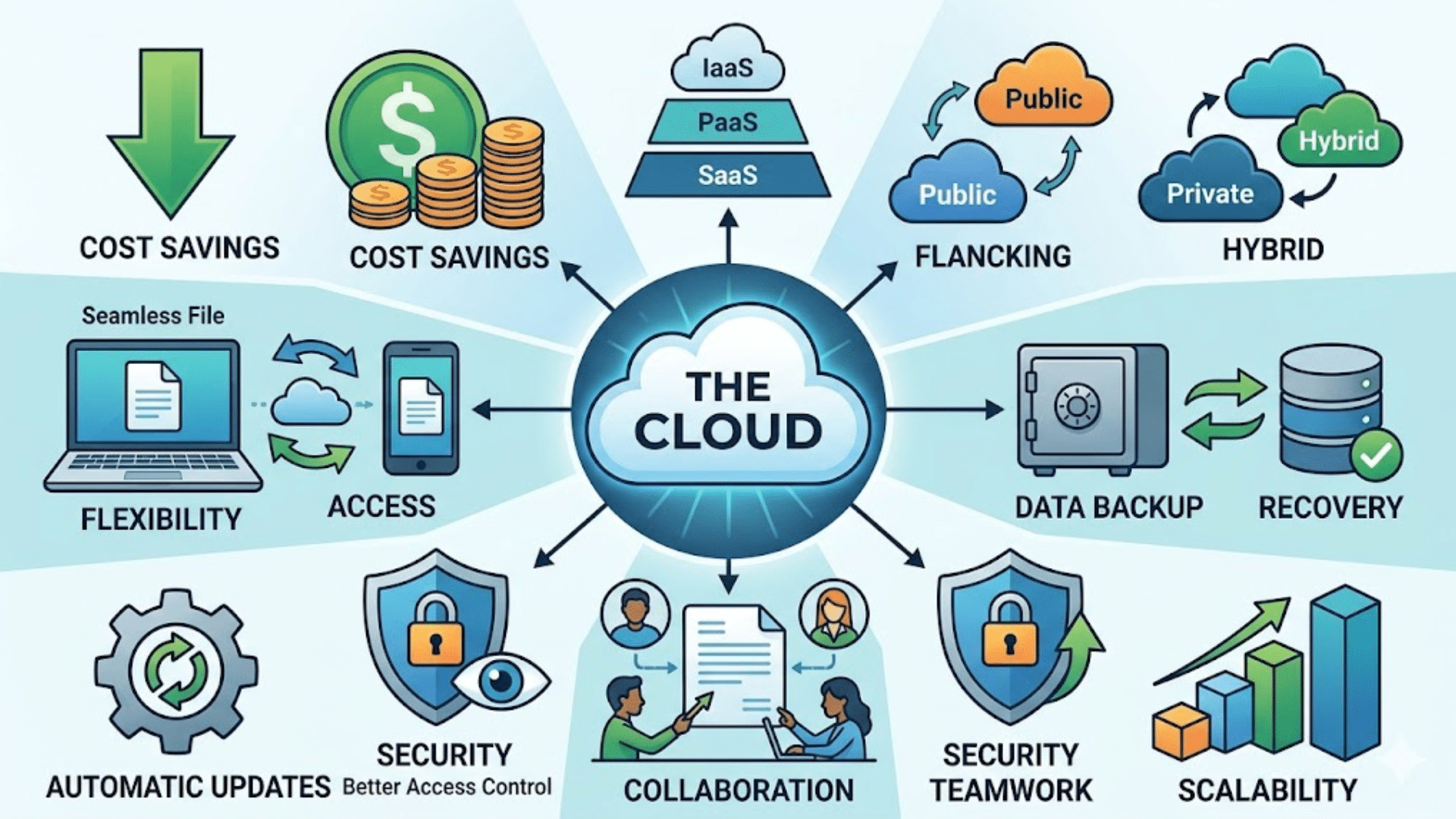
You might already be using it for email, storage, or online apps without thinking about it. The core benefits of cloud computing are lower infrastructure costs, location-independent access, elastic scalability, and built-in data protection.
In this guide, you’ll learn the key parts of cloud computing, how businesses use it every day, and the real benefits it offers for speed, cost, and flexibility.
And by the end, you’ll have a clear understanding of how cloud computing works and how to use it more effectively.
What Is Cloud Computing?
Cloud computing is the use of internet-based systems to store data, run applications, and manage tasks, rather than relying on a single physical device.
In simple terms, your files and software are hosted on remote servers and accessed through a browser or app.
This means your device acts as a gateway, not the main system doing all the work. When you perform an action, such as opening a document or using an app, your device sends a request to a remote server.
The server processes the task and sends the result back to your screen. This process happens quickly and depends less on your device’s hardware.
Most of the storage, processing, and system operations take place on these remote servers.
As a result, users do not need to install or manage everything locally. Cloud computing focuses on handling data and tasks through connected systems rather than a single machine.
Benefits of Cloud Computing for Users and Businesses
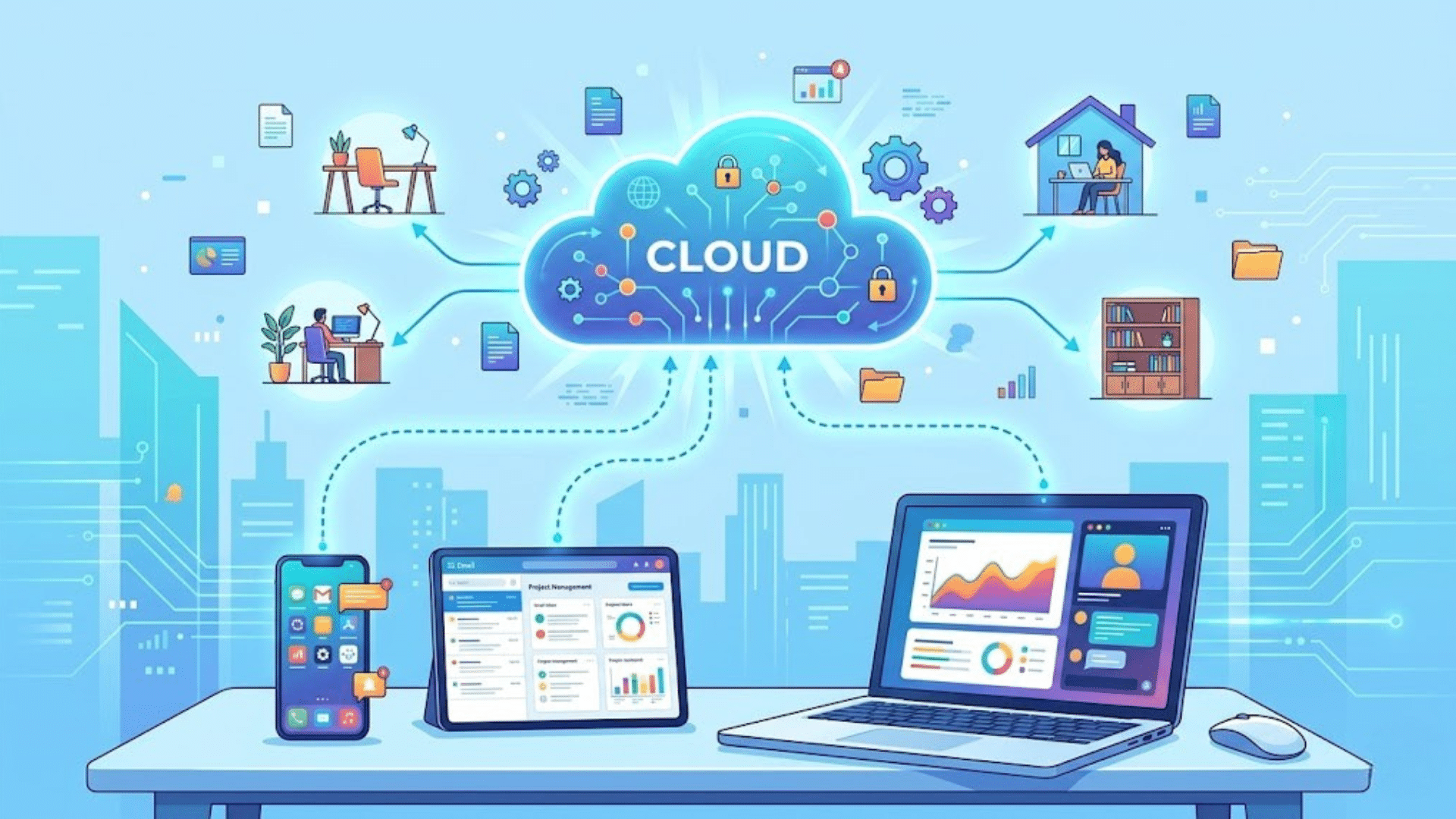
Cloud computing offers practical advantages that improve how work is done and how data is managed. It helps reduce costs, improve access, and support daily operations with less effort.
1. Cost Savings and Budget Control
One of the most clear gains is lower cost. There is no need to invest in expensive hardware or maintain physical servers.
Users pay based on usage, which keeps spending predictable and easier to manage.
This setup works well for small teams and growing businesses that want strong tools without high upfront costs.
According to Flexera’s 2024 State of the Cloud Report, organizations that actively manage cloud spend reduce waste by an average of 28%.
This underscores the importance of pairing cloud adoption with cost governance practices like tagging, budget alerts, and rightsizing.
2. Easy Access and Flexibility
Cloud computing makes it easy to access files and tools from anywhere.
A stable internet connection is all that is needed to get started. This setup supports remote work and keeps teams connected without delays.
Work can continue across devices without needing manual file transfers. It also helps users switch between devices without losing progress.
During a distributed team migration I supported on Azure, enabling cloud-based access cut the average time engineers spent on file syncing and version management by roughly half.
The operational friction of “where is the latest version?” largely disappears.
3. Data Backup and Recovery
Keeping data safe is a major concern, and cloud systems help reduce that risk. Files stored online are backed up automatically at regular intervals.
If a device stops working or data is lost, recovery is quick and simple. This reduces stress and downtime during unexpected issues.
Backup copies are stored securely, providing an additional layer of protection.
The benefits of cloud computing include secure storage, reliable backup systems, and easier recovery options for both personal and business data.
4. Scalability Based on Needs
Cloud services can adapt to changing requirements. If more storage or processing power is needed, it can be added without delay. When usage drops, resources can be reduced to avoid extra costs.
This helps keep systems efficient without paying for unused capacity. It also supports growth without major system changes.
The benefits of cloud computing include better resource management, cost efficiency, and the ability to respond quickly to changing workloads.
5. Improved Collaboration and Teamwork
Cloud-based tools make it easier for teams to work together in real time. Multiple users can access and edit the same files without confusion.
Changes are saved automatically, so there is no need to manage different versions.
This reduces errors and keeps everyone updated. It also supports communication across different locations and time zones.
The benefits of cloud computing include better teamwork, faster updates, and smoother coordination between team members working on shared tasks.
6. Automatic Updates and Maintenance
Cloud services handle updates and system maintenance in the background. Users do not need to install software updates or manually manage system upgrades.
This saves time and ensures that tools always run on the latest version. It also reduces the risk of using outdated software with security gaps.
Maintenance tasks, such as bug fixes and performance improvements, are handled by the provider.
The benefits of cloud Computing include less technical effort, improved system reliability, and consistent performance without extra work.
7. Better Security and Access Control
Cloud platforms offer built-in security features to protect data and control access. Users can set permissions based on roles, ensuring that only the right people can view or edit files.
Features like two-step verification add an extra layer of protection. Activity tracking also helps monitor usage and detect unusual actions.
While users must follow good practices, these tools make security easier to manage.
The Benefits Of Cloud Computing include safer data handling, controlled access, and reduced risk of data misuse.
8. Business Continuity and Reduced Downtime
Cloud computing helps keep work running even during unexpected issues like system failures or power outages. Data is stored on remote servers, so it remains safe even if local devices fail.
Teams can continue working from another device without major delays.
Many providers also offer backup systems that reduce service interruptions. This improves reliability and keeps operations stable.
Service level agreements from major cloud providers typically guarantee 99.9% to 99.99% uptime for core services. At 99.99% availability, annual downtime is under 53 minutes.
Matching that with on-premises infrastructure requires significant investment in redundant hardware and failover systems.
9. Faster Setup and Quick Deployment
Setting up cloud services takes much less time compared to traditional systems. There is no need to install heavy hardware or complex software before getting started.
Users can create accounts, set up tools, and begin work quickly.
This is helpful for businesses that need to start projects quickly or scale operations without delays.
It also induces dependency on technical teams for setup. The benefits of cloud computing include faster deployment, quicker onboarding, and the ability to start tasks without extensive preparation.
10. Environment-Friendly Resource Usage
Cloud computing helps reduce the need for physical hardware, which lowers energy use and electronic waste. Data centers used by cloud providers are designed to use resources more efficiently.
This helps reduce the overall impact on the environment compared to traditional systems.
Businesses can also avoid running unused servers, which saves energy. While it may not be the main reason for adoption, it still adds value.
The benefits of cloud computing include improved resource utilization and reduced energy consumption.
11. Integration with Other Tools and Services
Cloud platforms often support easy integration with other tools and software. This allows users to connect multiple systems and manage work from a single place.
For example, storage services can integrate with communication or project tools to improve workflows.
This reduces the need to switch between multiple platforms. It also helps automate simple tasks and improve efficiency.
The benefits of cloud computing include better system connectivity, smoother workflows, and easier management of multiple tools in a single setup.
Cloud vs Traditional Computing: Key Differences
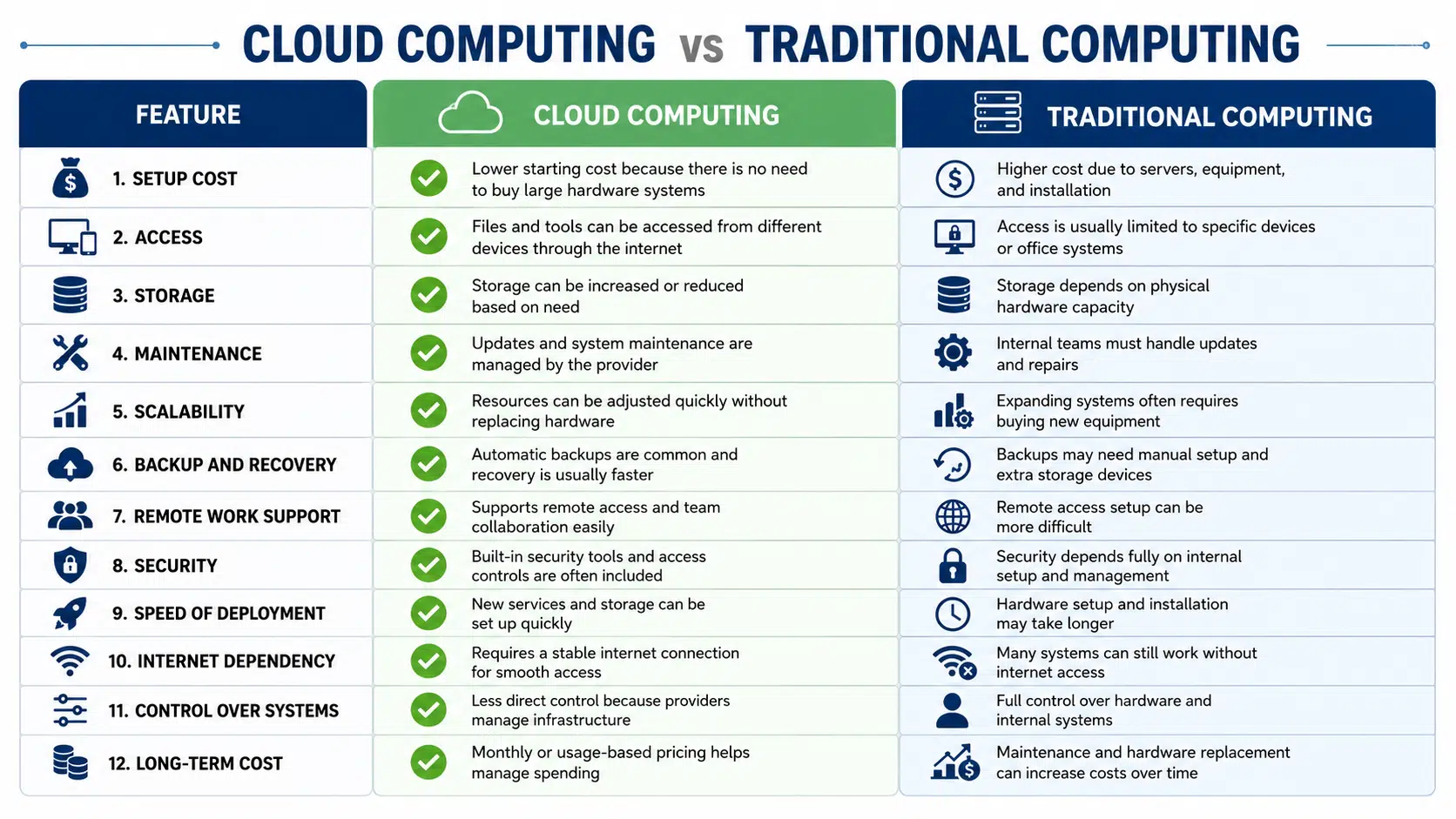
Cloud computing and traditional computing both help store data and run applications, but they work in very different ways. The right choice depends on budget, security needs, system control, and how teams use data in daily work.
Cloud Deployment Types (Public, Private, Hybrid)
Cloud deployment types explain how cloud services are set up and used. Each option offers a different level of control, cost, and flexibility based on business or user needs.
- Public Cloud: A shared environment where services are delivered over the internet by a third-party provider. Resources are used by multiple users, keeping costs lower and setup simple without hardware management.
- Private Cloud: A setup for a single organization with greater control over data and systems. It can be hosted on-site or by a provider, allowing custom settings and stronger control over access.
- Hybrid Cloud: A mix of public and private cloud systems that work together. It allows data and apps to move between both, helping balance cost, control, and workload management.
Common Uses of Cloud Computing Across Daily Life and Industries
Cloud computing is used for many everyday tasks, both for personal use and for business operations. It helps manage data, run tools, and keep systems running without relying on a single device.
1. Personal and Everyday Use
Cloud computing is part of daily digital use, even without direct awareness. It supports services like email, online storage, and media streaming across multiple devices.
Files such as photos, videos, and documents can be stored online and accessed anytime. It also allows quick sharing through links without using physical storage.
Many apps automatically save data, reducing the risk of data loss.
iCloud, Google Photos, and Dropbox are all cloud services that handle personal data storage. Most users interact with cloud infrastructure dozens of times a day without realizing it.
2. Business Operations and Work Management
Businesses use cloud computing to handle daily operations, such as storing data, managing customer relationships, and running internal tools.
It removes the need for large physical systems and allows teams to work on shared platforms. Tasks like communication, file sharing, and project tracking become easier and faster.
Companies can also run websites and applications that handle user activity without system delays.
CRM systems like Salesforce, project management tools like Jira, and communication platforms like Slack all run on cloud infrastructure.
For most businesses, adopting these tools means adopting cloud computing, whether intentional or not.
3. Industry-Level Applications
Different industries use cloud computing based on their specific needs. The table below shows how it is applied across sectors and what value it brings in real use.
| Industry | Common Use Case | Key Benefit |
| Healthcare | Patient data storage and telemedicine | Secure access to medical records |
| Education | Online classes and student data management | Easy access to learning materials |
| Retail | Inventory tracking and online sales | Real-time stock and order management |
| Finance | Online transactions and data processing | High data security and faster processing |
| Manufacturing | Production tracking and supply chain control | Better planning and reduced delays |
| Logistics | Shipment tracking and route management | Improved delivery efficiency |
| Media | Content storage and streaming | Fast content delivery |
| Agriculture | Crop monitoring and data analysis | Better resource use |
4. Multi-Cloud and Hybrid Use
Many organizations are now using multiple cloud services rather than relying on a single provider. This helps reduce the risk of downtime and gives more flexibility in managing workloads.
Hybrid setups, which combine cloud systems with on-site infrastructure, are also becoming more common.
They allow better control over critical data while still using cloud benefits.
Using a mix of cloud options helps balance cost, performance, and system stability, making cloud computing more adaptable for different business needs.
Types of Cloud Computing Services
Cloud Computing Includes Different Service Models based on the level of control and responsibility a user needs. Choosing the right type makes it easier to match your needs and understand the real benefits of cloud computing.
1. Infrastructure as a Service
Infrastructure as a Service provides the basic building blocks like servers, storage, and networking through the internet.
Instead of buying physical hardware, users rent these resources as needed. This provides greater control over system setup while eliminating the cost of equipment maintenance.
It is often used for hosting websites, running applications, and managing large datasets.
The Benefits Of Cloud Computing in this model include flexible scaling, cost control, and the ability to adjust resources based on demand without long-term commitment.
2. Platform as a Service
Platform as a Service provides a ready environment for building and testing applications without managing hardware or system setup.
Developers get tools, frameworks, and databases in one place, which speeds up the development process.
This reduces the time spent on setup and maintenance tasks. It is useful for teams working on web or mobile applications.
The Benefits Of Cloud Computing here include faster development cycles, simplified workflows, and fewer technical steps required to launch and manage applications.
3. Software as a Service
Software as a Service provides fully functional applications that run through a browser or app. There is no need to install or manage software on a local device.
Common examples include email platforms, document editors, and project management tools. Users simply log in and start using the service.
Updates and security are handled by the provider. The benefits of cloud computing in this model include ease of use, quick setup, and access to tools from any device with an internet connection.
| Service Type | What User Manages | Common Example |
| IaaS | Servers and apps | AWS EC2 |
| PaaS | Applications only | Google App Engine |
| SaaS | Nothing technical | Gmail |
Key Challenges of Cloud Computing
Cloud computing is useful, but it also has a few limitations that should not be ignored. Knowing these helps avoid issues and keeps systems running smoothly.
- Internet Dependency: Cloud computing relies on a stable internet connection. Slow or unreliable networks can delay access to files, apps, and real-time tasks like sharing or meetings.
- Data Security Concerns: Providers offer strong security, but users must follow basic practices. Weak passwords, shared logins, and poor access control can increase risks.
- Downtime and Service Interruptions: Services may face downtime due to maintenance or technical issues. This can limit access to data and apps, slowing daily work.
- Limited Control Over Infrastructure: Users have less control over system settings and updates since providers manage them. This can limit customization and delay issue resolution.
Popular Cloud Computing Platforms
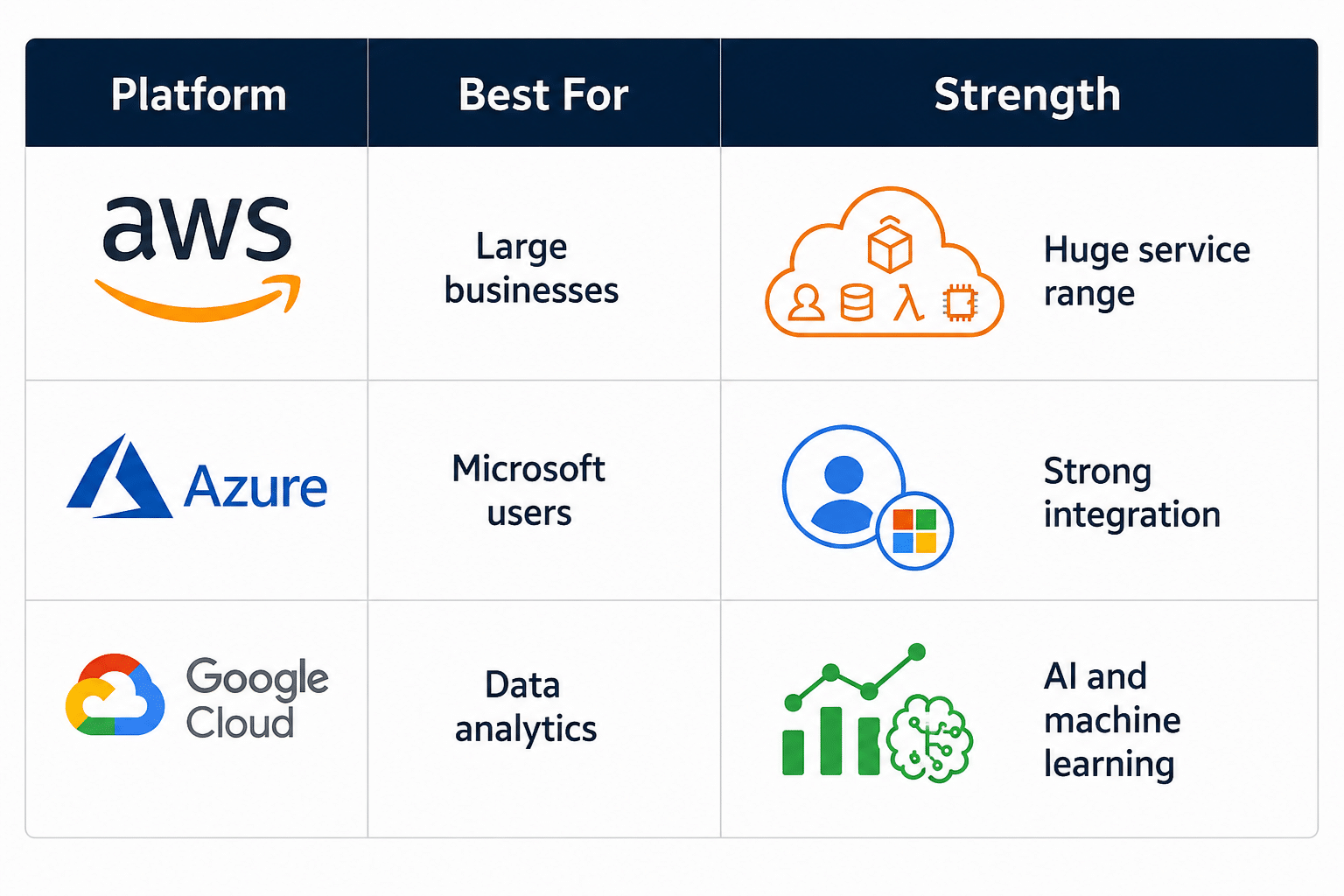
Cloud computing platforms provide the tools and services needed to store data, run applications, and manage systems online. Each platform offers different features, pricing models, and levels of control based on user needs.
1. Amazon Web Services (AWS)
Amazon Web Services is one of the most widely used cloud computing platforms, offering a large range of services for storage, computing, and networking.
It supports businesses of all sizes with flexible pricing and scalable resources that adapt to demand. Many companies use it to host websites, manage databases, and run applications without heavy local systems.
AWS holds the largest share of the global cloud infrastructure market and offers over 200 fully managed services.
Its strength is breadth: nearly any workload can be run on AWS without reaching for a third-party tool. SLAs for core services like EC2 and S3 guarantee 99.99% uptime.
2. Microsoft Azure
Microsoft Azure is a cloud computing platform that works well with Microsoft tools and systems already used by many organizations.
It supports services like app development, data storage, and system management within a single environment. This makes it easier to manage tasks without switching between tools.
It is often used by businesses that rely on Windows-based systems.
Strong integration with existing tools improves workflows and system control, making daily operations more consistent and easier to manage.
3. Google Cloud Platform (GCP)
Google Cloud Platform is known for its strong focus on data processing, analytics, and machine learning tools.
It is often used by companies that need to handle large data sets or perform detailed analysis.
GCP also offers reliable computing and storage services for different types of applications. Its interface is simple and easy to manage.
It works well for data-focused tasks that need speed and accuracy, helping teams process and use information more effectively across projects.
4. Other Notable Platforms
Apart from major providers, several other cloud computing platforms serve specific needs and budgets. These include smaller providers and regional services that offer simpler setups and lower costs for basic use.
They may focus on hosting, storage, or limited computing features without added complexity.
These options can be useful for small businesses or simple workloads.
DigitalOcean and Linode (now Akamai Cloud) are popular among developers and small teams for their simpler pricing and interfaces.
For organizations with data residency requirements, regional providers in specific markets may offer compliance advantages that the hyperscalers cannot match in all geographies.
How to Get Started with Cloud Computing?
Getting started with cloud computing is simple when the basics are clear. A few small steps can help set up access, store data, and begin using tools without confusion.
- Choose a Cloud Provider: Start with trusted platforms like AWS, Microsoft Azure, or Google Cloud. Each offers beginner-friendly services and free plans.
- Understand Your Needs: Decide what you want to use the cloud for, such as file storage, website hosting, app development, or team collaboration.
- Learn Basic Cloud Services: Focus on core services like virtual servers, cloud storage, databases, and networking before moving to advanced tools.
- Create a Free Account: Most providers offer free-tier accounts so you can test services without paying upfront.
- Use Online Tutorials: Follow official guides, videos, and hands-on labs to learn how cloud platforms work in real situations.
- Practice with Small Projects: Try simple tasks like hosting a website, storing files online, or creating a virtual machine to build confidence.
- Learn Cloud Security Basics: Understand passwords, multi-factor authentication, and access control to keep cloud data safe.
- Track Costs Carefully: Use pricing calculators and budget alerts to avoid unexpected charges while learning.
- Earn Beginner Certifications: Entry-level certifications can help improve your skills and strengthen your resume.
- Stay Updated: Cloud technology changes quickly, so keep learning about new tools, updates, and best practices.
Future of Cloud Computing
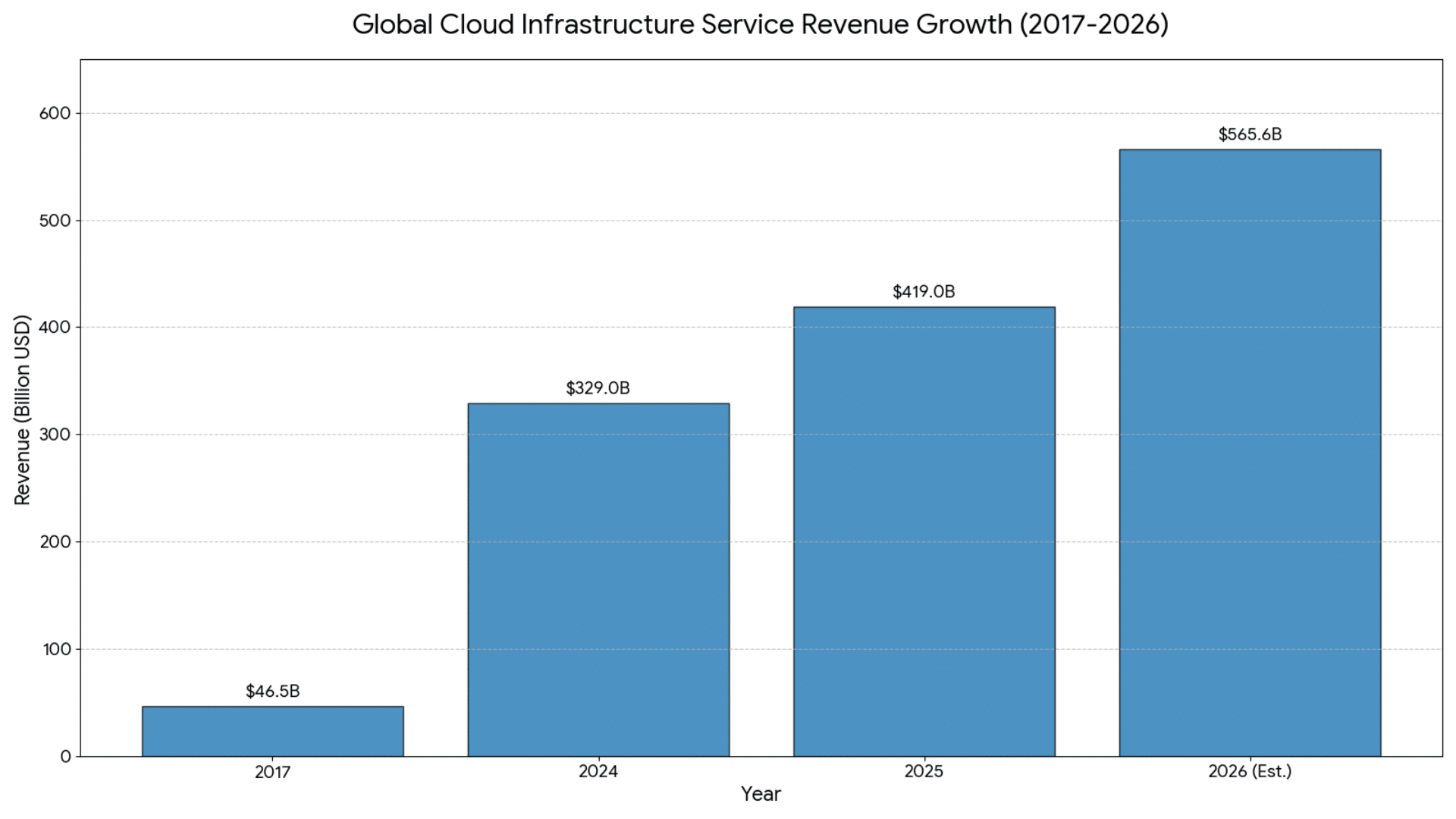
Cloud computing continues to grow as more systems shift online for speed, storage, and better control. It is expected to support faster processing, smarter tools, and easier access to data across devices.
1. Edge Computing Growth
Edge computing is becoming more common as data needs to be processed closer to where it is created.
This reduces delays and helps systems respond faster in real time. It is widely used in areas such as smart devices, video streaming, and connected systems that require quick responses.
Instead of sending all data to a central server, some of it is handled near the source.
This helps improve speed and reduce load on main systems, making cloud computing more reliable and efficient across different use cases.
2. AI And Cloud Integration
Artificial intelligence is now closely linked with cloud computing, especially when handling large volumes of data.
It helps automate tasks, study patterns, and support faster decision-making in business operations.
Many cloud platforms provide ready-to-use AI tools, reducing the need for complex setup or advanced technical skills.
This makes it easier for teams to work with advanced systems.
Built-in AI support improves accuracy and saves time, enabling better data use without adding extra effort or cost to daily processes.
3. Stronger Data Security Measures
Data security remains a major focus as more sensitive information moves to cloud systems.
Providers are improving protection through encryption, strict access control, and regular system checks. These steps help reduce risks and keep data safe from unauthorized access.
Businesses are also setting clear rules on how data is stored and shared across teams.
Strong security practices help maintain trust and protect important information, especially when systems are accessed from different locations and devices.
Conclusion
Cloud computing offers lower costs, flexible scaling, remote access, automated backups, and stronger security at a lower cost than many on-site systems.
Those are the core gains. The limitations, namely internet dependency, shared infrastructure constraints, and the need for active cost management, are manageable with the right setup and practices.
Even small steps, like saving files online or sharing documents, can save time and reduce stress.
If you are just getting started, begin with simple tools and build your comfort step by step. Over time, it becomes part of your routine, and tasks feel easier to manage. The benefits of cloud computing grow as you use it more often.
Give it a try and see how it fits your needs. Have you used any cloud tools before? Share your experience or tips in the comments below.
Frequently Asked Questions
Is Cloud Computing Suitable for Small Businesses?
Cloud computing reduces setup costs and offers flexible pricing. It supports growth without major system changes.
What Types of Data Can Be Stored in Cloud Systems?
Cloud systems store documents, media files, and databases. They support both small and large data needs.
Does Cloud Computing Require Technical Skills to Use?
Basic cloud services are easy to use. Most platforms provide simple dashboards and guides.
How Does Cloud Computing Support Remote Work?
Cloud computing allows access to files from any location. Teams can work without being in the same place.
Can Cloud Services Be Customized Based on Business Needs?
Cloud services offer flexible plans. Resources can be adjusted based on usage and demand.

