



I often see people get confused about the POAM meaning, especially when they first deal with security or planning work.
It sounds technical, but it is actually simple once you break it down. If you work with systems, audits, or risk checks, you will come across this sooner or later.
In this guide, I will walk you through what POAM means, why it matters, and how it is used in real work.
You will also learn its components, how it fits into frameworks like NIST and CMMC, and what a real-world POAM looks like in use.
By the end, you will know how POAM helps you track issues, plan fixes, and improve security in an easy, practical way.
What Does POAM Mean and What Is It in Cybersecurity?
POAM stands for Plan of Action and Milestones. It is a structured document used to track security weaknesses found during audits or assessments, define the corrective steps needed, and set binding deadlines for resolution.
In cybersecurity, it functions as a living record, updated regularly as issues are addressed and new ones surface.
Agencies and contractors using frameworks like NIST’s Risk Management Framework and FedRAMP are required to maintain one.
Without it, there is no systematic way to show auditors that identified risks are being actively managed rather than quietly ignored. A POAM provides clear visibility into the problems, their severity, and the steps needed to fix them.
It is widely used in frameworks such as NIST and FedRAMP to ensure that systems meet security and compliance standards.
Key Features of a POAM and Why They Matter
A POAM outlines the main parts needed to track and fix security issues. Each feature helps teams stay organized and move step by step.
1. Issue Identification
A POAM begins with a clear list of all security issues or gaps found in a system. Each issue is written in a simple way so teams can understand it quickly.
This step helps remove confusion and ensures nothing important is missed.
By listing problems clearly, teams can focus on real risks instead of guessing.
It also creates a strong base for planning fixes and tracking progress throughout the process without mixing different issues together.
2. Planned Actions
Each issue in a POAM includes a defined action that explains how it will be fixed. These actions act as a guide for teams so they know what steps to take next.
The focus is on giving clear and direct solutions instead of vague ideas. This makes the work easier to follow and reduces delays.
With planned actions in place, teams can move forward without stopping to figure out what to do at each stage of the process.
3. Assigned Responsibility
A POAM includes clear ownership for every task, meaning each issue has a person or team responsible for fixing it. This helps avoid confusion and ensures work does not get ignored.
When roles are defined, teams can stay focused and complete tasks faster. It also makes it easier for managers to track who is handling each issue.
Clear responsibility keeps the workflow smooth and ensures that every part of the plan moves forward without delays.
4. Timeline and Milestones
A POAM sets a timeline for each task along with key milestones. These timelines show when work should start and finish, while milestones mark progress along the way.
This helps teams manage time better and stay on track. Instead of handling everything at once, tasks are broken into smaller parts.
This step-by-step approach improves focus and makes large tasks easier to complete without feeling overwhelming or disorganized.
5. Risk Classification
Each issue in a POAM is assigned a risk level, such as high, moderate, or low. This helps teams understand how serious a problem is and decide what to fix first.
By focusing on higher risks, teams can reduce major threats early.
This feature helps in better planning and ensures that time and effort are used wisely. It also supports smarter decision-making by showing which issues need urgent attention.
6. Current Status Tracking
A POAM includes the current status of each task, such as not started, in progress, or completed. This gives teams a quick view of what has been done and what still needs work.
It helps avoid confusion and keeps everyone updated. Managers can use this information to check progress and make changes if needed.
Clear status tracking helps teams stay aligned and ensures that work continues without unnecessary delays.
7. Dependencies and Constraints
Some tasks in a POAM depend on other actions or resources before they can be completed.
This feature captures those dependencies and any limits that may affect progress. By noting these factors, teams can plan better and avoid unexpected delays.
It also helps in setting realistic expectations for timelines.
Understanding these connections ensures smoother execution and prevents issues from slowing down the overall plan.
8. Supporting Evidence
A POAM may include supporting details such as references to reports, scans, or audit findings. This helps give context to each issue and shows where the problem was identified.
Having this information makes the document more reliable and easier to verify.
It also supports better tracking and review during audits. With clear evidence, teams can understand the background of each issue and address it more effectively.
Quick reference: Under FedRAMP, high-risk POAMs must be remediated within 30 days, moderate-risk within 90 days, and low-risk within 180 days. Missing these windows can jeopardize an Authorization to Operate (ATO).
General Guidelines in POAM
A POAM should follow clear rules to stay useful and easy to manage. These guidelines help teams track issues, fix them on time, and meet security needs.
- Clarity: Keep all entries simple, clear, and easy to understand so teams can quickly review and take action without confusion
- Regular Updates: Update the POAM regularly to reflect progress, changes, and new findings so nothing becomes outdated or overlooked
- Realistic Deadlines: Set practical timelines based on resources and workload to ensure tasks can be completed without delays
- Clear Ownership: Assign each task to a specific person or team so responsibility is defined and work does not get missed
- Risk Priority: Focus on high-risk issues first to reduce serious threats and improve overall system security faster
- Source Linking: Connect each issue to audits, scans, or reports to provide context and support accurate tracking
- Progress Tracking: Use clear status updates to show what is pending, in progress, or completed for better visibility
- Specific Actions: Define clear, measurable steps so each issue has a direct and actionable solution
- Routine Reviews: Review the POAM during regular security checks to ensure all items are still relevant and updated
- Compliance Support: Maintain proper records and documentation to meet security standards and audit requirements consistently
I’ve seen POAMs rejected during assessments, not because the risks were unresolved, but because entries lacked source references.
An auditor’s first question is almost always: ‘Where was this finding generated?’
If you can’t answer that instantly, the POAM loses credibility, regardless of how much remediation work you’ve done.
Why Is POAM Important for Organizations?
Organizations that operate under federal contracts or handle sensitive data cannot treat security gaps as informal to-do lists.
A POAM converts informal awareness of a problem into a documented, traceable commitment. It tells auditors, regulators, and leadership that each identified weakness has an owner, a plan, and a deadline.
It also helps teams set priorities better. High-risk issues stand out and don’t get lost in routine work.
That visibility matters. According to NIST Special Publication 800-53, continuous monitoring and documented corrective action plans are foundational to maintaining an effective security posture.
A well-maintained POAM indicates that the organization is actively addressing its weaknesses. This builds trust with auditors, clients, and stakeholders.
POAM also improves accountability by assigning tasks clearly, so everyone knows their role and deadlines.
Over time, this leads to better planning, faster issue resolution, and stronger security management across the organization.
Key Components of a POAM
A POAM includes several important parts that help track issues and manage fixes in a clear way. Each component plays a role in making the document useful and easy to follow.
- Issue Description: A clear summary of the identified problem or security weakness
- Risk Level: The severity of the issue, such as low, medium, or high
- Source of Finding: Where the issue was found, like audits, scans, or assessments
- Corrective Actions: Steps needed to fix or reduce the issue
- Responsible Party: The person or team assigned to handle the fix
- Resources Required: Tools, budget, or support needed to complete the action
- Milestones: Key steps or checkpoints to track progress
- Completion Timeline: Target dates for resolving each issue
- Current Status: Progress updates such as open, in progress, or closed
- Residual Risk: Remaining risk after the issue has been addressed
Role of POAM in CMMC Compliance

POAM plays an important role in CMMC (Cybersecurity Maturity Model Certification) by helping organizations track and fix security gaps.
CMMC is a framework used by the U.S. Department of Defense to ensure companies protect sensitive data.
In CMMC, a POAM is used to document unmet security requirements. It helps organizations demonstrate they are working to fix gaps within a set timeline.
This is how POAM supports CMMC:
- Tracks Unmet Controls: Lists security requirements that are not fully in place
- Shows Action Plans: Outlines steps needed to fix each missing control
- Sets Deadlines: Defines timelines for completing required fixes
- Supports Compliance: Shows progress during CMMC assessments
- Improves Readiness: Helps move toward full compliance over time
CMMC note: Under CMMC Level 2, a POAM must be resolved within 180 days of assessment. If the timeline is not met, the conditional certification is revoked, and the organization must be re-assessed.
How a POAM Works?
A POAM follows a clear process to identify, track, and fix issues over time. Each step helps teams stay organized and move toward better security and planning.
- Identify Issues: Find security gaps or problems through audits, scans, or assessments
- Record Findings: Document each issue clearly in the POAM with full details and context
- Assess Risk Level: Assign a severity level to understand how serious each issue is
- Define Corrective Actions: List clear steps needed to fix or reduce each issue
- Assign Responsibility: Give each task to a specific person or team for accountability
- Set Milestones and Deadlines: Create timelines and checkpoints to track progress
- Track Progress: Update the status regularly as work moves forward
- Review and Validate: Check if the issue is fully resolved and meets security standards
- Close the Item: Mark the issue as closed once it is fixed and verified properly
Significance of Using a POAM
A POAM is important because it helps organizations manage problems in a clear and planned way. It provides a simple system for tracking issues, fixing them on time, and improving security step by step.
1. Better Risk Control
A POAM helps identify risks early and track them in a structured way. This makes it easier to focus on high-risk issues first and reduce serious threats.
By documenting all risks, teams avoid missing important issues. It also supports faster action, so risks do not grow over time.
This improves system safety and helps organizations better control risk management across departments and processes.
2. Clear Action Planning
A POAM provides a clear plan for handling each issue in an organized way. It breaks problems into simple steps with defined actions and timelines.
This reduces confusion and helps teams stay on track. With a clear structure, tasks become easier to manage and complete.
It also improves workflow, supports better coordination, and ensures that every issue is handled properly without delays or missed steps.
3. Stronger Cybersecurity
A POAM improves cybersecurity by making sure all weaknesses are tracked and fixed. It helps reduce system vulnerabilities over time by addressing issues found in audits or scans.
Regular updates keep security efforts active and focused. This process builds a stronger system and helps prevent future threats.
It also ensures that security practices stay effective and aligned with current standards and requirements.
4. Improved Accountability
A POAM assigns each task to a specific person or team, which creates clear responsibility. This avoids confusion about who should complete each task.
When roles are defined, work gets done faster and more efficiently. It also improves team coordination and communication.
This level of accountability ensures that no task is overlooked and that all issues are addressed within the given timeline, without delay.
5. Supports Compliance Needs
A POAM helps organizations meet required standards, such as NIST and other frameworks. It shows that issues are properly tracked and resolved.
This is useful during audits, as it provides clear proof of security efforts.
Maintaining a POAM helps avoid penalties and ensures systems follow guidelines. It also builds trust with clients and stakeholders by showing strong compliance practices.
6. Easy Progress Tracking
A POAM makes it simple to track the status of each issue in one place. Teams can quickly see what is completed, in progress, or still pending.
This improves visibility and helps manage work more effectively. It also supports quick updates and better communication among teams.
With clear tracking, organizations can ensure tasks move forward without confusion or delays.
7. Smarter Decision Making
A POAM provides useful data about risks, actions, and progress. This helps leaders make better decisions based on real information.
They can identify urgent issues and plan resource use effectively. It also supports long-term planning and improvements.
With clear insights, organizations can focus on the right priorities and improve both security and overall performance.
Common Mistakes to Avoid in POAM
A POAM can lose its value if it is not managed properly. Avoiding common mistakes helps keep it accurate, useful, and easy to follow.
- Unclear Issue Descriptions: Vague details make it hard to understand and fix the problem
- No Assigned Responsibility: Tasks without owners often get delayed or ignored
- Unrealistic Deadlines: Setting tight timelines can lead to incomplete or rushed work
- Ignoring Risk Levels: Treating all issues the same can delay fixing critical risks
- Lack of Regular Updates: An outdated POAM fails to reflect current progress
- Missing Source References: Without linking audits or scans, issues lose context
- Incomplete Action Plans: Weak or unclear steps make resolution difficult
- Poor Progress Tracking: Not updating the status leads to confusion and missed tasks
- Skipping Reviews: Without regular checks, errors and gaps can go unnoticed
One pattern I see repeatedly is that teams add a finding to the POAM with a 90-day deadline, then roll that deadline forward every quarter without documenting why. Auditors call these ‘evergreen’ POAM items.
They signal that the organization has no real plan to fix the issue, just a plan to keep logging it.
I’ve seen this single pattern trigger deeper scrutiny of an entire security program
POAM Document Template
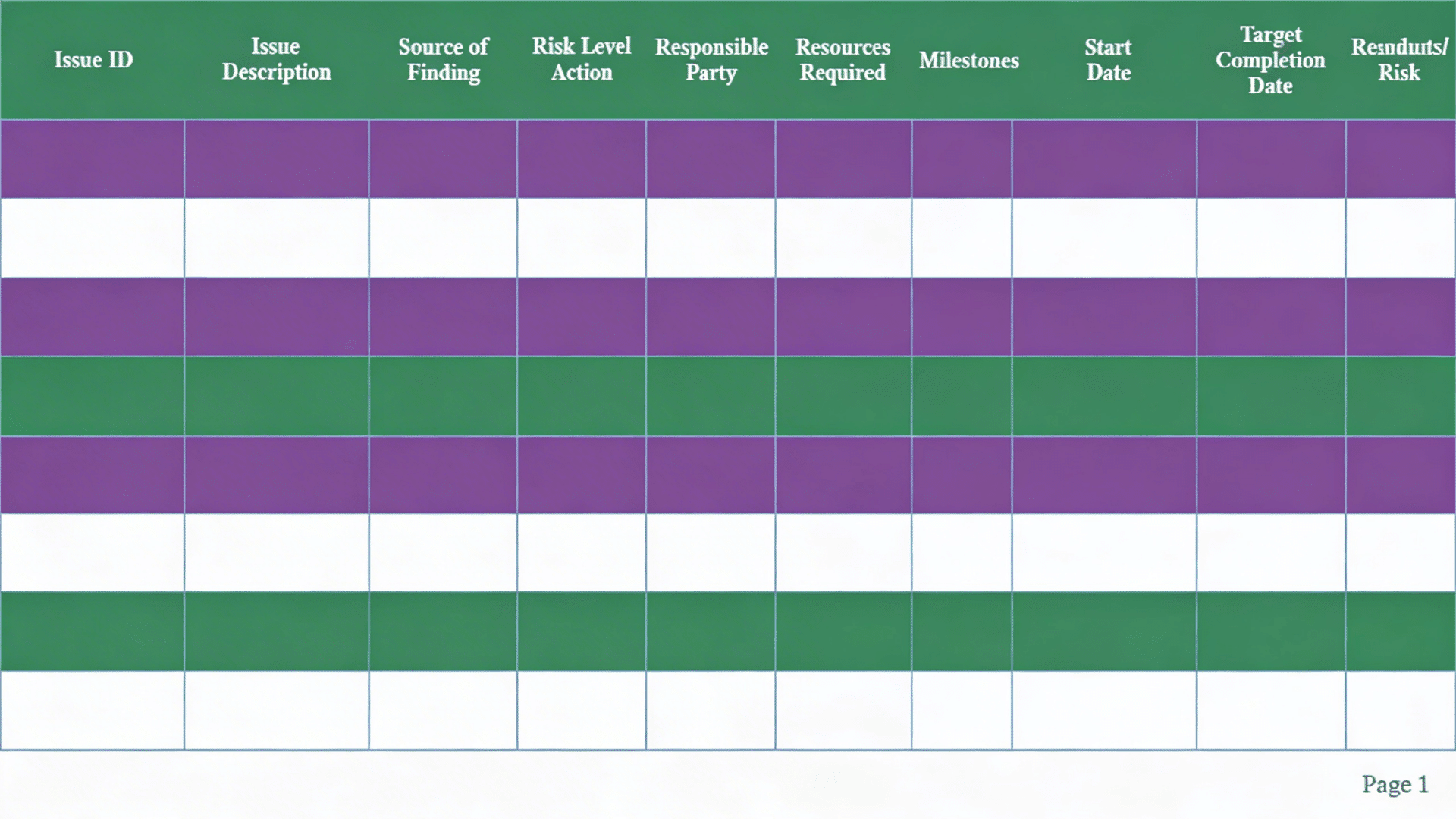
A POAM document uses a simple table format to clearly track issues, actions, and progress. This makes it easy for teams to review and update regularly.
- Issue ID: Assign a number or code to each issue so it can be tracked easily without confusion.
- Issue Description: Write a simple and direct explanation of the security gap or weakness.
- Source of Finding: Mention if the issue came from an audit, scan, test, or review.
- Risk Level: Mark the issue as low, medium, or high based on its impact.
- Corrective Action: List the exact steps needed to resolve the issue.
- Responsible Party: Assign a person or team to handle and complete the fix.
- Resources Required: Note any tools, budget, or help required to complete the task.
- Milestones: Break the work into smaller steps to track progress clearly.
- Start Date: Record when the task begins to keep timelines clear.
- Target Completion Date: Set a clear end date for completing the issue.
- Current Status: Show if the task is open, in progress, or completed.
- Comments/Notes: Add updates, changes, or important remarks for better clarity.
- Residual Risk: Note any risk that still exists after the issue is fixed.
POAM vs Other Risk Management Tools
POAM is often compared with other tools for risk and security management. While they all support risk handling, each one has a different purpose and use.
| Aspect | POAM | Other Risk Tools |
|---|---|---|
| Main Purpose | Track and fix identified issues | Identify and assess risks |
| Focus | Action plans and deadlines | Risk analysis and evaluation |
| Usage Stage | After issues are found | Before or during risk identification |
| Detail Level | Very detailed with tasks and milestones | High-level overview of risks |
| Responsibility | Assigns tasks to specific people | May not always assign clear ownership |
| Examples | NIST POAM, FedRAMP POAM | Risk Register, Risk Matrix, SWOT analysis |
| Outcome | Issue resolution and compliance tracking | Risk understanding and prioritization |
Key distinction: A Risk Register asks “what risks might we face?” A POAM asks, “What risks have we confirmed, and what are we doing about them?” Both are necessary, but they answer different questions.
What Type of Issues Are Included in a POAM?
A POAM is used to track issues identified during audits, scans, or reviews. These issues are usually related to security, system performance, or compliance gaps.
- Security Vulnerabilities: Weak passwords, missing updates, or unpatched software that can expose systems to threats
- Configuration Issues: Incorrect system settings that do not meet security standards or best practices
- Access Control Problems: Improper user permissions or lack of role-based access controls
- Outdated Software: Systems or applications that are not updated and may contain known risks
- Compliance Gaps: Missing requirements based on standards like NIST, FedRAMP, or internal policies
- Network Weaknesses: Issues in firewalls, ports, or network setup that may allow unauthorized access
- Policy Violations: Failure to follow defined security or operational guidelines
- Audit Findings: Problems identified during internal or external security assessments
- Process Gaps: Missing or weak processes that affect system security or task management
Who Uses POAM?

A POAM is used by different teams and organizations that need to manage risks and fix issues in a structured way. It is common in environments where security, compliance, and planning are important.
- Government Agencies: Use POAM to meet compliance standards like NIST and track security issues during audits
- IT and Security Teams: Use it to manage system vulnerabilities, assign fixes, and improve cybersecurity
- Project Managers: Use POAM to track tasks, deadlines, and progress for issue resolution
- Compliance Officers: Use it to ensure all risks are documented and handled as per the required guidelines
- Contractors and Vendors: Use POAM when working with government or regulated systems to show accountability
- Large Enterprises: Use it to manage complex systems and keep track of multiple risks across departments
Conclusion
A POAM is the difference between knowing you have a security problem and having a verifiable plan to fix it.
For organizations operating under NIST, FedRAMP, or CMMC frameworks, it is a required artifact, but its value extends beyond compliance.
A well-maintained POAM gives security teams a single source of truth and helps leadership make better resource decisions.
It also provides clear proof to auditors that risk management is active and properly handled.
If you are working with one for the first time, start with the template in this guide, log your first finding in full detail, and build the maintenance habit from there.
Have you worked with a POAM before, or are you planning to use one? Share your experience or questions in the comments below.
Frequently Asked Questions
How Often Should a POAM Be Updated?
A POAM should be updated regularly as progress and new findings emerge.
What Happens If a POAM Is Not Maintained Properly?
Issues may get missed, leading to security risks and compliance problems.
Can Deadlines in a POAM Be Changed?
Yes, deadlines can be updated if needed, but changes should be documented clearly.
Is a POAM Reviewed During Audits?
Yes, auditors often review POAMs to check how issues are tracked and resolved.