






You may not think much about your software until something stops working. I’ve seen many businesses rely on systems built 10 or even 20 years ago.
They still run, but they’re slower than they should be, harder to maintain, and don’t connect well with newer tools.
At first, these issues seem manageable. Over time, though, they start to affect growth, security, and daily operations in ways that are difficult to ignore.
That’s why legacy software modernization has become such an important conversation for business leaders.
In this guide, I explain what legacy software modernization means, why companies continue to use outdated systems, and the real risks of delaying change.
I also cover the main modernization strategies, the practical benefits you can expect, a step-by-step roadmap for getting started, and how to decide whether your business is ready to act.
What Is Legacy Software Modernization?
Legacy software modernization means updating old software so it works well with today’s systems.
Many companies still use outdated programs that are slow, hard to fix, and not safe.
Modernization improves speed, security, and ease of use without fully replacing everything. It may involve updating code, moving data to the cloud, or improving system design.
Understanding the benefits of migrating to the cloud helps businesses see why this step improves long-term performance and flexibility.
The goal is to extend the life of existing software while making it more useful.
This approach helps save time and cost compared to building a new system from scratch. It also allows businesses to connect with modern tools and platforms.
Modernization keeps operations smooth and helps companies meet current demands.
In simple terms, it is about improving old software so that it stays reliable, efficient, and ready for future changes without causing major disruptions.
Why Do Businesses Hold on to Legacy Systems for So Long?
Many businesses keep legacy systems because they still work and support daily tasks. Replacing them feels risky, and costs can be high.
Upgrading or rebuilding software takes time, money, and planning, which some companies try to avoid.
Another reason is a lack of awareness. Some businesses do not fully see the long-term risks, such as security gaps or slow performance.
Staff may resist change, and training takes time, so companies delay updates even when better options exist.
There is also a talent gap, as experts in older systems like COBOL are becoming rare. Companies often stay on legacy systems not by choice, but because keeping them running feels easier than finding experts to change them.
Financial firms avoid updates due to risk and poor system understanding, so companies delay changes even when safer options exist.
The risk is that delay compounds: technical debt accumulates, integration costs rise, and the eventual modernization project becomes far more expensive than an earlier, incremental effort would have been.
Key Approaches to Legacy System Modernization
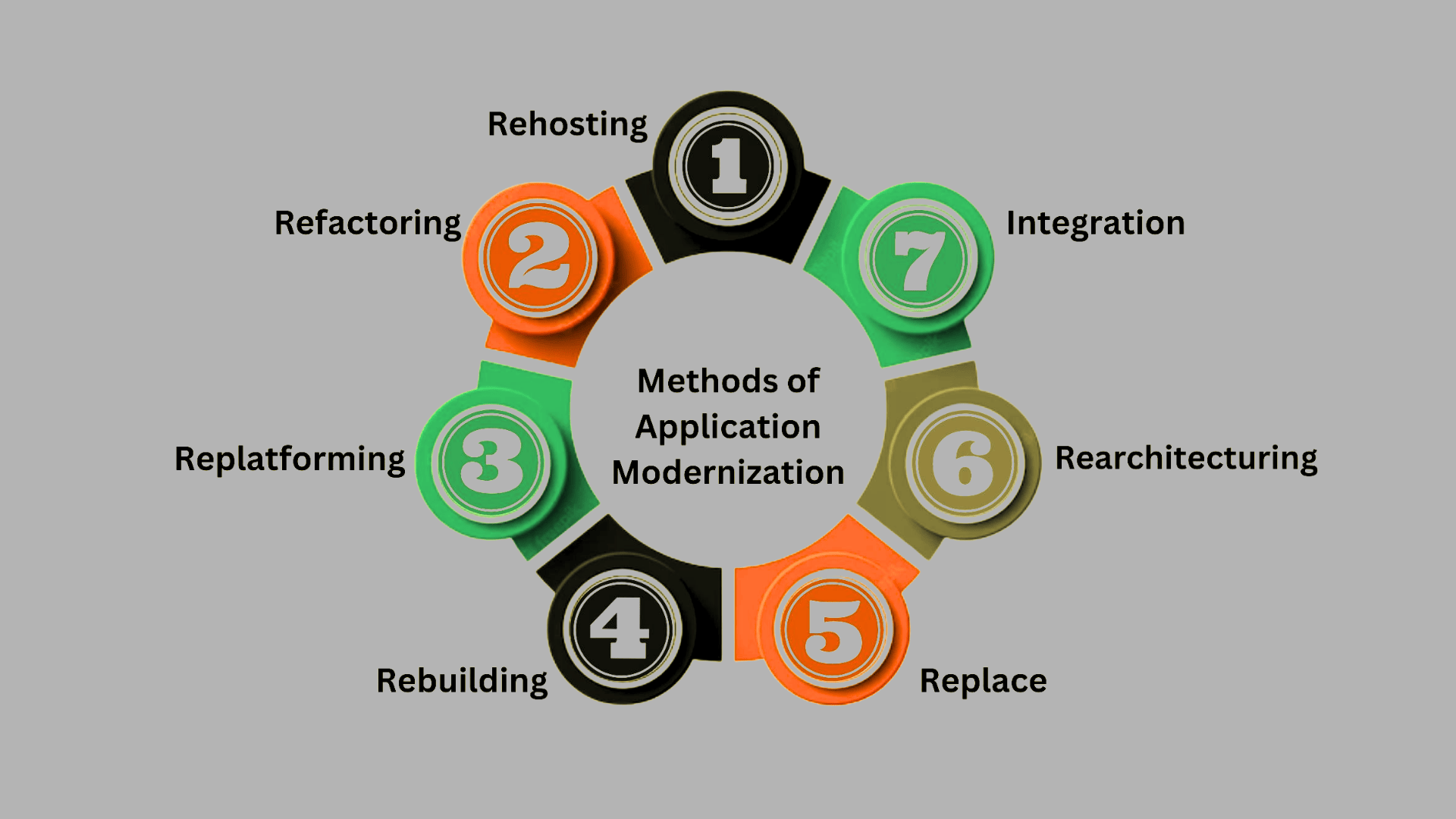
These methods help businesses update systems step by step. Each approach fits different needs based on cost, risk, and goals.
- Rehosting: Move applications to a new environment, like the cloud, without changing code. It is quick and low risk but offers limited improvement.
- Refactoring: Update parts of the code to improve performance and maintainability. It keeps the core system but makes it easier to manage.
- Replatforming: Shift the system to a new platform with small changes. It improves efficiency without a full rebuild.
- Rebuilding: Rewrite the system from scratch using modern tools. It takes time but gives better long-term results.
- Replace: Swap the old system with a new one or a ready-made solution. This is useful when the current system no longer meets needs.
- Rearchitecting: Redesign the system structure for better scalability and flexibility. It supports future growth and advanced features.
- Integration: Connect legacy systems with modern tools or APIs. This helps extend system use without full replacement.
The Strangler Fig approach replaces legacy systems step by step by adding new parts around them until the old system is fully removed.
This is how many enterprise cloud migrations proceed in practice, especially in enterprise cloud computing environments where risk must be reduced step by step.
The Real Risks of Delaying Modernization
The cost of inaction is rarely obvious at first. Systems continue to run. Users adapt workarounds.
IT teams patch what they can. But the risks accumulate in the background, and eventually they surface in ways that are difficult and expensive to reverse.
Security exposure is one of the most serious. Legacy systems often run on software that no longer receives vendor patches.
Older systems may lack basic security and fail to meet rules like HIPAA, SOC 2, or GDPR, creating compliance risks.
Performance degradation compounds over time. Older codebases were not written for the data volumes, API ecosystems, or concurrent user loads that modern businesses generate.
What once worked can turn into a bottleneck, often during peak traffic or critical moments.
There is also the cost of talent. Developers who can maintain COBOL, AS/400 applications, or aging proprietary frameworks are expensive and increasingly scarce.
Relying on a few experts for legacy systems risks major issues if they leave.
Benefits of Legacy Application Modernization Services
Modernizing outdated systems can improve how a business runs day to day. It also helps reduce risks and supports future growth.
1. Improved System Performance
Modernizing legacy applications helps improve overall system speed and reliability. Older systems often slow down over time due to outdated code and limited resources.
After modernization, applications run faster, handle more tasks, and respond better to user needs.
This leads to smoother daily operations and fewer delays. Teams can complete their work without dealing with constant system issues.
Better performance also means fewer crashes and less downtime.
As a result, businesses can work more efficiently and provide a better experience for both employees and customers.
2. Better Security Protection
Upgrading legacy systems improves security by adding modern protection methods. Older applications may not receive updates, leaving them open to threats.
Modern systems include stronger encryption, regular updates, and built-in safety features.
These changes help protect sensitive data from attacks and reduce the risk of breaches.
Businesses can also more easily meet current security standards. With better protection in place, both company data and user information stay safer.
This creates a more secure environment for daily operations and builds trust with customers who rely on the system.
3. Easier Scalability
Modern applications are built to grow with business needs. Legacy systems often struggle when new users or features are added.
After modernization, systems can handle higher workloads without slowing down. This makes it easier to expand services, add tools, or support more users.
Businesses can adjust quickly without major system changes. Flexible systems also allow smoother updates in the future. This means companies can keep up with market demands without facing constant technical limits.
Scalability supports long-term growth and keeps operations running without disruption.
4. Reduced Maintenance Costs
Maintaining old systems can become expensive over time. Legacy applications often require specialized skills and ongoing maintenance. After modernization, systems become easier to manage and maintain.
Newer technologies need fewer repairs and are supported by more developers. This reduces the cost of hiring experts for outdated systems.
Businesses can also avoid frequent breakdowns that lead to extra expenses.
Over time, these savings add up and free up resources for other areas. Lower maintenance costs make modernization a practical and cost-effective decision.
5. Better Integration with Modern Tools
Modernized applications can easily connect to new tools and platforms. Legacy systems often struggle to work with updated software or cloud services.
After modernization, systems can share data and work smoothly with other applications.
This helps improve workflow and supports better communication between tools. Teams can use the latest technologies without facing compatibility issues.
Better integration also allows faster updates and smoother processes.
It helps businesses stay current with industry trends and improves how different systems work together.
When to Upgrade Your Legacy Systems?
Your business is ready for modernization when outdated systems begin to affect growth, costs, and security.
Common signs include slow performance, frequent downtime, and systems that cannot scale as the business grows.
If software cannot support tools like cloud services or modern integrations, it can limit progress and make daily work harder.
High maintenance costs and a shortage of developers for older technologies also add pressure. Security and compliance risks increase when systems are not updated.
In some cases, teams adjust their work to fit the software, which reduces efficiency.
A system audit showing broken connections, data gaps, or poor user experience confirms that it is time to move forward.
One question worth asking, honestly, is whether the system’s business logic itself is still valid. Modernization preserves and improves a system’s ability to do what it does.
If what it does is no longer aligned with how your business operates, replacement rather than modernization may be the more cost-effective path.
Step-By-Step Process for System Modernization
Most successful modernization efforts follow a structured sequence. Skipping phases is how organizations end up with a cloud migration that simply relocates their problems rather than resolving them.
Step 1: Assessment and Discovery
Start with a thorough audit of your current system landscape. Document which applications exist, what they do, how they connect to each other, and who depends on them.
Map your technical debt. Identify the components most likely to cause problems during migration, such as undocumented custom integrations, hardcoded credentials, or modules that only one person understands.
This phase often reveals dependencies that were not in any diagram and that would have caused serious delays if discovered mid-project.
Step 2: Prioritize by Business Impact
Not everything needs to be modernized at once. Prioritize based on business risk, not technical preference.
Start with the components that pose the greatest security exposure, the highest maintenance cost, or the most significant barriers to growth.
Systems that are stable, low-risk, and infrequently changed can often wait.
This prioritization also makes the business case clearer to stakeholders, because you can tie each modernization decision to a specific operational or financial outcome.
Step 3: Choose the Right Approach Per System
The five modernization strategies described above are not mutually exclusive. A realistic program will apply different approaches to different systems.
A stable but poorly performing reporting tool might be a rehosting candidate, while a customer-facing application built on an outdated framework might warrant a full rebuild.
Choosing the approach based on each system’s specific risk profile and business value prevents over-engineering low-priority systems and under-investing in critical ones.
Step 4: Execute in Phases with Clear Rollback Plans
Phased delivery reduces risk and lets the organization learn from early migrations before tackling more complex systems.
Define rollback criteria before each phase begins, not after something goes wrong.
The Strangler Fig pattern described earlier applies here: build confidence incrementally rather than betting the organization on a single cutover event.
Testing environments that mirror production as closely as possible are essential at this stage.
Step 5: Monitor, Measure, and Iterate
Modernization is not a one-time event. Once new systems are live, instrument them properly with performance monitoring, error tracking, and security alerting.
Establish baseline metrics before migration so you can demonstrate improvement with evidence rather than assumption.
Use post-migration performance data to inform the next prioritization decision, creating a continuous improvement cycle rather than a project that ends and is forgotten.
Key Factors when Selecting Modernization Services
Choosing the right service provider can make the process smoother and more effective. A careful approach helps avoid risks and ensures better long-term results.
- Experience and Expertise: Select a provider with strong experience in handling both legacy systems and modern technologies across different projects.
- Clear Modernization Strategy: The provider should offer a well-defined, structured plan that aligns with your business needs and long-term goals.
- Security Focus: Ensure the service includes robust security measures to protect data during and after the upgrade.
- Scalability Support: The solution should be able to grow with your business and handle increased demand without issues.
- Integration Capability: Check that the new system can easily connect with your existing tools and future platforms.
- Cost Transparency: Clear pricing helps avoid unexpected expenses and keeps the project within budget.
- Post-Upgrade Support: Reliable support after modernization ensures the system stays stable and performs well over time.
Conclusion
Outdated software doesn’t fail all at once. It slows you down gradually in ways that are easy to overlook until the cost becomes impossible to ignore.
Legacy software modernization is not just about upgrading technology.
It removes limits that slow your business, reduces growing security risks, and builds a system ready for long-term growth.
Organizations that plan modernization in steps and focus on impact perform better than those that delay or try to replace everything at once. You don’t have to figure it all out before you start.
Knowing your options, risks, and choosing the right partner puts you ahead of most.
If you’re facing challenges with legacy systems, I’d genuinely like to hear about it. What issues are you seeing? Share your thoughts below to help others decide.
Frequently Asked Questions
How Long Does a Legacy Software Modernization Project Typically Take?
It can take weeks for simple moves or 12–24 months for complex systems. Phased projects may show results in 3–6 months.
What Are the Biggest Risks and How Are They Managed?
Risks include data loss, downtime, and delays. Teams manage them with planning, testing, phased rollout, and backup plans.
Is Cloud Migration the Same as Legacy Modernization?
No. Cloud migration moves systems to the cloud. Modernization also includes improving or rebuilding systems, with or without cloud use.
How to Make the Business Case for Legacy Modernization Internally?
Show costs of current issues like downtime and risks. Compare with the clear benefits of modernization tied to business outcomes.

