



A 200 Mbps plan sounds fast, but the number alone does not tell the whole gaming story. The answer is clear: 200 Mbps is enough for most players, even when other people are streaming, calling, or browsing.
When readers ask, “is 200 mbps good for gaming,” I look beyond download speed. Ping, upload speed, Wi-Fi strength, packet loss, and the number of active devices can matter just as much.
A fast plan may still feel slow when the router is poorly placed, or a large update is running. With a background in computer engineering and more than ten years in technical documentation,
I focus on network details rather than broad promises. This article explains gaming speed needs, cloud gaming, shared connections, streaming, lag, wired versus wireless play, and checks you can run to improve performance before you pay for a faster plan.
Is 200 Mbps Good for Gaming?
Yes, 200 Mbps is good for gaming in most homes. It provides far more download capacity than a locally installed online game usually needs, while leaving room for voice chat, video calls, web use, and streaming on other devices.
The main limit is rarely the 200 Mbps speed itself. Smooth play also depends on low latency, steady upload performance, little packet loss, and a reliable connection between the gaming device and router.
The FCC treats download speed, upload speed, latency, and packet loss as separate measures because each can affect how well an internet service works. A crowded Wi-Fi channel or a background game update can still cause delay.
For one gamer, several players, or a typical family, 200 Mbps is usually a sensible speed tier.
How Much Internet Speed does Gaming Need?
Internet needs change based on how a game is delivered and what else is happening on the network. The table shows how 200 Mbps compares with published requirements for common online activities.
| Activity | Published or Practical Requirement | Is 200 Mbps Enough? |
|---|---|---|
| Installed online games | No universal speed requirement because latency and stability often matter more | Yes, for most players |
| Xbox Cloud Gaming | Xbox recommends 20 Mbps on consoles, PCs, and tablets | Yes |
| GeForce NOW at 1080p and 60 FPS | NVIDIA requires at least 25 Mbps | Yes |
| GeForce NOW at 4K and 60 FPS | NVIDIA lists at least 40 Mbps for supported setups | Yes |
| PlayStation Remote Play | PlayStation recommends 15 Mbps upload and download for better performance | Yes |
| Netflix 4K Streaming | Netflix lists a steady 15 Mbps connection for supported 4K viewing | Yes |
| Zoom 1080p Video Call | Zoom recommends about 3.8 Mbps upload and 3 Mbps download | Yes |
| Live Gameplay Broadcasting | Depends mainly on upload speed, bitrate, resolution, and frame rate | Usually, if upload speed is sufficient |
These figures are not amounts that must be added in every situation. They are useful reference points for estimating how several active services may share a connection.
What Can You Do With 200 Mbps?
A 200 Mbps connection can handle online play while other household members use common internet services. One person can play on a console or PC while someone else watches a 4K video, joins a work call, or browses on several phones.
Netflix lists 15 Mbps as the steady connection speed needed for 4K viewing on supported Windows setups, while Zoom recommends about 3.8 Mbps upload and 3.0 Mbps download for 1080p calls.
A 200 Mbps connection can also reduce waiting time for game installations and updates. Under ideal conditions:
- A 10 GB game may download in around 7 minutes.
- A 50 GB game may download in about 34 minutes.
- A 100 GB game may download in roughly 68 minutes.
Actual download times may be longer because of Wi-Fi strength, server speed limits, router performance, network traffic, installation time, and other devices using the connection.
Those activities use only part of a 200 Mbps connection when the network is working properly. The main exception is heavy use at the same time, such as several large downloads, cloud gaming sessions, and video uploads.
How Many Devices Can 200 Mbps Support?
There is no fixed device limit for a 200 Mbps plan. Active use matters more than the number of phones, TVs, consoles, and smart devices connected to the router.
- One gaming device: A single console or PC will have plenty of available bandwidth for multiplayer games, voice chat, updates, and normal browsing.
- Two to four gamers: Several installed online games can run together because active gameplay normally uses less bandwidth than cloud streaming or large downloads.
- Gaming with household streaming: A game and one or more video streams should fit within 200 Mbps, although streaming quality and simultaneous downloads affect total use.
- Several cloud gamers: Xbox recommends 20 Mbps for cloud gaming, while NVIDIA requirements range from 15 Mbps to 40 Mbps or more based on resolution and frame rate.
- Large downloads on several devices: Game installations and system updates may take most of the available capacity, which can raise latency during a match.
What Affects Gaming Beyond Download Speed?
A speed plan shows how much data the connection can carry. It does not show how quickly or consistently gaming data reaches the server.
1. Ping And Server Distance
Ping measures the time required for data to travel from a device to a server and return. Lower, steady ping usually produces quicker responses in shooters, racing games, sports titles, and fighting games.
Server distance, ISP routing, connection type, and local congestion can all affect it. The FCC includes latency as a separate broadband performance measure rather than treating download speed as the full result.
Ping Targets for Gaming
| Ping | Gaming Experience |
|---|---|
| Below 20 ms | Excellent for competitive and fast-paced games |
| 20–50 ms | Good for most online games |
| 50–100 ms | Playable, but some delay may be noticeable |
| Above 100 ms | Input delay, lag, or slower responses may occur |
These ranges are general estimates. Actual performance can vary by game type, server location, ISP routing, connection quality, network traffic, and Wi-Fi strength.
Competitive shooters and fighting games usually benefit more from lower ping than slower strategy or turn-based games.
2. Packet Loss And Jitter
Packet loss happens when some pieces of data fail to reach their destination. It can lead to freezing, delayed movement, rubber-banding, missed voice chat, or sudden disconnections.
Jitter describes changes in delay, so actions may arrive at uneven times even when average ping appears acceptable. The FCC measures packet loss alongside speed and latency because it affects connection quality.
A brief wired test can help separate an internet service problem from wireless interference. Continued packet loss over Ethernet may point to the modem, cable, provider network, or game server rather than the chosen speed tier.
3. Wi-Fi Signal Quality
Wi-Fi performance changes with distance, walls, furniture, nearby networks, and the router’s position. A device may receive only part of a 200 Mbps connection when it sits far from the router or uses a crowded wireless band.
Xbox recommends 5 GHz Wi-Fi or mobile data for cloud gaming, while NVIDIA recommends Ethernet or a 5 GHz router. A 2.4 GHz connection may travel farther, but it is often more exposed to interference.
The correct choice depends on distance, home layout, router quality, and the wireless hardware inside the gaming device.
4. Background Network Traffic
Game updates, computer backups, video uploads, and large downloads can fill a connection for short periods. When the network becomes busy, small gaming packets may wait behind larger transfers.
This delay can affect play even when a speed test later reports 200 Mbps. The FCC measures latency under download and upload load because a connection can respond differently when it is busy.
Scheduling updates outside gaming hours often helps. Router quality-of-service settings may also give gaming traffic higher priority, although features and results vary by router.
Upload activity deserves attention because many internet plans provide far less upload capacity than download capacity.
Is 200 Mbps Good for Cloud Gaming?
Yes, 200 Mbps is fast enough for cloud gaming, including high-resolution play on a single device. Cloud services send a live video feed from a remote server, so they need more steady bandwidth than a game installed on a console or PC.
Xbox recommends at least 20 Mbps for cloud gaming on consoles, PCs, and tablets. NVIDIA lists 25 Mbps for 1080p at 60 frames per second and 40 Mbps for 4K at 60 frames per second on supported setups.
A 200 Mbps plan clears those speed requirements with room for other activity. However, available server regions, network congestion, latency, Wi-Fi quality, and simultaneous cloud sessions can still change the result.
Both services prefer Ethernet or a strong 5 GHz connection.
Is 200 Mbps Good for Gaming and Streaming?
Gaming and streaming can share a 200 Mbps connection in most homes. The result depends on whether “streaming” means watching video or broadcasting gameplay to an online audience.
- Watching 4K video: Netflix lists 15 Mbps for a steady 4K connection on supported Windows devices, leaving much of a 200 Mbps plan available for gaming.
- Watching live gaming streams: The selected resolution, streaming platform, and other active devices affect the amount used.
- Broadcasting gameplay: Twitch advises choosing bitrate, resolution, and frame rate settings that keep the broadcast stable instead of pushing the connection to its limit.
- Streaming through YouTube: YouTube recommends testing upload bitrate and matching encoder settings to the planned resolution and frame rate.
- Using voice or video chat: Zoom’s published 1080p requirements remain small compared with a 200 Mbps download plan, although upload capacity is still important.
Wired or Wi-Fi: Which is Better for Gaming?
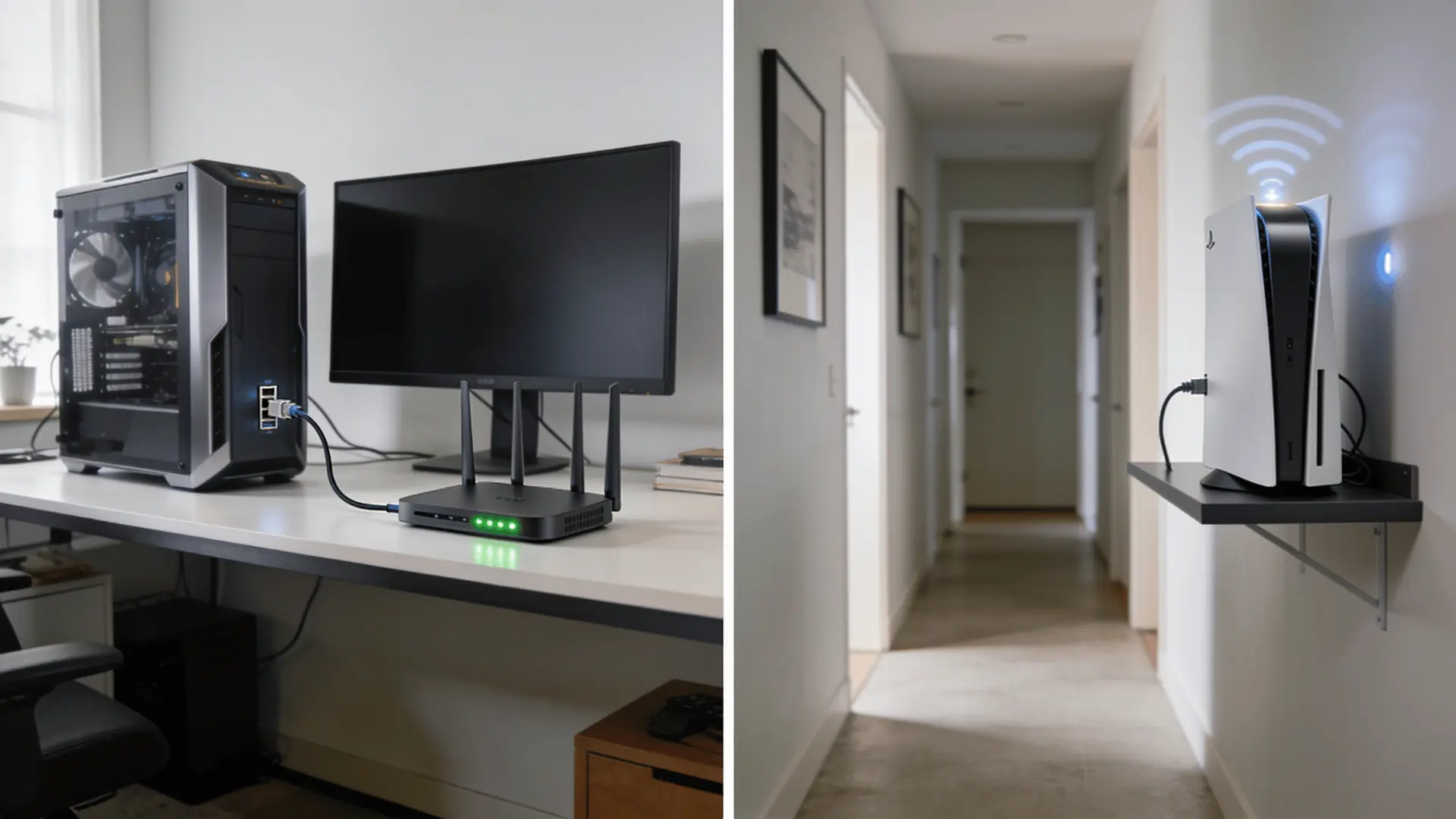
Both connection types can work on a 200 Mbps plan. The better option depends on distance, interference, router hardware, and how competitive or delay-sensitive the game is.
Ethernet for Stable Performance
Ethernet creates a direct cable connection between the gaming device and router.
It avoids most wireless interference and usually delivers more consistent results, making it a strong choice for competitive games, cloud play, and live broadcasts.
Xbox recommends Ethernet where possible for cloud gaming, and Twitch suggests using a wired connection when troubleshooting broadcast quality.
Ethernet cannot fix a slow game server or poor ISP routing, but it removes one common source of variation. The cable and network ports must also support the expected speed, so damaged or outdated equipment may still reduce performance.
Wi-Fi for Flexible Device Placement
Wi-Fi is practical when running a cable is not possible. A modern router using 5 GHz or 6 GHz can deliver strong performance at short or moderate distances, but walls and floors weaken higher-frequency signals.
Xbox and NVIDIA recommend 5 GHz wireless connections for cloud gaming when Ethernet is unavailable. Router placement matters as much as the plan speed.
A central, open position usually works better than a cabinet, floor corner, or room behind several walls. Wi-Fi extenders may increase coverage, although some models reduce speed or add delay.
A wired mesh connection may provide a steadier result.
How to Improve Gaming on a 200 Mbps Plan
A faster internet package should not be the first response to lag. A few checks can show whether the problem comes from the plan, local network, provider, or game server.
- Test through Ethernet: Connect the gaming device or computer directly to the router before judging whether the 200 Mbps service is too slow.
- Check more than download speed: Look at upload speed, ping, jitter, and packet loss because the FCC identifies these as separate performance factors.
- Pause large transfers: Stop game updates, cloud backups, file uploads, and high-resolution downloads before a competitive session.
- Use 5 GHz or 6 GHz Wi-Fi: These bands can provide faster wireless performance at shorter ranges when supported by the router and gaming device.
- Move the router: Place it in an open, central area rather than behind a television, inside a cabinet, or near appliances.
- Choose a nearby server: Select the closest available region in the game settings, but remember that server load and ISP routing can still affect ping.
- Update network equipment: Install router firmware updates and replace damaged Ethernet cables. An old router may struggle with many active devices.
- Compare busy and quiet hours: Run the same wired test at different times to see whether performance falls when local internet use is higher.
- Contact the provider when needed: Continued low wired speeds, packet loss, or disconnections may require support from the ISP or a network professional.
When is 200 Mbps Not Enough?
A 200 Mbps plan may feel limited in a home with several heavy users active at once.
Examples include two or three cloud gaming sessions, repeated game downloads, multiple 4K streams, off-site backups, and live video uploads running together.
Gaming alone rarely requires an upgrade from 200 Mbps, but total household demand sometimes does. A faster plan may help when large games must download quickly, although the game server, storage drive, and Wi-Fi link can still limit the rate.
Low upload speed is another concern on plans with uneven download and upload service. Before changing tiers, test through Ethernet during peak hours and compare the result with the provider’s promised range.
If wired performance remains poor, the ISP or a network technician may need to check the line or equipment.
Final Verdict
A 200 Mbps plan gives most gamers enough room for online matches, updates, cloud play, calls, and streaming. The better question is how well that speed reaches the gaming device.
Start with a wired speed test, check ping and packet loss, then compare the result with Wi-Fi from the playing spot.
Avoid paying for a faster tier until you’ve ruled out issues. Router placement, old cables, background downloads, crowded wireless channels, and weak upload performance can reduce quality.
Cloud gaming and live broadcasting also need a steady connection, not only a high download number. A network professional or internet provider can help when wired results stay poor or disconnections continue.
What has 200 Mbps been like in your home? Share your gaming results and setup tips in the comments below.
Frequently Asked Questions
Will a Data Cap Affect Gaming?
Online matches use limited data, but game downloads, patches, cloud gaming, and 4K streaming can quickly consume a monthly data allowance.
Is 200 Mbps Good for Fortnite?
Yes, 200 Mbps is more than enough for Fortnite. Smooth gameplay depends more on low ping, stable Wi-Fi or Ethernet, and limited packet loss.
Does a Gaming VPN Improve Performance?
A gaming VPN may improve routing in rare cases, but it can also add delay. Test normal and VPN connections before keeping it enabled.
Is 200 Mbps Good for PS5 and Xbox?
Yes, 200 Mbps works well for PS5 and Xbox gaming, updates, voice chat, cloud play, and streaming, even with several connected household devices.