


I use URLs every day, and you probably do too, even if you do not think about them much. Each time you click a link, open a website, or download a file, a URL helps your browser find the right place online.
In this guide, I’ll explain What Is a URL is in simple words, then break down its main parts, common types, and real examples.
You’ll learn what the protocol, domain, path, query, and fragment mean without getting stuck in hard tech terms.
I’ll also show how URLs affect browsing, safety, and SEO, so you can read web addresses with more confidence. By the end, you’ll know how a URL works, why it matters, and how to spot a clean, useful web address.
What Is a URL?
A URL, or Uniform Resource Locator, is the web address you type or click to visit a website. Every webpage, image, and file online has its own unique URL.
For example, https://www.example.com is a URL. Think of a URL like a home address.
Just like an address tells the mail carrier where to deliver a package, a URL tells your browser where to find a specific page online.
Type it in your browser, and it knows exactly where to go. Your browser then loads the page quickly and safely.
URLs matter more than most people realize. They help you access websites, allow browsers to locate resources instantly, and connect pages through clickable links.
They also play a big role in SEO and web development. Without URLs, navigating the internet simply wouldn’t work.
Structure of a URL (How It Is Built)
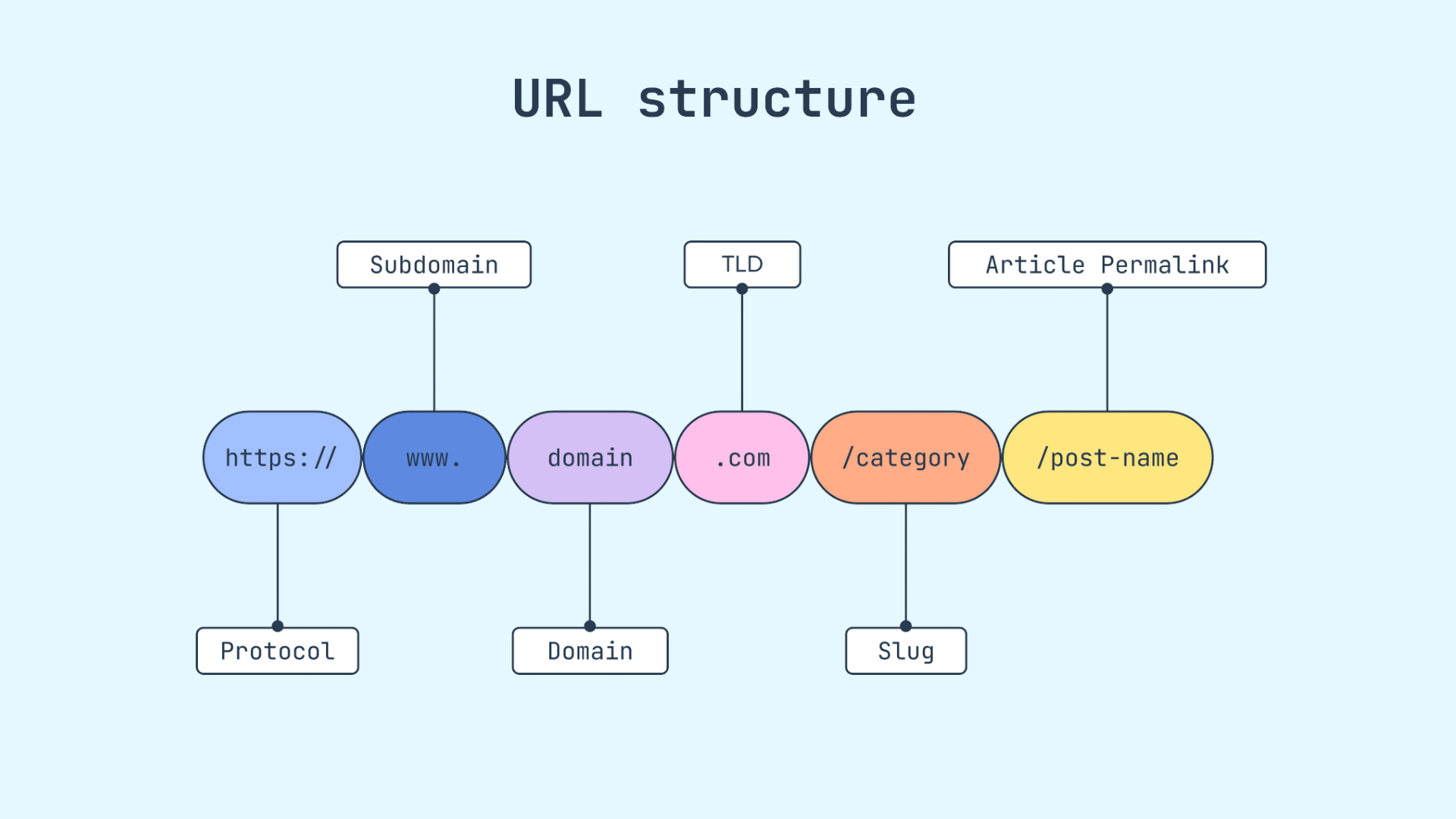
A URL isn’t just one piece; it’s built from several parts that work together. Each part has a specific job. Once you understand what each part of a URL does, reading a URL becomes much easier than it looks.
1. Protocol (HTTP vs HTTPS)
The protocol is the first part of a URL. It tells your browser how to communicate with a website. HTTP stands for HyperText Transfer Protocol.
HTTPS is the secure version; the “S” means the connection is encrypted.
This keeps your data safe from hackers. It protects sensitive information such as passwords and credit card details.
Always look for HTTPS before entering personal information on any site. Most modern websites use HTTPS by default. It adds an extra layer of protection for your data.
2. Subdomain
A subdomain sits in front of the main domain and points to a specific section of a website. In blog.example.com, “blog” is the subdomain.
Website owners use subdomains to organize content or create separate sections without buying a new domain.
They help keep different parts of a site structured and easy to manage.
You might also see “shop” or “support” used as subdomains on larger websites. These sections often serve different purposes within the same site.
3. Domain Name
The domain name is the main address of a website. It identifies the site’s owner and helps users find it easily. It is the part people remember and type most often.
For example, in https://www.google.com, the domain is google.com. Every website has a unique domain.
Think of it as the name on the front of a building; it tells you exactly where you are before you even step inside. It gives you a clear idea of the website’s identity.
4. Path
The path comes right after the domain name. It points your browser to a specific page or file within a website. It helps direct users to the exact content on the site.
For example, in https://www.example.com/about-us, the path is /about-us.
Think of it like walking down a hallway in a building to reach a specific room.
Without the path, you’d only reach the homepage. You would not be able to see the specific page you want to visit online.
5. Query Parameters
Query parameters pass extra information to a webpage. They start with a question mark and follow the path. They send small data packets to the server.
For example, https://www.example.com/search?id=123 tells the site to load content tied to ID 123.
You’ll often see them in search results or online store filters.
They help websites show you the right content based on what you clicked or searched for. They make pages more personal and relevant.
6. Fragment Identifier
The fragment identifier is the part of a URL that starts with a # symbol. It takes you to a specific section on a page without reloading the page.
For example, https://www.example.com/page#section2 takes you straight to “section2.” You’ll notice this on long pages with a table of contents.
It saves time and makes navigation much smoother for the reader.
Users can find what they need faster. It also improves the overall browsing experience.
URL vs Domain Name
People often mix up URLs and domain names because they look similar in a browser bar. Knowing the difference makes it easier to understand how websites and web pages work online.
| Feature | URL | Domain Name |
|---|---|---|
| Meaning | A full web address is used to open a page or file | The main name of a website |
| Purpose | Takes users to a specific location online | Helps identify a website |
| Includes | Protocol domain path query and more | Only the website name |
| Example | https://www.example.com/blog/post | example.com |
| Shows Page Location | Yes | No |
| Used For | Opening exact page files or images | Visiting the main website |
| Can Contain Slugs | Yes | No |
| Length | Usually longer | Usually shorter |
| SEO Role | Helps search engines understand page content | Helps with branding and trust |
| Changes by Page | Yes, each page has a different URL | Usually stays the same across the website |
What Is a URL Slug?
A URL slug is the last part of a web address that comes after the main domain name. It helps describe what the page is about in a short and readable way.
For example, in www.example.com/what-is-a-url, the slug is “what-is-a-url.” Website owners use slugs to keep links clear and organized. A good slug also helps search engines understand the topic of the page.
Short and simple slugs usually work best for SEO. Most websites use words separated by hyphens because they are easier to read.
Avoid using random numbers, long strings, or special characters in a slug.
Clear slugs also make links easier for people to remember and share. Keeping the slug close to the page topic improves both user experience and search visibility over time.
Types of URLs
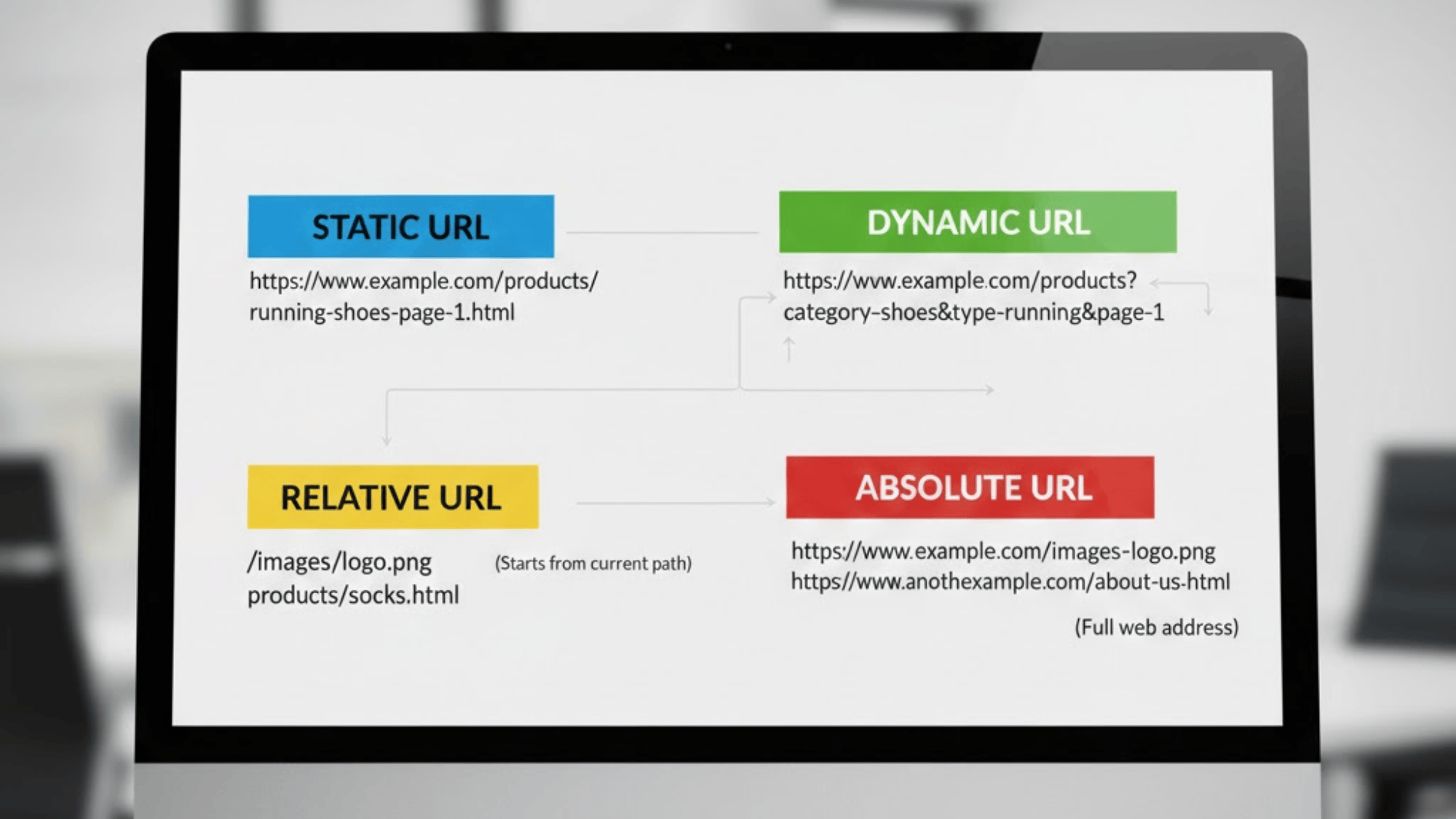
Here’s a simple breakdown of the most common URL types you’ll see online. Each type serves a slightly different purpose on the web.
1. Absolute URL
An absolute URL is the full, complete web address. It includes everything: the protocol, domain, and path. It can work on its own without needing any extra context.
For example, https://www.example.com/blog/post-1 is an absolute URL.
You’ll use this type when linking to a page on a completely different website.
It gives the browser everything it needs to find that exact page, no matter where the link is placed. It works the same across different websites and platforms.
2. Relative URL
A relative URL is a shorter, partial address. It only includes the path, not the full domain. For example, /blog/post-1 is a relative URL.
It works within the same website because the browser already knows the domain. Web developers use relative URLs to link between pages on the same site.
They’re quicker to write and easier to manage during website updates.
They also reduce repetition in your website code. This makes site maintenance more efficient.
3. Static vs Dynamic URLs
A static URL stays the same every time you visit it. It points to a fixed page that doesn’t change.
It usually has a clean and simple structure.
A dynamic URL, on the other hand, is generated on the spot based on user actions or database queries.
You’ll often spot dynamic URLs by their query parameters, like ?id=45&category=shoes.
Static URLs are easier to read and often better for SEO. Dynamic URLs enable websites to display custom content to users.
How URLs Work in Web Browsers?
Every time you type a URL and hit enter, a lot happens behind the scenes, and it all takes less than a second. Here’s exactly what goes on, step by step.
- Browser Sends a Request: The moment you enter a URL, your browser sends a request out to the internet. It’s essentially asking, “Where is this website, and can I access it?”
- DNS Translates the Domain: Your browser uses DNS to convert a domain name into an IP address so it can reach the correct server. This process happens behind the scenes in seconds.
- Server Receives the Request: Once the browser has the IP address, it connects to the website’s server. The server receives the request and checks which page or file you’re requesting.
- Server Sends Back the Webpage: The server then sends the requested page’s data back to your browser. This includes all the text, images, and code needed to display the page correctly.
- Page Loads on Your Screen: Your browser takes all that data and builds the page you see. Within moments, the website appears on your screen, ready to use.
Best Practices for SEO-Friendly URLs
Clean URLs help both users and search engines understand your page faster. Using a simple structure can improve readability, crawling, and click-through rates over time.
1. Keep URLs Short and Clear
Short URLs are easier to read, share, and remember. They also help search engines quickly understand what the page covers.
Try to include only the most important words related to the topic. Remove extra filler words, numbers, or symbols that do not add value.
For example example.com/url-guide looks much cleaner than example.com/page?id=48293.
Short links also look better in search results and social shares.
A simple structure improves user experience and makes your website easier to manage later when you update content or build internal links.
2. Use Your Main Keyword Naturally
Adding the main keyword to the URL helps search engines connect your page to relevant searches. It also tells readers what the page is about before they click the link.
Use the keyword naturally without stuffing extra words into the URL.
For example, example.com/what-is-a-url works better than example.com/url-url-guide-best-url-tips.
Keep the wording simple and readable. A clean keyword-focused URL can improve visibility in search results and make the page easier for users to trust, understand, and share across different platforms online.
3. Use Hyphens Between Words
Hyphens make URLs easier to read for both users and search engines. Search engines treat hyphens as spaces between words, while underscores can create confusion.
For example, example.com/url-structure-guide is much clearer than example.com/url_structure_guide.
Clean spacing improves readability and helps users quickly understand the page topic. Most modern websites follow this format because it keeps links organized and user-friendly.
Consistent formatting across your site also helps maintain a cleaner structure, which supports crawling, indexing, and better overall website management in the long run.
4. Avoid Random Numbers and Symbols
Random numbers, symbols, and special characters can make a URL look messy and confusing. They also make links harder to remember and share with others.
A clean URL should clearly explain the page topic without unnecessary characters.
For example example.com/best-url-tips looks much better than example.com/page?id=8472&ref=54. Simple URLs build more trust with readers because they look organized and professional.
They also improve the user experience by helping visitors understand where the link leads before clicking on it from search results, social media, or another website online.
5. Always Use Lowercase Letters
Using lowercase letters keeps URLs consistent and avoids technical problems on some servers. A URL with capital letters may sometimes lead to a different page or create duplicate versions of the same content.
For example, example.com/URL-Guide and example.com/url-guide can be treated differently on certain websites.
Keeping everything lowercase helps maintain a cleaner structure and reduces confusion. It also makes links easier to type, copy, and share.
Most SEO experts recommend lowercase URLs because they improve consistency, readability, and website management across all pages and platforms.
Common URL Mistakes
URLs don’t always work perfectly. Sometimes a small mistake can keep you from reaching a page at all. Here are the most common URL problems you’ll run into and what they actually mean.
- Typing Errors: One wrong character can send you to the wrong page, so always double-check before hitting enter.
- Broken Links: Clicking them leads nowhere, which frustrates visitors and can also hurt a website’s SEO performance.
- 404 Error: The URL works, but the specific page has been deleted, renamed, or never existed in the first place.
- Wrong Protocol: Using HTTP instead of HTTPS can sometimes block access to a page entirely. Small detail, quick fix.
- Security Warnings: Never enter personal information on a page showing a security warning until the issue is resolved.
- Redirects: Too many redirects in a chain can slow loading and may stop the page from opening altogether.
- Expired Domain: The URL still exists, but clicking it may redirect to an unrelated site that purchased the domain.
URL vs URI vs URN (Understanding the Difference)
These three terms are related but not the same. A URI is the main term, and URLs and URNs are types of URIs. Here’s a table for a simple explanation:
| Term | Full Form | What It Does | Shows Location? | Example |
|---|---|---|---|---|
| URI | Uniform Resource Identifier | Identifies a resource on the internet. It is the general term that includes URLs and URNs. | Not always | isbn:0451450523 |
| URL | Uniform Resource Locator | Identifies a resource and tells where to find it. It gives the exact web address. | Yes | https://example.com |
| URN | Uniform Resource Name | Identifies a resource by name only. It does not show where the resource is located. | No | urn:isbn:0451450523 |
Examples ofURLs
Every link you click or page you open has a URL behind it. Here are a few real examples that show exactly how it all works.
1. Website Homepage Example
When I type https://www.example.com into my browser, it takes me to the website’s main page. This page is called the homepage.
It is like the front door of a house. From here, I can click links to visit other pages on the site. The URL is short and simple because it points to the starting page.
Most websites use their main domain name for the homepage, so users can find it quickly and easily without any confusion.
2. Product Page Example
When someone visits https://www.example.com/shoes/blue-running-shoes, they land on a product page. This URL is longer because it directs users to a specific item.
The part after the slash shows the category and the product name.
It helps users know exactly which page opens and makes the URL easier to understand at a glance.
Online stores use clear URLs like this so users can find products fast. A product page URL usually includes the product name to make it easy to read.
3. Image URL Example
Sometimes a URL points directly to an image instead of a full webpage. For example, https://www.example.com/images/logo.png opens only the picture file.
The image can be viewed on its own in a browser. The last part, such as .png or .jpg, indicates the image file format. It tells the browser how to display the file correctly.
Websites use image URLs to display pictures on pages. Each image has its own unique URL, even if it appears inside a larger webpage.
4. Download File Example
A URL can also link to a file that I can download. For example, https://www.example.com/files/guide.pdf opens a PDF file.
When I click it, the file may open in the browser or start downloading. The ending, like .pdf or .zip, tells me what type of file it is.
Many websites use file URLs to share guides, forms, or software.
Each downloadable file has its own direct web address. This allows users to access or download the file quickly.
Common Signs of a Fake URL
Many fake links are designed to look real at first glance. Checking a few small details can help you avoid unsafe websites and online scams.
- Misspelled Domain Names: Fake URLs often replace letters or slightly change a trusted brand name like goggle.com instead of google.com.
- Extra Numbers or Symbols: Unsafe links may include random numbers, symbols, or strange characters to confuse users and hide the real address.
- Missing HTTPS: Secure websites usually begin with HTTPS. A missing secure connection can be a warning sign on pages asking for personal details.
- Very Long URLs: Extremely long links filled with random words or codes may lead to suspicious or harmful websites.
- Strange Subdomains: Scammers sometimes place trusted brand names before the real domain, like paypal.login.verify-example.com, to trick users.
- Unexpected Shortened Links: Short URLs can hide the real destination, making it harder to know where the link actually leads.
- Too Many Hyphens: Fake websites often use extra hyphens to copy real domains, such as amazon-login-security-check.com.
- Unrelated Domain Extensions: A trusted company using unusual endings like .xyz or .click instead of .com may be suspicious.
Conclusion
A URL is more than just a web address. It is the foundation of how the internet works. Every time you type an address into your browser, click a link, or download a file, a URL is doing the work behind the scenes.
Understanding what a URL is, how it is built, and why each part matters gives you more control over your browsing.
It also helps you spot security risks, avoid common mistakes, and read web addresses with confidence.
For website owners and content creators, clean, well-structured URLs directly affect how search engines crawl and rank pages.
Using HTTPS, keeping URLs short, and including a clear keyword are small steps that add up over time. The more you know about URLs, the better you can use the internet.
Have a question about URLs or spotted something worth adding? Drop it in the comments below.
Frequently Asked Questions
How to Find a URL?
A URL appears in the browser address bar at the top of a webpage. Copying that web address gives the exact URL for the page being viewed.
Where Is the URL Located on a Phone?
The URL is usually shown in the browser address bar at the top or bottom of the screen, depending on the mobile browser being used.
Can Two Websites Have the Same URL?
No. Every URL on the internet is unique. Even a single character difference makes it a completely different address.
Does the URL Path Affect Which Page Loads?
Yes. The path after the domain name points your browser to a specific page or file. Change the path, and you land on a completely different page within the same site.
Do URLs Affect Search Rankings?
Yes. Clean, keyword-friendly URLs help search engines understand your page faster and can improve your position in search results.