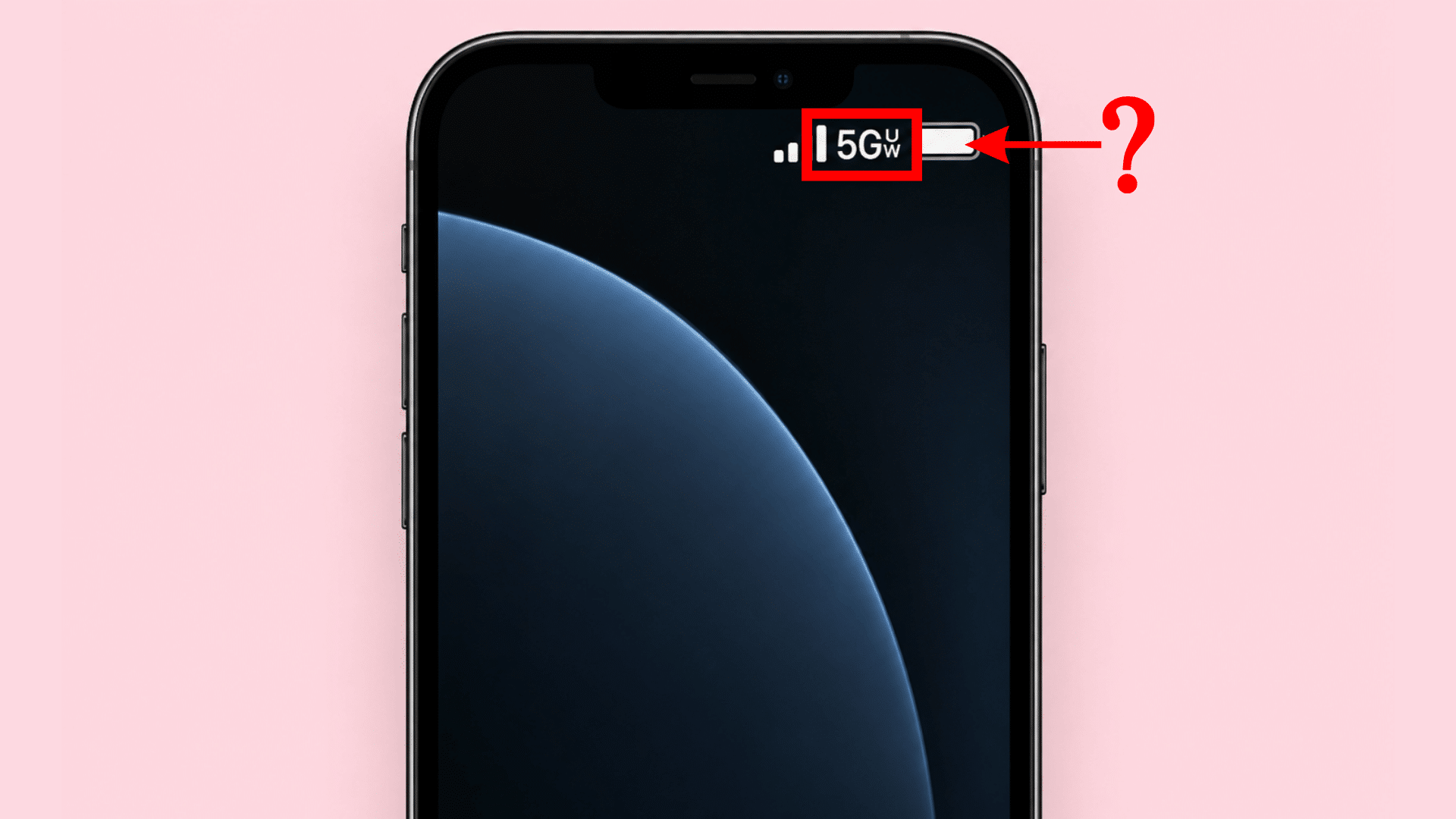



If you are wondering “what UW means next to 5G”, UW stands for Ultra Wideband. On Verizon, the 5G UW symbol indicates that its higher-performance 5G Ultra Wideband network is available to your phone.
Verizon currently uses both mid-band C-band and high-band mmWave spectrum for this service.
When I explain mobile-network icons, I treat them as network indicators rather than speed ratings. Seeing 5G UW tells you which type of 5G service is available, but it does not promise a particular download speed.
I also check the carrier before interpreting an icon because Verizon, T-Mobile, and AT&T use different labels. Below, I will explain what the symbol means, 5G vs. 5G Ultra Wideband, and why it may appear or disappear.
What Does UW Mean Next to 5G?
UW means Ultra Wideband, the label used for a higher-performance tier of 5G service. When 5G UW appears on your phone, it means a higher-performance 5G connection is available in your current location.
Regular 5G is generally designed to provide broader coverage, often by using lower-frequency spectrum that can travel farther and perform more consistently across wider areas.
By comparison, 5G Ultra Wideband uses mid-band C-band and high-band mmWave spectrum to provide greater capacity and stronger speed potential where coverage is available.
The icon does not guarantee a fixed download speed, because real-world performance still depends on signal strength, congestion, location, and device support.
It also does not automatically mean your phone is connected through mmWave, since C-band can also trigger the 5G UW indicator.
5G vs. 5G Ultra Wideband: What is the Difference?
The main difference between 5G vs. 5G Ultra Wideband is the network spectrum and performance tier being indicated.
Standard 5G generally prioritizes broader coverage, while 5G Ultra Wideband uses C-band and mmWave to provide higher-performance connectivity where available.
| Feature | Regular 5G | 5G Ultra Wideband |
|---|---|---|
| Phone Icon | 5G | 5G UW |
| Verizon Spectrum | Primarily low-band | C-band and mmWave |
| Coverage | Broader | More location-dependent |
| Capacity | Standard | Generally higher |
| Speed Potential | Varies | Generally higher |
| Best For | Everyday mobile use | High-data activities where available |
So, 5G UW is still 5G. It simply identifies Verizon’s higher-performance portion of its 5G network.
What does the 5G UW Symbol Mean on Your Phone?
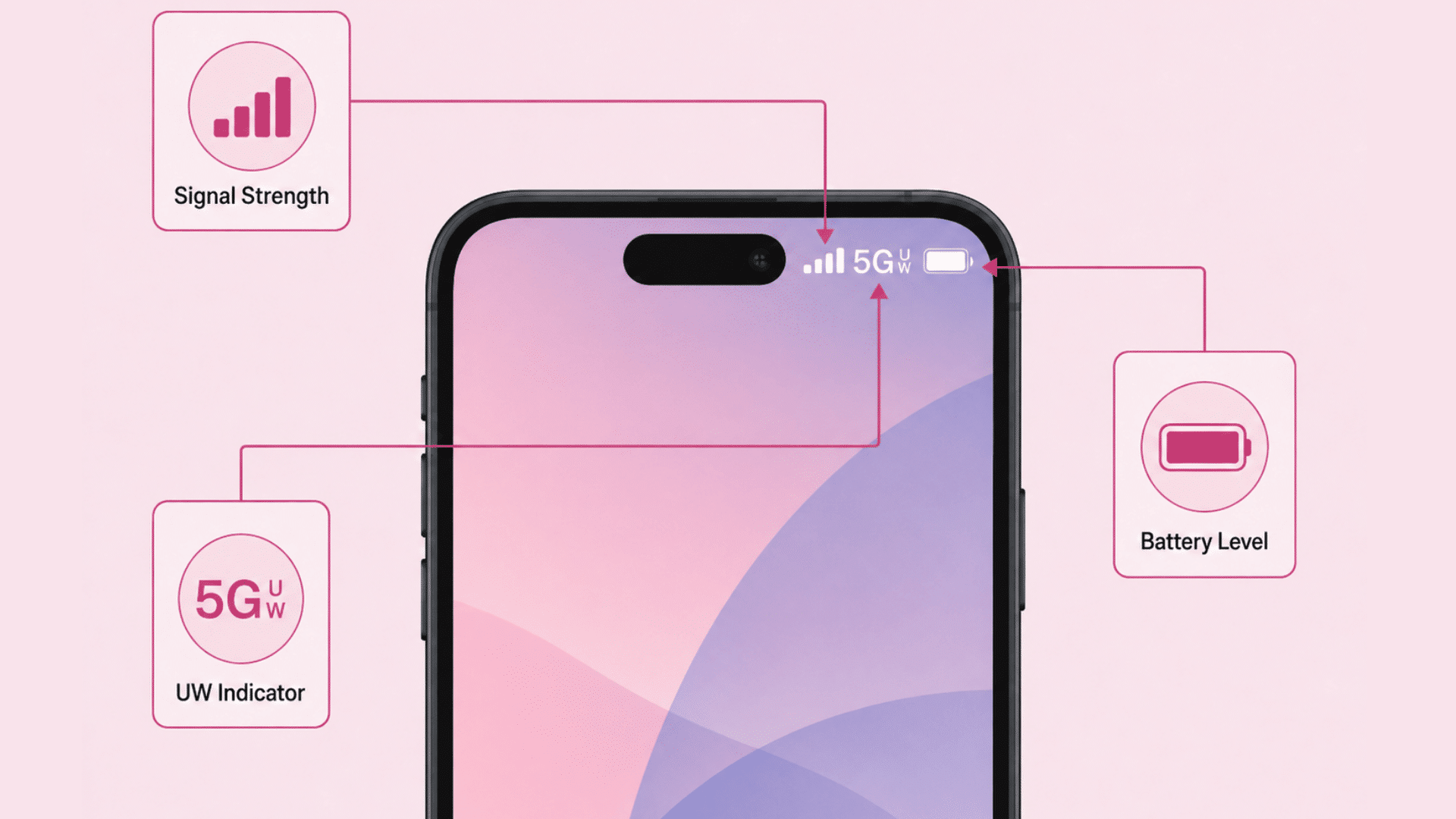
The 5G UW icon is a network-status indicator, not a speed-test result. On a compatible Verizon phone, it indicates that the carrier’s Ultra Wideband network is available in your current area.
The icon normally appears near the cellular signal indicator at the top of the screen. As your phone moves between network areas, it may change from 5G UW to 5G or LTE.
This change is normal. Network availability depends on your location, phone compatibility, signal conditions, and carrier coverage. Apple similarly describes 5G UW as one of the carrier-specific higher-frequency 5G indicators that can appear on supported iPhones.
What does 5G UW Mean on iPhone and Android?
The 5G UW symbol has the same basic purpose across compatible phones, but the way it appears and how network settings are managed can vary by device.
- On iPhone: The 5G UW icon indicates that a higher-performance 5G Ultra Wideband network is available. iPhones also provide 5G Auto and 5G On options. 5G Auto can switch between 5G and LTE when faster connectivity offers little benefit, while 5G On uses 5G whenever it is available.
- On Android: Compatible Samsung, Google Pixel, Motorola, and other Android phones may also display 5G UW when Ultra Wideband service is available. Status icons, network menus, and supported 5G bands can vary by model and carrier. If compatible 5G service becomes unavailable, the phone can fall back to regular 5G, 4G LTE, or another supported network.
Why does 5G UW Appear and Disappear?
The 5G UW symbol can disappear when your phone leaves an Ultra Wideband coverage area or network conditions change. Your device may then display regular 5G or LTE instead.
Common reasons include:
- Moving farther from compatible network equipment
- Entering a building or obstructed area
- Changes in local 5G coverage
- Phone or carrier compatibility
- Cellular network settings
- Temporary network conditions
Google notes that physical obstructions can affect 5G service and that supported phones fall back to 4G or lower networks where 5G is unavailable.
When I see an icon changing while moving between locations, I would first treat it as normal network handoff behavior rather than a phone fault.
Why is 5G UW Slow Sometimes?
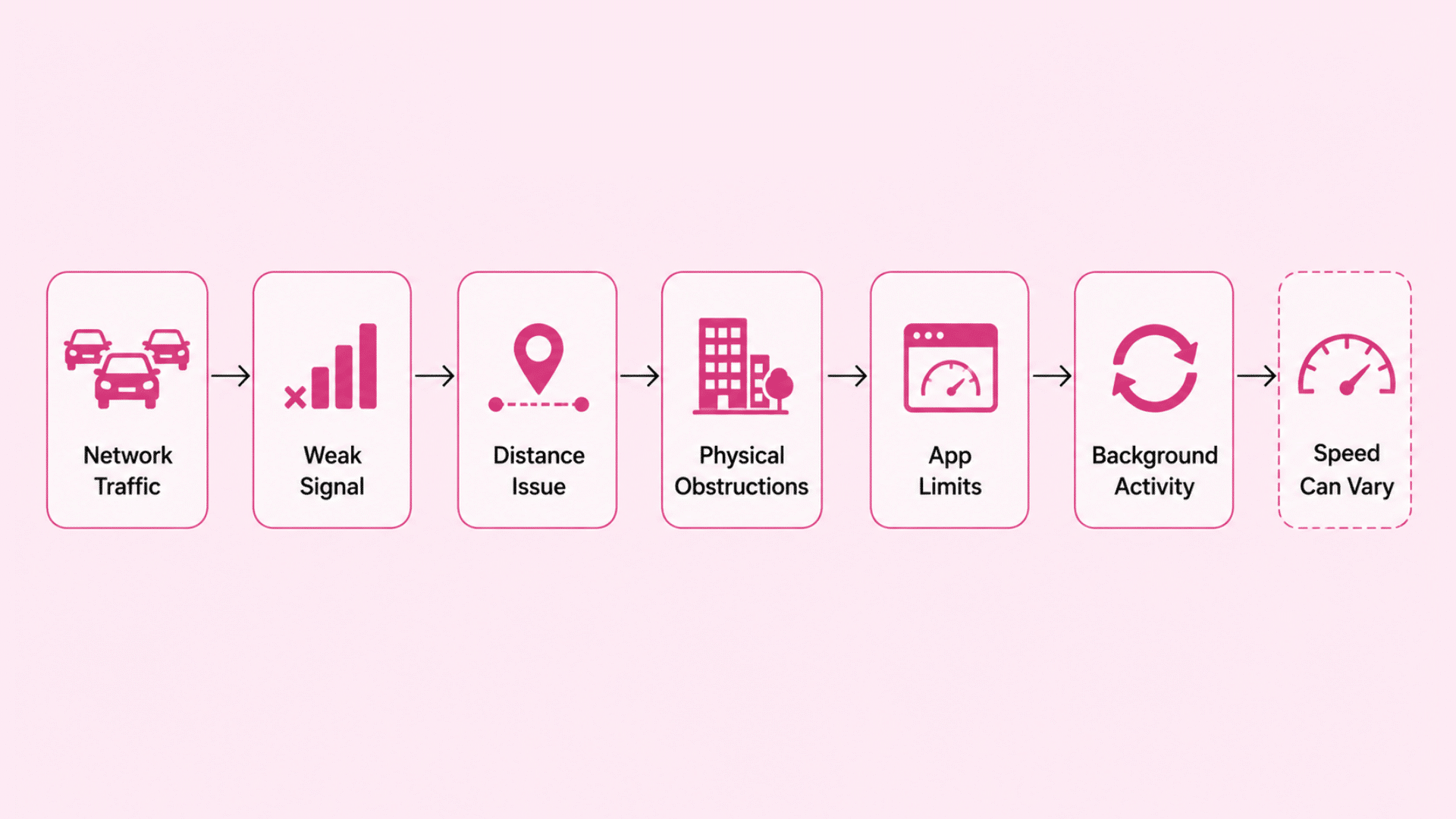
Seeing 5G UW does not guarantee that every download, stream, or webpage will immediately become faster. The icon identifies available network service, while actual performance depends on several conditions.
A 5G UW connection may feel slower because of:
- Heavy network traffic
- Weak or changing signal conditions
- Distance from network equipment
- Walls or other physical obstructions
- App or server limitations
- Background phone activity
Signal bars should not be treated as a complete measure of data performance either. A phone can show a strong cellular signal while available network capacity is limited.
I prefer to judge the connection by actual performance rather than assuming the letters beside 5G represent a fixed speed.
How does 5G Ultra Wideband Work?
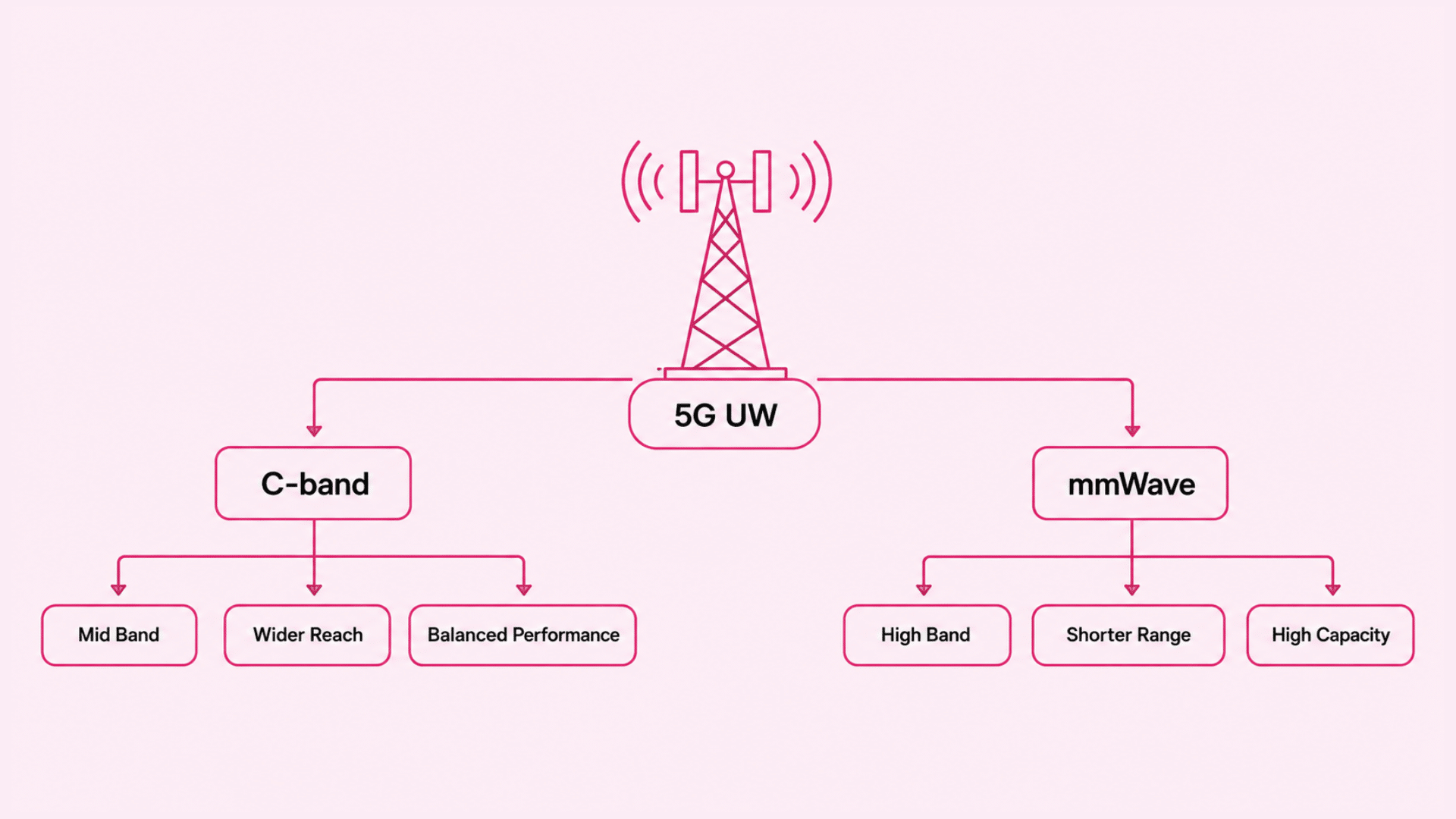
5G Ultra Wideband uses mid-band C-band and high-band mmWave spectrum to carry mobile data.
These spectrum ranges give the network different ways to balance speed, capacity, and coverage depending on the location and connection conditions.
C-Band 5G
C-band is a mid-band spectrum that offers a strong balance between coverage, capacity, and performance. It can generally reach farther than mmWave while still supporting noticeably faster data performance than lower-frequency 5G in suitable conditions.
This wider reach makes C-band useful across cities, suburbs, and other areas where consistent high-performance coverage is more practical than extremely short-range speed.
It can also handle more network traffic than lower-band connections, which helps in locations with many active users.
Because C-band is part of 5G Ultra Wideband, seeing the 5G UW icon does not automatically mean your phone is connected through mmWave.
The same icon can appear when C-band service is available, which is why the status symbol alone cannot identify the exact frequency band in use.
mmWave 5G
mmWave uses high-frequency spectrum designed to support very high speeds, low response times, and large amounts of network traffic within a smaller coverage area.
Its high capacity makes it especially useful in crowded places such as stadiums, transport hubs, event spaces, and busy city locations.
The main limitation is range. mmWave signals do not travel as far as lower-frequency signals and are more easily weakened by walls, buildings, trees, and other physical obstacles. Even moving a short distance can sometimes affect the connection.
For this reason, mmWave works best in targeted coverage zones where users are relatively close to network equipment.
It complements C-band rather than replacing it, giving 5G Ultra Wideband both high-capacity performance and more practical coverage.
Is 5G UW Better than Regular 5G?
5G UW generally offers higher performance potential, greater capacity, and faster data speeds than regular 5G when coverage is available. Its use of C-band and mmWave gives it an advantage in areas that need stronger network performance.
Regular 5G still has an important role because lower-frequency signals can cover wider areas and often provide more consistent availability. This makes it useful when Ultra Wideband coverage is limited or unavailable.
In practice, users do not usually switch between the two manually. A compatible phone connects to the best available network based on coverage, device support, and network settings.
For everyday browsing, messaging, and streaming, regular 5G may be sufficient. 5G UW becomes more valuable for larger downloads, high-quality streaming, hotspot use, and other data-heavy activities.
The practical choice is therefore not something users normally make manually while moving around. A compatible phone connects according to available carrier service and its network settings.
For everyday use, a stable regular 5G connection may be sufficient. Ultra Wideband becomes more noticeable when greater network capacity or faster data performance is available.
5G UW vs. 5G UC vs. 5G+: What do the Icons Mean?
The labels 5G UW, 5G UC, and 5G+ all indicate enhanced 5G service, but each belongs to a different carrier. They distinguish higher-performance 5G connections from standard 5G.
| Icon | Carrier | Meaning |
|---|---|---|
| 5G UW | Verizon | 5G Ultra Wideband |
| 5G UC | T-Mobile | 5G Ultra Capacity |
| 5G+ | AT&T | 5G Plus |
5G UW can use C-band and mmWave spectrum, while 5G UC generally refers to T-Mobile’s mid-band and high-band 5G service. 5G+ is AT&T’s label for its higher-performance 5G network.
Although these icons serve a similar purpose, they do not represent the same network.
Each carrier uses different spectrum bands, coverage strategies, and network deployments, so real-world speed and availability can vary by location.
Can You Turn Off 5G UW?
There is usually no separate switch specifically for 5G UW. Instead, you can control whether your phone uses 5G by changing its preferred cellular network mode.
The exact steps depend on the device, carrier, and software version, so the available options may differ slightly.
- On iPhone: Open Settings > Cellular > Cellular Data Options > Voice & Data. You may see 5G Auto, 5G On, and LTE. Choosing LTE disables 5G, while 5G Auto lets the phone switch between 5G and LTE based on network conditions and performance.
- On Android: Look under Mobile Network, Connections, SIMs, or Preferred Network Type. Where supported, selecting LTE or 4G prevents 5G use. Some carriers may limit manual network selection.
Bottom Line
5G UW is best understood as a network indicator, not a guaranteed speed rating. It shows that a phone can access Ultra Wideband service, which may use C-band or mmWave depending on location and coverage.
Regular 5G remains important because it usually offers wider availability, while 5G UW focuses more on higher capacity and stronger performance potential.
The icon can also appear or disappear as the phone moves between coverage areas or as network conditions change. On iPhone and Android, the exact settings and status-bar behavior may vary, but the core meaning stays the same.
Comparing the icon with real-world performance gives a clearer picture than relying on the label alone. If needed, users can also adjust their preferred network mode.
Next time 5G UW appears on your phone, check your connection speed and coverage to see how Ultra Wideband performs in your area.
Frequently Asked Questions
Is 5G Ultra Wideband the Same as UWB?
No. 5G UW refers to cellular network connectivity, while UWB is a separate short-range wireless technology used for nearby-device communication and precise location features.
Does 5G UW Use More Battery than Regular 5G?
It can use more battery in some conditions, but the impact depends on signal strength, network conditions, phone settings, and how the device is being used.
Can 5G UW Work Without a 5G Plan?
It depends on the carrier and plan, because some plans may limit access to specific 5G network features.
Does 5G UW Work on Every 5G Phone?
No, the phone must support the required 5G bands and be compatible with the carrier’s Ultra Wideband network.
Does 5G UW Affect Call Quality?
Usually, 5G UW mainly affects mobile data performance, while call quality depends on signal strength, network support, and the availability of voice-over-LTE or voice-over-5 G.