




Software bugs are a common part of software development, and almost every application contains them at some stage.
A software bug is an error, flaw, or unexpected issue that causes a program to behave differently than intended.
These bugs can range from minor display problems to serious security risks that affect performance and user experience.
Understanding the different types of software bugs helps developers, testers, and businesses build more reliable software and fix issues faster.
In this guide, you’ll learn about the most common software bug categories, their causes, real-world examples, and ways to prevent them.
Keep reading to gain a better understanding of computer bugs and their impact on modern software.
What Is a Software Bug?
A software bug is an error, flaw, or defect in a computer program that causes it to behave differently than intended.
It can lead to incorrect results, unexpected behavior, crashes, security issues, or poor performance.
Software bugs can occur during any stage of development, including planning, coding, testing, or maintenance.
They are commonly caused by programming errors, incorrect logic, missing requirements, compatibility issues, or unexpected user input.
Some bugs are minor, such as spelling errors or layout issues, while others are critical enough to cause application failures or expose security vulnerabilities.
Regular testing, code reviews, and software updates help reduce bugs and improve software reliability over time.
How Do Software Bugs Affect Programs?
Software bugs can affect a program in different ways, depending on their cause, severity, and location.
- Program Crashes: Bugs can cause applications to freeze, close unexpectedly, or stop responding, interrupting tasks and reducing overall software reliability.
- Incorrect Results: Faulty code may process data incorrectly, resulting in inaccurate calculations, incorrect outputs, or unexpected behavior during normal operations.
- Security Risks: Some bugs create vulnerabilities that attackers can exploit to gain unauthorized access, steal data, or disrupt system functionality.
- Performance Problems: Inefficient or faulty code can slow loading times, increase resource usage, and significantly reduce the application’s overall responsiveness.
- Compatibility Issues: Bugs may prevent software from working consistently across different operating systems, browsers, devices, or hardware configurations.
- Poor User Experience: Frequent errors, glitches, or unexpected behavior frustrate users, reduce trust, and may encourage them to stop using the software.
What Are the Types of Software Bugs?
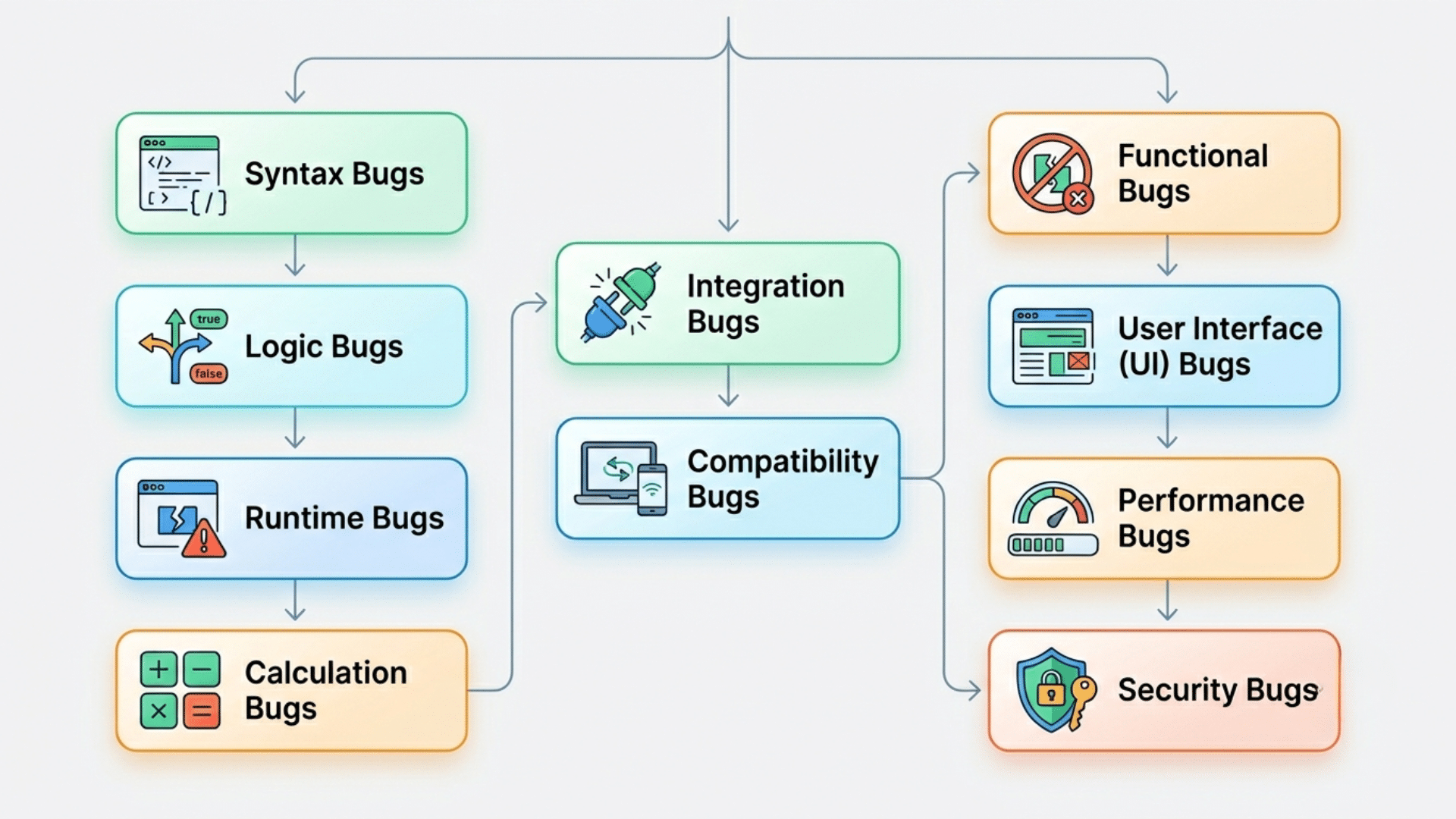
Software bugs can take many forms, and understanding the different types helps developers identify problems faster, improve software quality, and create a better user experience.
1. Functional Bugs
Functional bugs occur when a feature fails to perform the task it was designed to complete.
These bugs directly affect user actions and often prevent important functions from working properly. For example, a payment button may not process transactions, or a search tool may return incorrect results.
Since these bugs interfere with the main purpose of the software, they can reduce user satisfaction and create operational problems if not fixed quickly.
2. Logic Bugs
Logic bugs happen when the program follows incorrect decision-making rules, resulting in unexpected outcomes.
The software may run without displaying errors, but it produces wrong results because the underlying logic is flawed. For example, a discount may be applied to the wrong products, or taxes may be calculated incorrectly.
Logic bugs are often difficult to detect because the application appears to work normally while generating inaccurate outputs behind the scenes.
3. Syntax Bugs
Syntax bugs occur when code does not follow the grammar rules of a programming language. Common examples include missing semicolons, incorrect keywords, or improperly structured statements.
These bugs usually prevent code from compiling or executing correctly. Modern development tools often identify syntax errors quickly, making them easier to fix than other types of bugs.
Even though they are generally straightforward, syntax bugs can delay development and interrupt testing activities until they are resolved.
4. Runtime Bugs
Runtime bugs appear while a program is actively running rather than during compilation.
These issues often result from unexpected conditions such as invalid user input, unavailable files, memory shortages, or network failures.
A common example is an application crashing when processing unsupported data. Runtime bugs can be challenging because they may only occur under specific circumstances.
Developers often need detailed testing and debugging to effectively reproduce and resolve these issues.
5. Calculation Bugs
Calculation bugs occur when software performs mathematical operations incorrectly. These bugs are common in applications that handle pricing, payroll, taxes, statistics, or financial transactions.
For example, a billing system might calculate an incorrect total due to a faulty formula. Even small errors can lead to inaccurate reports, customer complaints, or financial losses.
Because many businesses rely on accurate calculations, developers must thoroughly test formulas and numerical operations before releasing software.
6. User Interface (UI) Bugs
User interface bugs affect the appearance and usability of software rather than its core functionality.
These issues may include overlapping buttons, broken layouts, missing images, unreadable text, or navigation problems.
Although UI bugs may not always stop a feature from working, they can confuse users and create a poor experience.
Consistent interface testing across different devices and screen sizes helps developers identify and fix these problems before users encounter them.
7. Performance Bugs
Performance bugs reduce the speed, efficiency, or responsiveness of software. They may cause slow page load times, excessive memory usage, high CPU usage, or delays in completing tasks.
For example, an application may take several seconds to load information that should appear instantly. Performance bugs become more noticeable as user traffic increases.
If left unresolved, they can frustrate users, reduce productivity, and limit the software’s ability to handle growing workloads.
8. Security Bugs
Security bugs create weaknesses that attackers can exploit to gain unauthorized access to systems or sensitive information.
Examples include weak password validation, insecure authentication methods, and flaws that expose private data.
These bugs are considered highly serious because they can lead to data breaches, financial losses, and legal consequences.
Organizations invest heavily in security testing and monitoring to identify vulnerabilities early and reduce the risk of cyberattacks targeting their applications.
9. Compatibility Bugs
Compatibility bugs occur when software functions properly in one environment but fails in another. Differences in browsers, operating systems, devices, or software versions often cause these issues.
For example, a website may display correctly in Chrome but not in Safari. Compatibility bugs can affect large groups of users if they are not identified before release.
Comprehensive testing across multiple platforms helps ensure a consistent experience regardless of the technology being used.
10. Integration Bugs
Integration bugs appear when different software components fail to communicate or interact correctly. These problems often occur when applications connect to databases, APIs, payment gateways, or third-party services.
For example, an online store may fail to confirm orders because payment data is not transferred properly.
Integration bugs can disrupt critical business processes and are often difficult to diagnose because multiple systems may contribute to the issue at the same time.
11. Configuration Bugs
Configuration bugs result from incorrect settings, permissions, server configurations, or environment variables.
Software may work perfectly in one environment but fail after deployment because of configuration differences. For example, an application might lose database connectivity due to incorrect server credentials.
These bugs can be difficult to troubleshoot because the source of the problem is not found in the code itself. Careful environment management helps reduce configuration-related issues.
12. Data Handling Bugs
Data handling bugs occur when software incorrectly stores, retrieves, processes, or displays information. These bugs can lead to duplicate records, missing entries, corrupted files, or inaccurate reports.
For example, customer information may be saved incorrectly due to a validation failure.
Because data is essential for decision-making and business operations, these bugs can have significant consequences.
Proper testing and validation procedures help ensure data remains accurate and reliable throughout the system.
13. Concurrency Bugs
Concurrency bugs occur when multiple processes or threads access shared resources simultaneously, leading to unexpected results.
Common examples include race conditions, synchronization failures, and deadlocks. These issues frequently arise in applications that support many users or perform multiple tasks simultaneously.
Concurrency bugs are particularly difficult to reproduce because they depend on timing and system conditions. Developers often use specialized testing techniques to identify and resolve these complex problems.
14. Network Bugs
Network bugs involve problems with communication between applications, devices, servers, or external services.
They may cause connection failures, delayed responses, data transfer errors, or timeout issues. For example, a mobile application may fail to retrieve information because it cannot connect to a remote server.
Network bugs can be difficult to diagnose because external factors such as internet quality and server availability often influence their occurrence. Thorough monitoring helps identify these issues.
15. Regression Bugs
Regression bugs occur when software changes unintentionally break features that previously worked correctly.
These bugs often appear after updates, enhancements, or bug fixes are introduced into an application. For example, fixing a checkout issue may accidentally affect order confirmation emails.
Regression bugs can affect both users and businesses by making existing functionality unreliable.
Regular regression testing helps developers verify that new changes do not create additional problems elsewhere in the software.
Common Causes of Software Bugs
Software bugs often result from issues in coding, design, testing, or the environment during the software development lifecycle.
| Cause | Impact |
| Coding Mistakes | Incorrect logic or syntax causes unexpected software behavior. |
| Unclear Requirements | Missing or changing requirements lead to incorrect implementation. |
| Inadequate Testing | Undetected defects remain until users encounter them. |
| Integration Problems | Software components fail to communicate or work together correctly. |
| Configuration Errors | Incorrect settings cause failures across systems or environments. |
| Compatibility Issues | Software behaves differently across devices, browsers, and operating systems. |
| Human Error | Oversights during development or maintenance introduce unintended defects. |
How to Identify Bugs in Software?
Software bugs are identified by checking whether a program behaves differently from its expected requirements.
Developers typically detect them through testing, code reviews, debugging, system logs, and user feedback.
The process usually begins with manual and automated testing to verify that features work as intended under different conditions.
Code reviews help identify logic mistakes, security weaknesses, and coding errors before release.
Developers also use debugging tools to trace the source of unexpected behavior and analyze error logs or crash reports for technical details.
User feedback is another valuable source, as it often reveals issues that occur in real-world environments.
How to Fix Software Bugs?
Fixing software bugs involves identifying the root cause, correcting the issue, and verifying that the solution works as expected.
- Reproduce the Bug: Recreate the issue consistently to understand when it occurs and to gather enough information before making code changes.
- Find the Root Cause: Analyze code, logs, and error reports to identify the exact cause of the bug, not just its symptoms.
- Correct the Code: Update the faulty logic, syntax, or configuration causing the problem while preserving the software’s intended functionality and stability.
- Test the Fix: Run manual and automated tests to confirm the bug is resolved and that no new errors are introduced into the application.
- Review the Changes: Conduct code reviews to verify that the fix consistently adheres to coding standards, improves quality, and avoids unintended side effects.
- Release the Update: Deploy the corrected version to users, monitor performance, and address any remaining issues through future maintenance if necessary.
Why Does Analyzing Bug Types Matter?
Analyzing bug types helps development teams identify recurring problems, prioritize fixes, and improve software quality over time.
It also supports better testing, reduces future defects, and makes software more reliable and secure.
Classifying bugs by type, severity, or root cause allows teams to understand where defects originate and which issues have the greatest impact on users.
This information helps developers focus on high-risk areas, improve coding practices, and strengthen testing strategies.
Bug analysis also supports quality assurance by revealing patterns that may indicate weaknesses in design, implementation, or requirements.
Many software teams use defect classification and root cause analysis as part of continuous improvement processes to reduce recurring errors, lower maintenance costs, and deliver more stable software releases.
Organizations such as the IEEE and NIST recognize defect tracking and root cause analysis as important practices in software engineering and quality management.
Software Bug vs Computer Bug
Although the terms are closely related, they refer to different types of technical issues. A software bug affects a specific program, while a computer bug can affect any part of a computer system, from hardware to software.
| Feature | Software Bug | Computer Bug |
| Definition | An error, flaw, or defect within a software application. | Any fault that causes a computer system to operate incorrectly. |
| Scope | Limited to software programs, applications, and operating systems. | Covers hardware, software, firmware, drivers, and system components. |
| Location | Exists within the software code or design. | Can occur anywhere in a computer system. |
| Primary Cause | Coding mistakes, logic errors, or incomplete testing. | Hardware failures, software issues, configuration problems, or system conflicts. |
| Affected Area | Usually impacts a specific feature or function. | May affect multiple components or the entire system. |
| Severity | Can range from minor glitches to critical application failures. | Can range from small issues to complete system breakdowns. |
| Resolution Method | Fixed through debugging, code updates, and software patches. | May require software fixes, hardware repairs, driver updates, or system changes. |
| Example | A checkout page is calculating the wrong order total. | A faulty graphics card is causing display problems and system crashes. |
| Relationship | A specific category of computer bug found in software. | A broader term that includes software bugs and other technical issues. |
Prevention Mapped to Bug Type
Different types of software bugs require specific prevention methods to reduce defects and improve overall software quality.
- Logic Bugs: Prevent with thorough code reviews, algorithm validation, and unit testing to ensure program decisions and calculations produce expected outcomes.
- Syntax Bugs: Prevented by using modern code editors, linters, and compiler checks that identify syntax mistakes before software execution begins.
- Integration Bugs: Prevent through integration testing, standardized APIs, and compatibility checks to ensure different software components work together correctly.
- Performance Bugs: Prevent by optimizing code, monitoring resource usage, and conducting performance testing under realistic workloads before software deployment.
- Security Bugs: Prevent them with secure coding practices, vulnerability scanning, regular security testing, and timely updates to effectively eliminate known weaknesses.
- Configuration Bugs: Prevent by maintaining consistent environments, validating settings, and automating deployment processes to reduce manual configuration mistakes.
Conclusion
Software bugs are an unavoidable part of software development, but understanding their types, causes, and solutions can make them much easier to manage.
Each bug affects software differently and needs a specific approach to find and fix.
Learning how bugs occur, how developers resolve them, and how they can be prevented helps improve software quality, reliability, and user satisfaction.
By following best practices such as clear requirements, regular testing, and code reviews, teams can reduce the risk of costly errors.
Use this guide as a reference to better understand computer bugs and software bugs, and apply these insights to build stronger, more dependable applications.
Frequently Asked Questions
What Are P1, P2, P3 Bugs?
P1 bugs are critical issues requiring immediate fixes, P2 bugs are major issues that affect functionality but have workarounds, and P3 bugs are minor issues with limited impact on users.
What Are The 5 Types of Errors in Programming?
The five common types of programming errors are syntax errors, runtime errors, logic errors, semantic errors, and compilation errors. Each affects software behavior in different ways and requires specific debugging methods.
What Are Type 3 Errors?
A Type III error occurs when a correct result is produced for the wrong problem. In simple terms, it means solving the wrong problem perfectly rather than solving the right one.
What Is a Bug in SDLC?
In the Software Development Life Cycle (SDLC), a bug is an error, flaw, or defect that causes software to behave differently from its intended requirements or expected functionality.