

How does TCP differ from UDP? TCP establishes a connection, checks that data arrives correctly, and restores the proper order when packets are delayed or lost.
UDP sends separate messages without built-in confirmation, reordering, or retransmission, which reduces overhead but places more responsibility on the application.
That difference explains why a website download cannot accept missing data, while a live call may continue after losing a small amount of audio.
In my years reviewing hosting platforms and managing live websites, I have seen these protocol choices affect DNS requests, file transfers, server access, and response times.
This guide explains what TCP and UDP are, how each protocol handles data, where each works best, and what hosting users should check before choosing or troubleshooting either option.
TCP vs UDP: Comparing Transport Protocols
TCP and UDP are transport protocols that carry data between applications over a network. However, they handle connections, delivery, ordering, and recovery differently. Let’s see how TCP differs from UDP:
| Feature | TCP | UDP |
| Full Name | Transmission Control Protocol | User Datagram Protocol |
| Connection | Establishes a connection before sending data | Sends data without creating a connection |
| Data Format | Transfers data as a continuous byte stream | Transfers data as separate datagrams |
| Delivery Check | Confirms that data reaches the receiver | Does not confirm whether data arrives |
| Data Order | Reassembles data in the correct order | Datagrams may arrive in a different order |
| Lost Data | Retransmits missing information automatically | Does not resend missing datagrams |
| Duplicate Data | Detects and manages duplicate data | Does not remove duplicates automatically |
| Flow Control | Prevents the sender from overwhelming the receiver | Has no built-in flow control |
| Congestion Control | Adjusts transmission during network congestion | Applications must manage sending rates |
| Processing | Uses more transport-level checks | Uses fewer transport-level checks |
| Best For | Websites, emails, downloads, SSH, and databases | DNS requests, voice calls, gaming, and live media |
| Main Priority | Complete and correctly ordered delivery | Timely transmission with lower protocol overhead |
TCP is preferred when every part of the information must arrive correctly. UDP is better suited to applications where receiving current data quickly matters more than recovering older information.
How TCP Sends Data
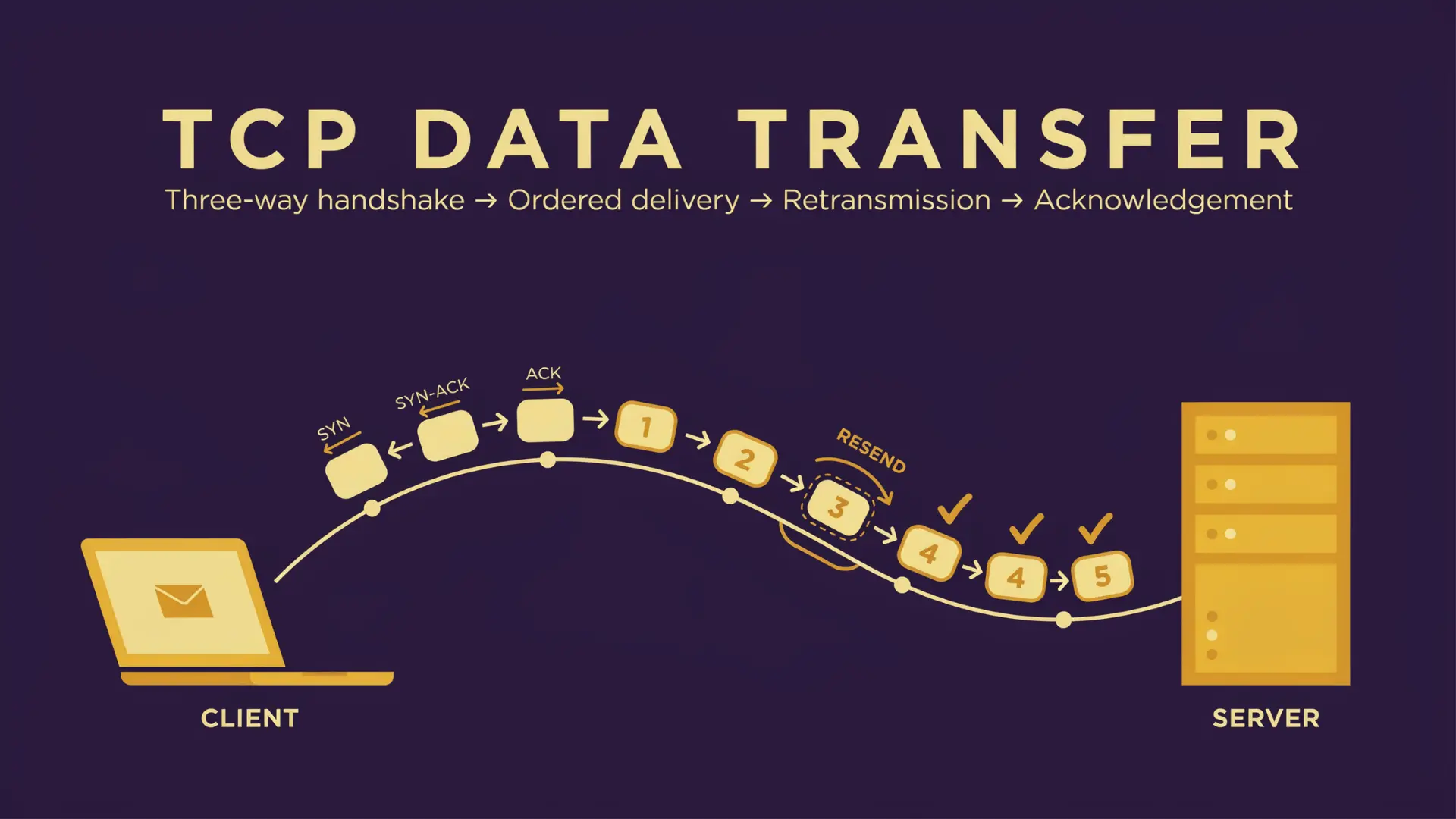
TCP sends data through a managed process that checks whether both devices are ready, tracks transmitted information, and restores anything lost during transfer.
TCP performs several checks before and during transmission so applications receive a complete, correctly ordered stream.
1. Connection Setup
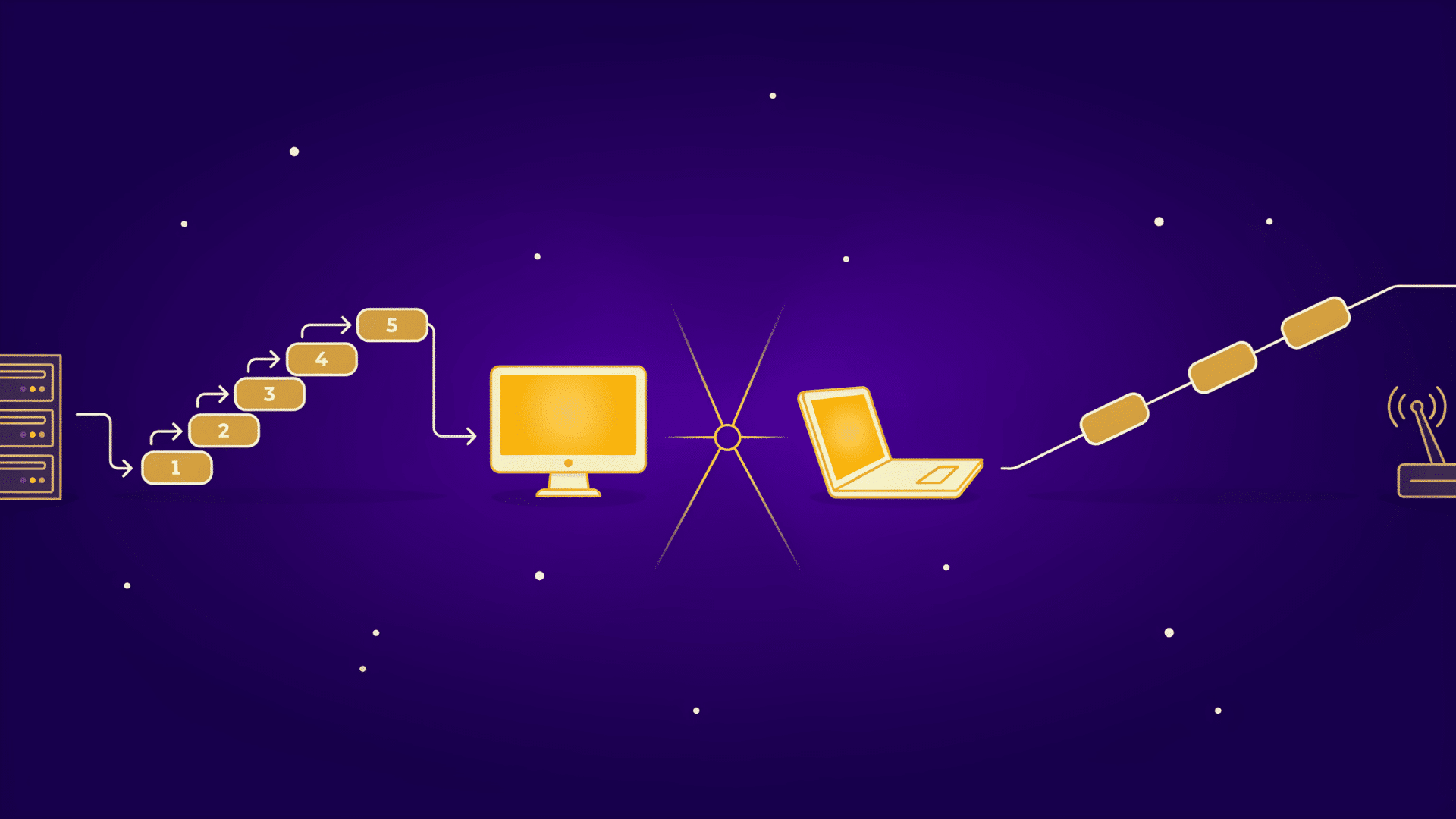
Before application data moves, TCP creates a connection through a process called the three-way handshake. The client sends a SYN message, the server responds with SYN-ACK, and the client returns an ACK.
This exchange confirms that both devices can send and receive information. Once the connection is active, ordinary data transfer begins.
The setup adds a small delay, but it helps both sides establish the details required to track communication correctly. The connection must be established successfully before TCP can begin its managed data transfer.
2. Ordered Delivery
TCP adds sequence information to transmitted data so the receiver knows where every segment belongs. Network packets can arrive late or in a different order because they may follow separate routes.
The receiver temporarily holds misplaced segments and arranges them before sending the completed stream to the application.
TCP preserves the correct byte order, but it does not retain the boundaries of individual messages created by the application.
This ordering process prevents applications from receiving scrambled website files, emails, or downloaded content.
3. Loss Recovery
TCP uses acknowledgments to confirm which information has reached the destination. When the sender does not receive confirmation within the expected period, it can retransmit the missing segment.
This recovery process matters when downloading files, loading scripts, or transferring website resources because missing bytes may make the final content unusable.
TCP eventually reports a connection failure when repeated delivery attempts cannot succeed. Automatic retransmission improves dependable delivery, although recovery can increase delay when the network is unstable.
4. Flow and Congestion Control
Flow control stops a fast sender from delivering more information than the receiving device can process. The receiver communicates how much data it can accept, allowing the sender to adjust its transmission rate.
Congestion control handles a different problem by reducing traffic when the network appears overloaded. These controls add processing, but they protect receivers and shared network paths from excessive traffic.
UDP does not provide these controls automatically, so applications using it must manage responsible sending behavior themselves.
How UDP Sends Data
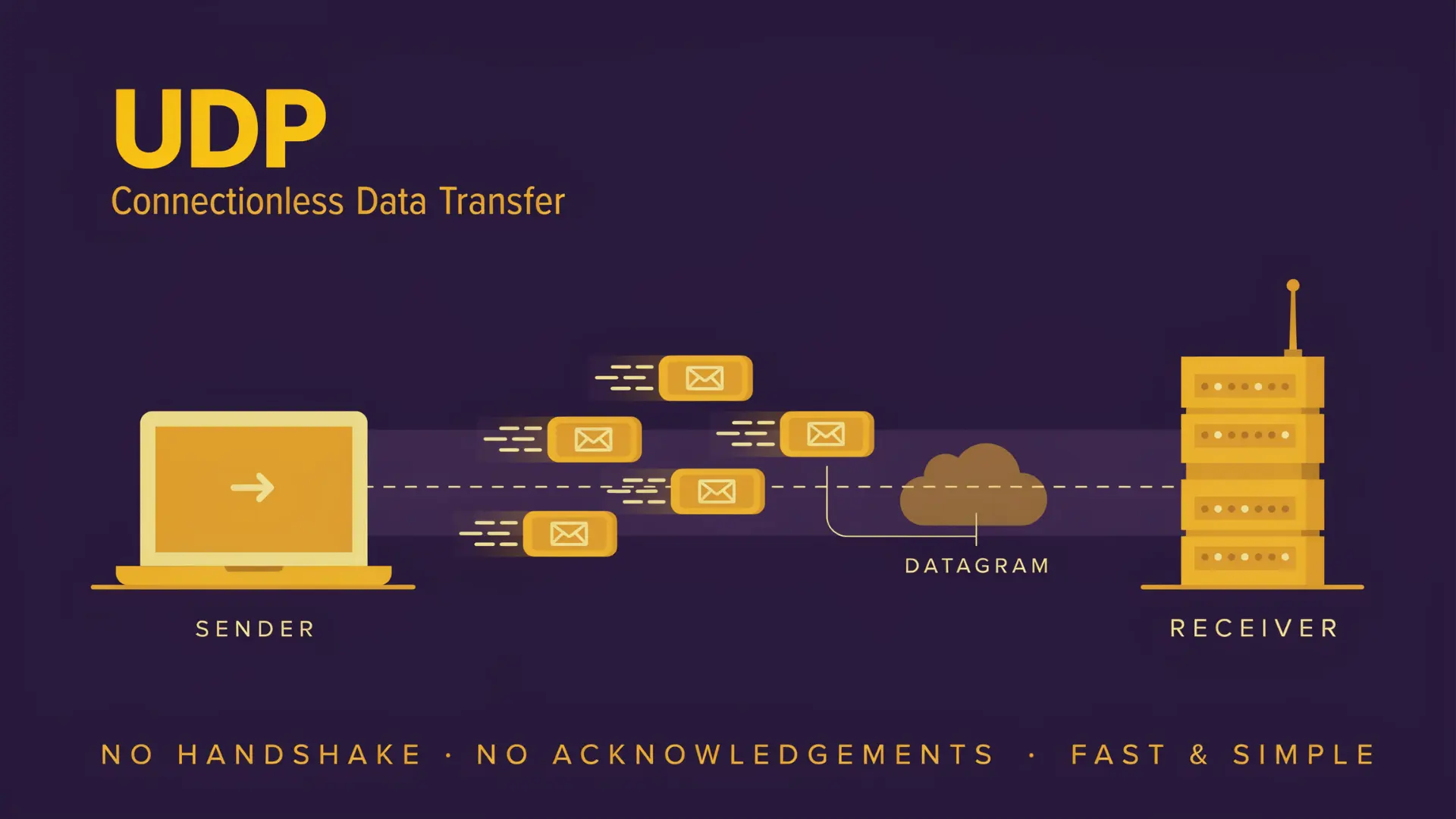
UDP sends information as separate datagrams without establishing a connection or confirming that the receiver is ready. Each datagram travels independently and may follow a different route before reaching its destination.
UDP keeps transport processing limited and gives applications greater control over timing, recovery, and delivery rules.
1. Independent Datagrams
UDP packages application data into separate messages called datagrams. Each datagram contains source and destination ports, a length value, a checksum field, and the application information being transferred.
Unlike TCP, UDP preserves the boundary of every message. If an application sends three datagrams, the receiving application processes them as three separate units rather than one continuous stream.
Each datagram travels independently, so messages may arrive in a different order, appear more than once, or fail to reach the receiver.
2. No Built-In Recovery
UDP does not automatically acknowledge received datagrams or resend information lost during transmission. It also does not rearrange messages that arrive later than expected.
This behavior can suit a live voice call because recovering an old audio packet may create more disruption than skipping it. The application can continue playing the newest available sound instead.
However, the same approach would be unsuitable for files, account details, or login information where missing data could make the result incomplete or unusable.
3. Application-Level Control
Applications using UDP can add their own delivery checks, sequencing, retries, encryption, pacing, or error correction. Developers decide which information deserves recovery and which data can be ignored after it becomes outdated.
For example, a game may resend an important action but discard an older position update that no longer reflects the current scene. This control allows applications to balance speed and reliability according to their specific needs.
Protocols such as QUIC use UDP while adding reliable streams, loss recovery, and congestion control on top of it.
WireGuard, the VPN protocol built into many modern routers and hosting firewalls, also defaults to UDP for the same reason: it avoids the handshake delay and lets the application manage its own encrypted session state.
Security Differences
TCP and UDP do not automatically encrypt data or verify user identities. Security depends on added protocols, firewall rules, access controls, and application configuration.
| Security Area | TCP | UDP |
| Encryption | Commonly uses TLS to protect websites, email, and application traffic | May use DTLS or secure protocols such as QUIC |
| Connection Tracking | Firewalls can follow connection stages and identify established sessions | Firewalls rely on timers and traffic patterns because no handshake occurs |
| Delivery Checks | Acknowledgments confirm data transfer but do not provide privacy | No built-in delivery confirmation or retransmission |
| Spoofing Risk | Connection setup makes address spoofing more difficult for completed sessions | Connectionless services may face higher spoofing and amplification risks |
| Protection Needs | Requires encryption, authentication, safe configuration, and access controls | Requires rate limits, validation, encryption, and response-size controls |
| Hosting Rules | TCP ports need matching firewall, listener, and load-balancer settings | UDP ports often require separate firewall and load-balancer configuration |
Neither protocol is secure by default. Proper encryption and server configuration determine how safely application data moves across the network.
The amplification risk on UDP is not theoretical.
In shared hosting environments I have audited, an open DNS or NTP service that responds to any UDP request, without checking who is asking, can be used to reflect a small query into a much larger flood aimed at someone else’s server.
Rate-limiting UDP responses and disabling recursive lookups from unknown sources are two of the first settings I check when a hosting account shows sudden, unexplained outbound traffic spikes.
Common TCP and UDP Uses
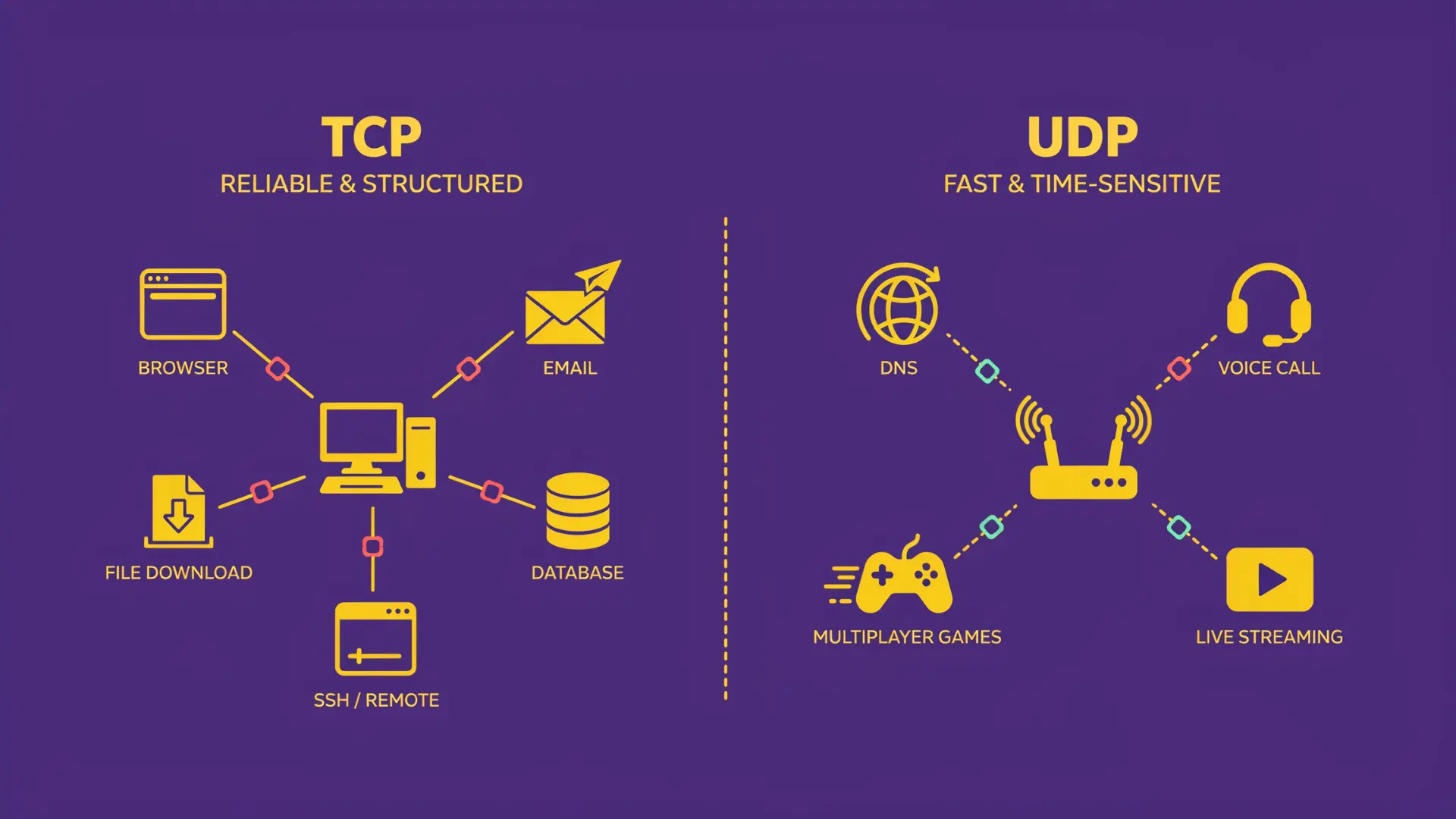
TCP is generally used when an application needs complete, correctly ordered data. UDP is often selected when information must arrive quickly and losing an occasional message causes less harm than waiting for recovery.
Protocol selection depends on whether the application values complete delivery, current information, independent messages, or lower setup delay.
1. Web, Email, Files, and Remote Access: TCP supports applications where missing or disordered information could make the result unusable. HTTP/1.1 and HTTP/2 commonly use TCP to transfer website resources, while SMTP, IMAP, and POP3 depend on it for email communication.
File transfers, database connections, and SSH sessions also require dependable delivery. TCP tracks the byte stream so commands, account information, downloads, and website files reach the receiving application in the proper order.
These services benefit from TCP’s acknowledgments, retransmission, and session management.
2. DNS, Voice, Gaming, and Live Media: UDP suits short requests and information that can quickly become outdated. Many DNS lookups use UDP because the request and response are small, while time services send brief updates without requiring a lasting connection.
Voice calls, multiplayer games, and live media may also use UDP. A late audio sample or old position update may no longer be useful when it arrives.
These applications can add buffering, pacing, error correction, or selective retransmission when some reliability is still required.
3. Services that Use Both: Some applications use TCP and UDP because different tasks have different delivery needs. DNS commonly sends many standard queries through UDP, but it can switch to TCP for larger responses, truncated replies, and zone transfers.
A service can also use the same numeric port separately for TCP and UDP because each protocol maintains its own port space. Firewall rules and server listeners must therefore identify both the port number and transport protocol.
Using both protocols allows a service to balance dependable transfer with timely communication.
How to Choose Between the Two
Choose the protocol based on the application’s delivery needs, timing requirements, and ability to manage missing data. Neither option is better for every situation.
| Choose TCP When | Choose UDP When |
| Every part of the data must arrive correctly | Occasional data loss will not make the application unusable |
| Information must reach the application in the correct order | Receiving current information matters more than recovering outdated data |
| The application needs automatic acknowledgments and retransmission | The application can tolerate loss or add its own recovery process |
| You are transferring website files, emails, downloads, or database records | You are sending voice, gaming, telemetry, or live media updates |
| Maintaining a dependable connection is important | Starting transmission without a connection handshake is preferred |
| Developers want built-in flow and congestion control | Developers need greater control over timing, retries, and message handling |
| Missing information could corrupt a file or interrupt a session | Late information may be less useful than the latest available update |
Choose the required behavior first, then select TCP, UDP, or a higher-level protocol that provides the needed controls.
Common Misconceptions
Several simplified claims about TCP and UDP can create confusion. The actual result depends on network conditions, application design, security controls, and recovery requirements.
- UDP Is Always Faster: UDP has less built-in processing and avoids a connection handshake. However, packet loss, encryption, retries, server response times, and application-level recovery can reduce its performance advantage. Reused TCP connections also avoid repeating setup for every transfer.
- TCP Is Secure by Default: TCP confirms delivery and restores data order, but it does not automatically encrypt information. Applications still require TLS, authentication, firewall rules, access controls, and secure server settings to protect data and verify identities.
- UDP Has No Error Checking: UDP includes a checksum that can detect certain data corruption. However, it does not confirm delivery, resend missing datagrams, remove duplicates, or restore arrival order. Applications must add these controls when dependable communication is required.
At the End
How does TCP differ from UDP? TCP creates a connection, tracks delivery, restores order, and retransmits missing data. UDP sends independent datagrams without built-in confirmation, reordering, or automatic recovery.
The right choice depends on what the application needs most. Website files, email, downloads, databases, and remote server access usually require TCP because every byte must arrive correctly.
Voice calls, live media, gaming updates, and short DNS requests may use UDP because current information often matters more than recovering older data.
From a hosting standpoint, I recommend checking each website, DNS service, application, firewall rule, and server tool separately before changing network settings.
Understanding what TCP and UDP are makes troubleshooting easier and helps you select the protocol that matches the required delivery, timing, and reliability.
Frequently Asked Questions
Can TCP and UDP Use the Same Port?
Yes. TCP and UDP maintain separate port spaces, allowing services to use the same numeric port under different transport protocol rules.
Does DNS Use TCP or UDP?
DNS uses both protocols. Many standard requests use UDP, while TCP supports larger responses, truncated replies, zone transfers, and other required operations.
Does HTTP3 Use TCP or UDP?
HTTP3 runs over QUIC, which uses UDP while adding reliable streams, encryption, congestion control, connection management, and loss recovery above the transport layer.