





Transferring a domain to another GoDaddy account is a common process for businesses, website owners, and agencies that need to change domain ownership or management responsibilities.
Unlike a traditional domain transfer, which moves a domain from one registrar to another, this process keeps the domain within GoDaddy while transferring control to a different account.
There are several reasons why someone might transfer a domain to another GoDaddy account, including business acquisitions, website sales, client handovers, or ownership changes.
From my experience, many users confuse a GoDaddy account change with a registrar transfer, even though the two processes work very differently.
In this guide, I’ll walk you through the requirements, transfer steps, timelines, costs, and best practices to help ensure a smooth domain ownership transfer.
What is a Domain Transfer between GoDaddy Accounts?
A domain transfer between GoDaddy accounts, often referred to as an Account Change, allows domain ownership and management rights to be transferred from one GoDaddy account to another without changing the registrar.
Instead of transferring the domain to another provider, the domain remains with GoDaddy while the recipient gains control over its settings, renewals, and management.
This process is commonly used when transferring domains to clients, business partners, or new owners.
Since the domain stays within the GoDaddy ecosystem, transfers are typically faster and simpler than moving a domain to another registrar.
It also helps minimize downtime and reduces the risk of transfer-related complications.
Domain Transfer vs. Account Change
Before starting the transfer process, it’s important to understand the difference between a standard domain transfer and a GoDaddy Account Change.
The table below highlights the key distinctions between the two options.
| Feature | Domain Transfer (To Another Registrar) | GoDaddy Account Change |
|---|---|---|
| Purpose | Moves a domain from GoDaddy to another registrar or vice versa | Transfers ownership between two GoDaddy accounts |
| Registrar Change | Yes | No |
| Authorization Code Required | Yes | No |
| Domain Unlock Required | Usually Yes | No |
| Transfer Time | Typically 5–7 days | Often completed within hours after acceptance |
| Transfer Fee | Usually includes a transfer fee and domain renewal | Generally free |
| Recipient Requirements | Account with another registrar | Existing GoDaddy account |
| Impact on Domain Management | Domain management moves to a new registrar | Domain remains managed through GoDaddy |
| Best For | Switching domain providers | Changing ownership within GoDaddy |
Understanding these differences can help you choose the correct transfer method and avoid unnecessary delays, fees, or transfer complications.
Requirements before Transferring a Domain to another GoDaddy Account
Before transferring a domain to another GoDaddy account, it’s important to confirm that all eligibility requirements are met.
The following checks cover the most important requirements to verify before initiating a transfer between GoDaddy accounts.
1. Verify Domain Ownership
The first step is confirming that you own the domain and have access to the GoDaddy account where it is currently registered.
Review the domain’s contact information to ensure it is accurate and up to date. You should also verify that you have the necessary permissions to manage domain settings and initiate ownership changes.
Completing these checks beforehand helps prevent authorization issues and transfer delays.
2. Gather Recipient Information
A successful transfer requires accurate information from the recipient. At a minimum, you’ll need the recipient’s GoDaddy customer number and the email address associated with their account.
Incorrect details can cause transfer requests to fail or be sent to the wrong user.
Verifying this information before starting the process helps reduce errors and ensures the ownership change can be completed without unnecessary complications.
3. Check Domain Restrictions
Some domains may be subject to restrictions that prevent immediate transfers. Common examples include the 60-day transfer lock, pending ownership changes, or additional security protections applied to the domain.
Checking the domain’s status before submitting a transfer request can help identify any limitations in advance.
Resolving these issues beforehand reduces delays and increases the likelihood of a successful account transfer.
How to Transfer a Domain to another GoDaddy Account
Moving a domain between GoDaddy accounts is a simple process when the necessary details are available.
Before initiating the transfer, it is important to confirm account access, gather recipient information, and ensure the domain meets GoDaddy’s transfer requirements.
Step 1: Sign in to your GoDaddy Account
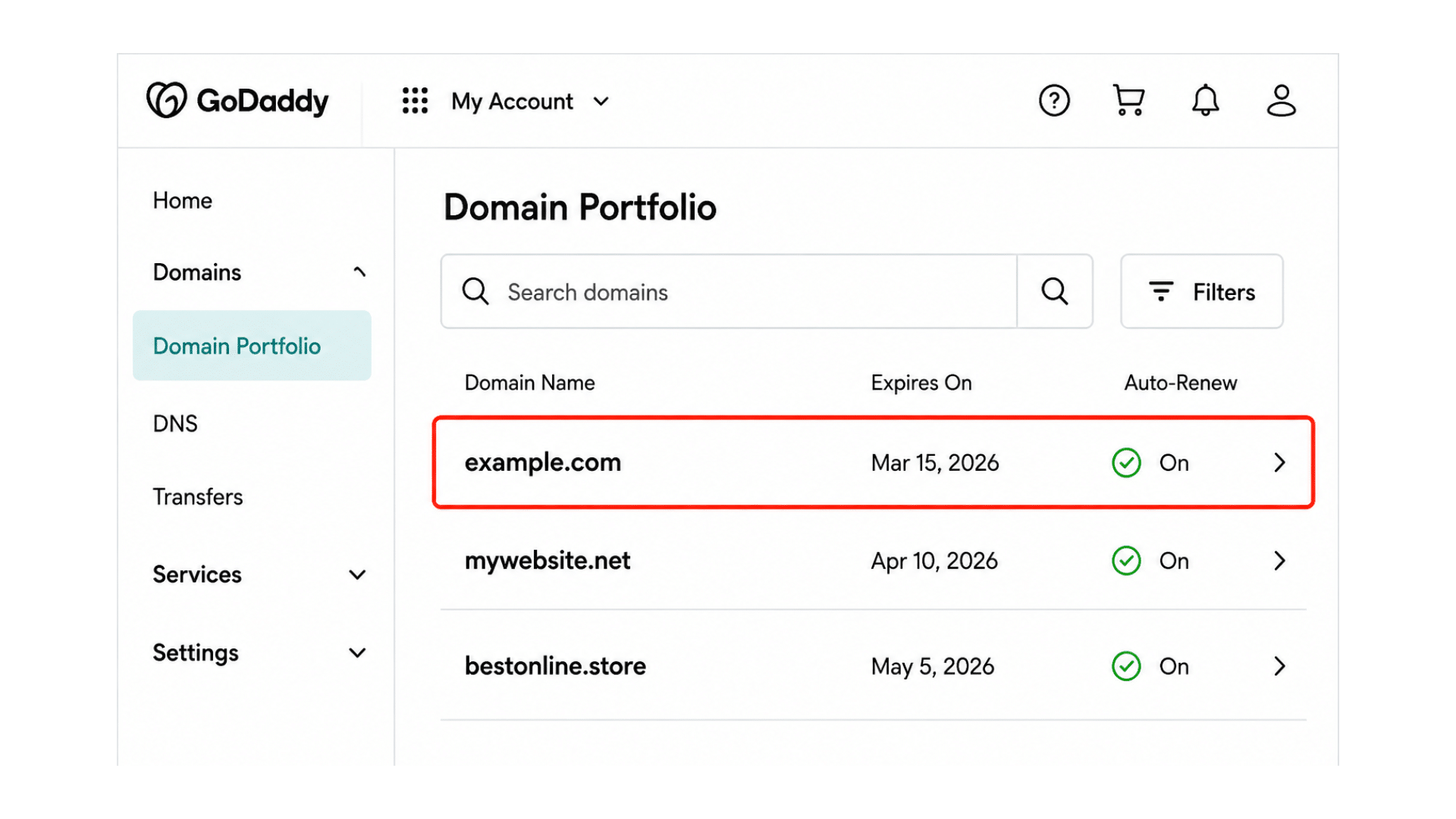
Begin by signing in to the GoDaddy account that currently owns the domain. After logging in, navigate to your Domain Portfolio, where all registered domains are listed.
Locate and select the domain you want to transfer to another GoDaddy account.
Ensuring you’ve selected the correct domain before proceeding can help prevent accidental ownership changes and avoid unnecessary delays later in the process.
Step 2: Choose Ownership Transfer
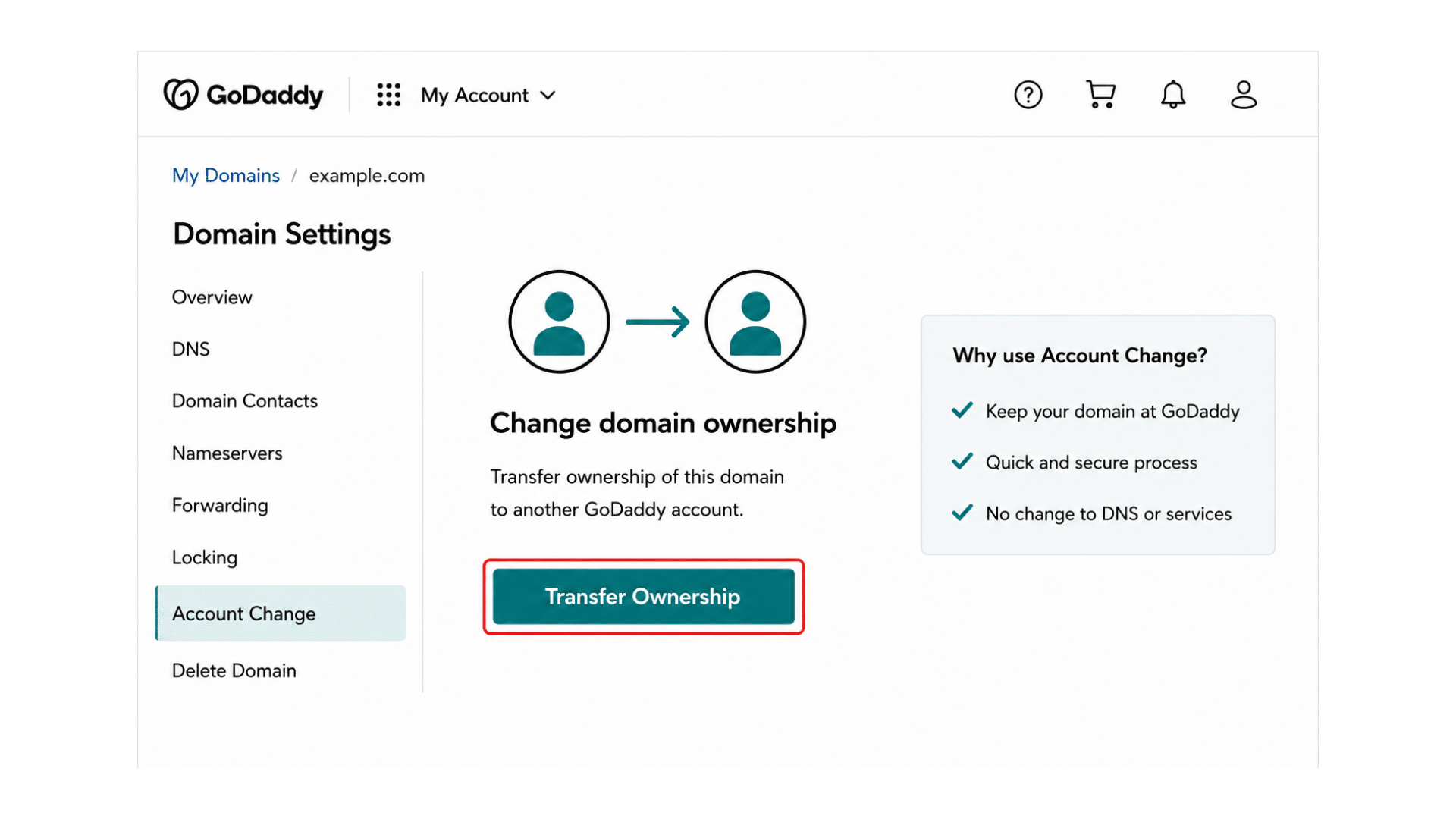
After selecting the domain, open its settings and look for the Account Change, Transfer Ownership, or similar option within the domain management section.
This feature allows you to initiate the transfer process without moving the domain to another registrar.
Carefully review the available options and confirm that you’re choosing an internal GoDaddy ownership transfer before continuing to the next step.
Step 3: Enter the Recipient’s Information
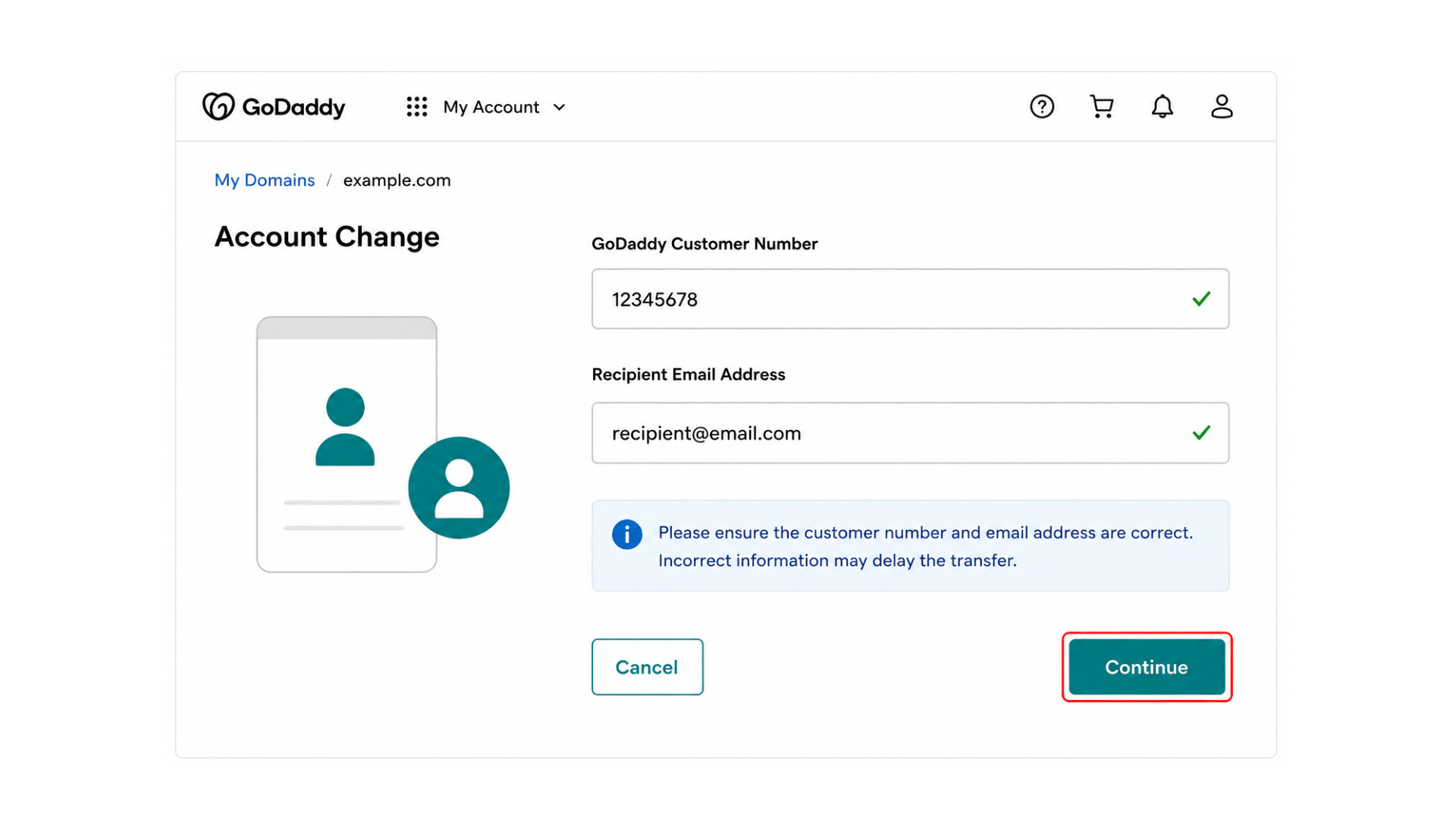
Next, enter the recipient’s GoDaddy customer number and the email address associated with their GoDaddy account.
Double-check all information before submitting it, as incorrect details can delay or prevent the transfer from being completed.
Verifying the recipient’s account information in advance helps ensure the ownership request is delivered to the correct account and reduces the likelihood of transfer errors.
Step 4: Review and Submit the Request
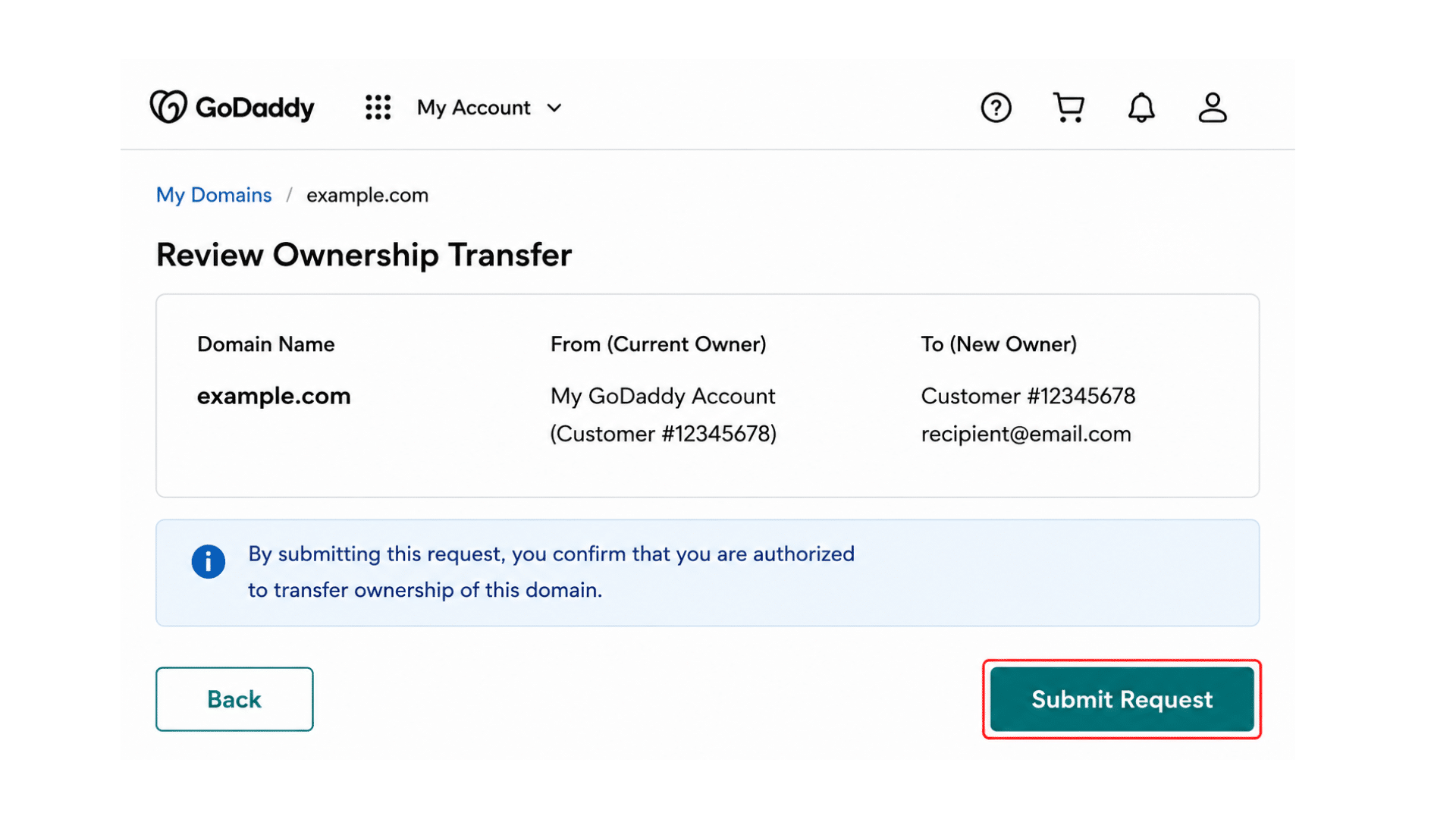
Before submitting the transfer request, carefully review all information, including the selected domain and recipient details.
Confirm that the ownership change is being sent to the intended recipient and that all information is accurate. Once verified, submit the request through GoDaddy.
The recipient will then receive a notification prompting them to review and accept the ownership transfer.
Step 5: Recipient Accepts the Transfer
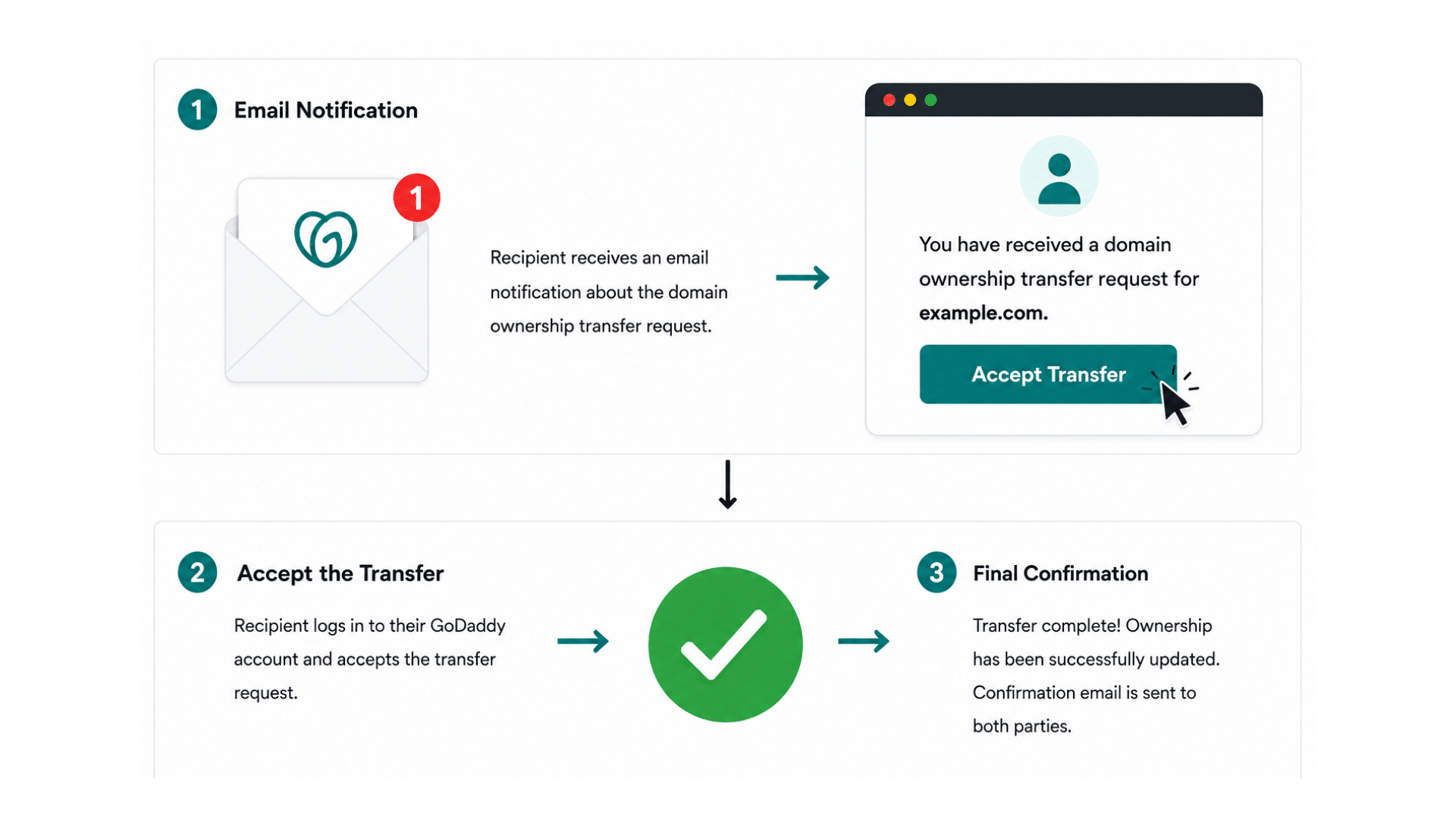
After the request is submitted, GoDaddy sends an email notification to the recipient with instructions on how to accept the transfer.
The recipient must sign in to their GoDaddy account, review the ownership change request, and complete the acceptance process. Once approved, GoDaddy finalizes the transfer and updates ownership records.
A confirmation notification is typically sent to both parties once the transfer has been successfully completed.
Time Taken to Transfer a Domain to Another GoDaddy Account?
A domain transfer between GoDaddy accounts is usually much faster than a traditional registrar transfer.
In most cases, the process can be completed within a few hours once the recipient accepts the ownership change request.
However, the timeline may vary depending on account verification requirements, domain eligibility, and the recipient’s response time.
Compared to transfers between registrars, which often take several days, GoDaddy account changes offer a quicker, more streamlined way to transfer domain ownership while keeping the domain on the same platform.
Is it Paid to Transfer a Domain to another GoDaddy Account?
In most cases, GoDaddy does not charge a fee for transferring a domain between two GoDaddy accounts.
Since the domain remains registered with GoDaddy, the process is treated as an account change rather than a registrar transfer.
However, additional costs may apply if the domain includes premium services, protection plans, or other paid add-ons.
Businesses should also review any associated products linked to the domain, as certain services may require separate billing or ownership updates after the transfer is completed.
Common Issues with Domain Transfers between GoDaddy Accounts
While transferring a domain between GoDaddy accounts is usually simple, certain issues can cause delays.
Incorrect account details, domain eligibility restrictions, and overlooked transfer requests are common obstacles.
Knowing these challenges beforehand can help you avoid mistakes and complete the transfer more efficiently.
1. Customer Number or Email Address
One of the most common transfer mistakes is entering an incorrect GoDaddy customer number or recipient email address. Even a small error can prevent the transfer request from reaching the intended recipient.
Before submitting the request, verify the information directly with the recipient and double-check all details for accuracy.
Taking this extra step can help avoid failed transfers and unnecessary troubleshooting later in the process.
2. Domain Locked or Restricted
Some domains may be subject to restrictions that prevent immediate ownership transfers.
Common examples include 60-day transfer locks, pending account changes, or additional security protections enabled on the domain. Checking the domain’s status before initiating the transfer can help identify any restrictions early.
If limitations exist, you’ll typically need to wait for the restriction period to end or update the domain settings before proceeding.
3. Transfer Request Not Received
Occasionally, the recipient may not receive the transfer notification email. When this happens, the first step is to check spam, junk, and promotional email folders.
It’s also important to verify that the correct email address was entered during the transfer process.
If the notification still cannot be found, the transfer request can usually be canceled and resubmitted using the correct recipient information.
Security Tips for GoDaddy Domain Transfers
Domain names are valuable digital assets, so security should be a priority throughout the transfer process. The tips below can help minimize risks and prevent unauthorized changes to ownership.
- Verify the recipient’s identity before initiating the transfer to ensure the domain is being sent to the correct person or organization.
- Confirm the recipient’s GoDaddy customer number and email address to avoid ownership transfer errors.
- Enable two-factor authentication (2FA) on your GoDaddy account to add an extra layer of security during the transfer process.
- Review domain settings before transferring ownership to ensure all configurations are accurate.
- Update domain contact information to keep ownership records current and verifiable.
- Check for unauthorized account activity before submitting the transfer request.
- Keep a record of transfer confirmations and emails for future reference.
- Verify ownership details one final time before approving the transfer to prevent accidental changes to ownership.
Following these best practices can help protect your domain from unauthorized transfers and ensure a secure, hassle-free transfer of ownership.
At the End
Transferring a domain to another GoDaddy account is a relatively simple process when the necessary requirements are met and all information is verified beforehand.
By confirming domain ownership, gathering accurate recipient details, and checking for potential restrictions, you can significantly reduce the risk of delays or failed transfers.
Throughout this guide, I’ve covered the key steps, common issues, timelines, costs, and security considerations involved in changing a GoDaddy account.
Before initiating a transfer, take a few minutes to carefully review the domain settings and recipient information. Doing so can help ensure a smooth, secure, and hassle-free domain ownership transfer.
Frequently Asked Questions
Do I need the recipient’s GoDaddy customer number?
Yes. GoDaddy typically requires the recipient’s customer number and account email address to complete an ownership transfer successfully.
Can I Cancel a GoDaddy Domain Transfer?
Yes. In many cases, you can cancel the request before the recipient accepts the transfer, depending on the transfer status.
Will Transferring Ownership Affect My Website or Email?
No. A GoDaddy account change usually does not affect website files, DNS settings, or email services when completed correctly.